Basic OBD2 code readers leave car owners stranded as soon as a dashboard warning light illuminates outside the standard engine and emissions parameters.
The Innova 5410 CarScan Code Scanner separates itself from entry-level diagnostic tools by supporting full-vehicle architecture checks rather than limiting scans strictly to the powertrain control module.
Diagnostic work requires clear answers to practical mechanical questions before investing in hardware. Buyers and do-it-yourself mechanics need to understand the true scope of an All-System Network Scan, how deep the diagnostic functions go into safety systems, and what maintenance resets are actually available.
True vehicle compatibility also depends heavily on the specific make, model, and year of the automobile under inspection.
What Is the Innova 5410?
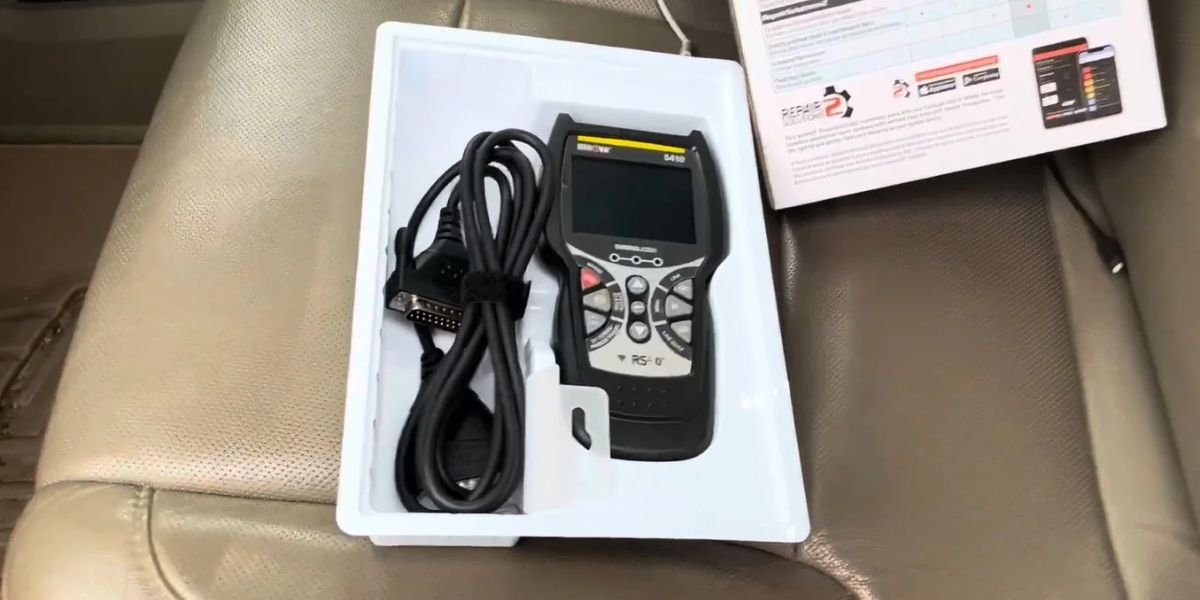
The Innova 5410 is a handheld, full-featured automotive diagnostic tool built for enthusiast home mechanics and professional technicians who need deep module access without paying four-figure workshop pricing.
The hardware platform combines a crisp color display, physical navigation buttons, and integrated Bluetooth capability that pairs directly with mobile companion applications.
The device core capabilities span traditional powertrain code reading alongside advanced service routines.
- All-System Network Scan providing access to modules beyond the basic engine computer.
- ABS and SRS diagnostics for anti-lock braking and supplemental restraint airbag systems.
- Live data streaming, graphing, and recording for real-time sensor tracking.
- Battery and charging system tests to evaluate alternator output and electrical health.
- Oil light resets and battery initialization routines for routine post-service upkeep.
- I/M readiness indicators for checking state emissions compliance.
- RepairSolutions2 integration supplying verified repair reports, part recommendations, and guided fixes.
How the All-System Network Scan Works
The defining functional advantage of the Innova 5410 is its capacity to run an exhaustive network evaluation across multiple electronic control units.
To execute this scan, you plug the device directly into the vehicle’s Data Link Connector (DLC), which is typically located underneath the driver-side dashboard near the steering column.
Once the ignition is turned to the run position, you navigate to the main menu and select the All Module Scan option to initiate communication over the vehicle data bus.
The scanner polls the vehicle network, querying every accessible module and compiling a comprehensive status report showing active and stored diagnostic trouble codes (DTCs) across individual systems.
Traditional entry-level readers communicate exclusively with the engine control unit, meaning a fault hidden inside the transmission, body control module, or anti-lock braking system goes completely undetected.
An All-System Network Scan bypasses this limitation by interrogating every electronic module exposed on the vehicle communication network.
It is important to understand that the term all-system is defined by the manufacturer architecture of the specific automobile being tested, rather than a universal guarantee that every car exposes every conceivable module. Older vehicles or base-trim models may feature only a handful of networked computers, while modern vehicles can expose over 150 distinct electronic modules.
What Systems Can the 5410 Scan?
Modern automobiles operate as rolling computer networks rather than purely mechanical machines. Understanding exactly which vehicle systems the Innova 5410 can access helps clarify its practical utility in the garage.
The foundation of any diagnostic session remains standard engine and powertrain troubleshooting. The device retrieves check-engine codes, reads freeze-frame snapshots, and evaluates emissions readiness across domestic, Asian, and European vehicle platforms.
Beyond the engine bay, the scanner reaches into critical safety systems that basic code readers ignore entirely.
- ABS modules tracking wheel speed sensor data and hydraulic modulator performance.
- SRS airbag computers monitoring crash sensors, seatbelt pretensioners, and airbag deployment loops.
- Transmission control units managing shift solenoids, fluid temperatures, and gear engagement.
- Body control computers overseeing door locks, interior lighting, and accessory power distribution.
Platform accessibility varies significantly by manufacturer protocols. While a late-model sedan may expose dozens of networked modules, an older utility vehicle might limit external diagnostic access strictly to powertrain and emissions computers.
OBD2 Code Reading and Engine Diagnostics
Standard powertrain troubleshooting forms the daily workload for any diagnostic scan tool. The Innova 5410 provides a complete suite of engine-level functions designed to decode dashboard warnings accurately.
The device reads active diagnostic trouble codes, pending codes, and permanent codes where supported by the vehicle computer.
When a fault occurs, the computer captures a freeze-frame snapshot, recording vehicle speed, coolant temperature, engine load, and fuel trim percentages at the exact moment the failure happened.
Clearing a diagnostic code turns off the dashboard warning light, but it does not fix the underlying mechanical or electrical problem.
Experienced mechanics treat a cleared code merely as a reset. A proper repair requires cross-referencing code descriptions with live sensor data, physical component inspection, and manufacturer service manuals before declaring the vehicle fixed.
Live Data, Graphing, and Recording
Static trouble codes only tell you what failed after the fact. Solving intermittent drivability problems requires watching parameter IDs (PIDs) update in real time while the engine is running.
The Innova 5410 allows users to select specific live data streams, view them as numerical values, or render them as visual graphs on the color display.
You can also record live data during a test drive to review sensor behavior later without staring at the screen while navigating traffic.
- Monitoring oxygen sensor switching speeds to check catalytic converter efficiency.
- Comparing upstream and downstream temperature readings during a cold start.
- Tracking fuel trim percentages under acceleration to pinpoint vacuum leaks or weak fuel pumps.
- Inspecting individual wheel speed sensor outputs while rolling down the street to catch erratic ABS signals.
Watching sensors react to throttle input gives you an immediate window into internal engine behavior that static codes simply cannot provide.
ABS and SRS Diagnostics
Dashboard warning lights for brakes and airbags demand immediate attention, but traditional OBD2 scanners are blind to these non-powertrain systems.
Anti-lock braking system codes identify failed wheel speed sensors, sticking hydraulic valves, or pump motor malfunctions. Accessing these codes helps isolate whether a braking issue stems from a simple wiring harness break or an expensive electronic control module failure.
Supplemental restraint system codes reveal faults inside crash impact sensors, occupant detection mats, or steering wheel clock springs.
Airbag circuits require extreme caution. Never probe airbag wiring with a standard test light or attempt physical repairs on pyrotechnic components without disconnecting the vehicle battery and following strict manufacturer safety procedures.
Diagnostic trouble codes point you toward a malfunctioning circuit or sensor, but they rarely mean you should replace a part blindly. Wiring corrosion, blown fuses, or loose ground straps frequently trigger identical codes to failed hardware components.
Battery and Charging-System Testing
Electrical failures often masquerade as complex computer glitches. A weak battery or a failing alternator can trigger erratic dashboard warning lights and set false communication codes across multiple vehicle modules.
The Innova 5410 features dedicated electrical testing functions to evaluate battery voltage health and charging system performance directly through the battery posts or the diagnostic port.
- Initial battery voltage checks determine static charge state before attempting a crank.
- Cranking voltage tests reveal whether a battery drops dangerously low under starter load.
- Alternator output tests verify that the charging system maintains proper voltage when the engine runs accessories and headlights.
Separating a dying battery from a failing alternator prevents wasted money on unnecessary parts replacement and ensures stable system voltage during deep diagnostic scans.
Oil Reset and Battery Reset
Routine maintenance on modern vehicles involves more than simply changing fluids and bolting on new hardware. Service reminder lights and advanced electrical components require proper digital initialization after replacement.
The Innova 5410 includes dedicated service reset functions to handle routine upkeep without requiring a trip to the dealership.
- Oil maintenance resets clear the service interval reminder on the instrument cluster after an oil change.
- Battery registration and initialization tell the vehicle computer that a fresh battery has been installed, adjusting charging profiles to match battery age and chemistry.
Neglecting battery registration on modern vehicles equipped with intelligent charging systems can lead to premature battery degradation or electrical anomalies. The exact reset procedure varies significantly by manufacturer, making direct tool support essential.
Emissions Testing and Readiness
Passing state smog checks requires more than just erasing check-engine lights. When diagnostic codes are cleared, the vehicle computer resets its internal self-test monitors, making the car temporarily unready for emissions inspection.
The Innova 5410 features quick-check I/M readiness indicators that display the status of emission monitors in real time using intuitive color-coded LEDs.
- Green indicators show that mandatory monitors have completed their self-tests successfully.
- Yellow indicators point out unsupported tests or specific readiness parameters that require a drive cycle.
- Red indicators signal incomplete or failed monitors that will cause an automatic inspection rejection.
Checking monitor status before driving to the testing station saves valuable time and prevents unnecessary DMV retest fees.
RepairSolutions2 With the 5410
Diagnostic trouble codes provide a starting point, but translating raw codes into a concrete repair plan often requires deep technical resources.
Pairing the Innova 5410 with the companion RepairSolutions2 mobile app bridges the gap between raw data and actionable repairs.
The application links retrieved trouble codes, vehicle mileage, and live freeze-frame data to an extensive cloud database containing verified fixes compiled from professional technicians.
- Verified part recommendations pinpoint the exact components commonly required to resolve the specific code.
- Step-by-step repair guides provide instructions on testing components and replacing failed parts safely.
- Comprehensive diagnostic reports compile historical vehicle health data for easy record-keeping.
While the app offers powerful diagnostic assistance, it serves as an informational resource rather than an automatic diagnosis. Technicians must still verify the underlying fault using physical tests and multimeter measurements.
Vehicle Compatibility and Feature Coverage
Tool capabilities mean little if the hardware cannot communicate with a specific vehicle make or model.
The advertised feature set of the Innova 5410 should never be interpreted as universal functionality across every automobile on the road.
Vehicle architecture dictates what systems are accessible. While a modern domestic sedan may expose every feature from ABS bleeding to battery registration, an older import vehicle might limit diagnostic communication strictly to basic powertrain codes.
Before purchasing or attempting complex service routines, check official manufacturer coverage charts using your exact model year, make, model, and engine configuration to confirm which modules and reset functions are supported.
Using the 5410 in a Real Diagnostic Workflow
A diagnostic scan tool delivers maximum value when integrated into a structured, methodical troubleshooting process rather than used as a guessing game.
- Observe dashboard warnings and note any active drivability symptoms before connecting the hardware.
- Plug the 5410 into the DLC port and execute an All-System Network Scan to capture all stored and pending trouble codes.
- Isolate the affected module whether it points to the powertrain, ABS, or SRS system.
- Inspect freeze-frame data to understand operating conditions when the failure occurred.
- Analyze live sensor streams to test component behavior while the engine runs.
- Perform physical inspections and electrical multimeter checks to confirm the root cause before replacing parts.
- Clear trouble codes and execute a verification test drive followed by a final system rescan.
Treating the scanner as an investigative guide rather than a magic fix ensures accurate repairs and prevents wasted money on misdiagnosed components.
Final Assessment of the Innova 5410
The Innova 5410 CarScan Code Scanner bridges the gap between basic powertrain readers and expensive professional shop equipment.
Its defining capability remains the All-System Network Scan, which uncovers hidden faults across ABS, SRS, and networked body computers that entry-level tools miss entirely.
Additional features including live data graphing, battery and charging system tests, maintenance resets, and RepairSolutions2 integration transform the hardware into a comprehensive garage companion.
Ultimately, actual system access depends heavily on the specific vehicle under inspection. Verifying feature support before tackling complex repairs ensures the tool matches your diagnostic expectations.