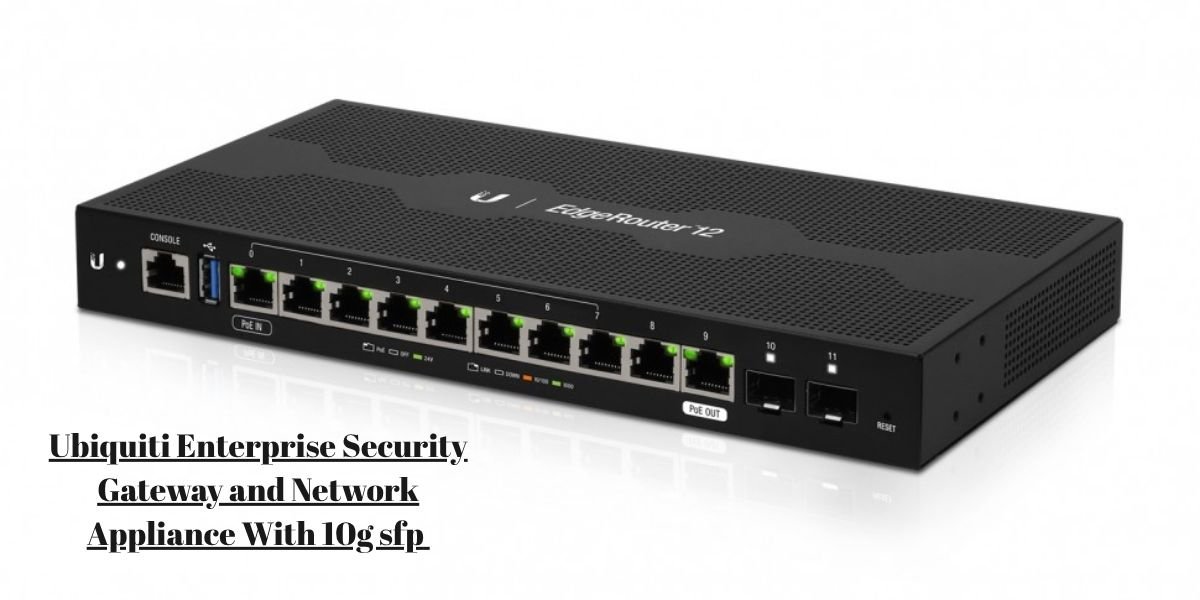
The Ubiquiti Enterprise Security Gateway and Network Appliance with 10G SFP+ refers directly to the UniFi Dream Machine Pro, widely recognized across enterprise and prosumer environments as the UDM-Pro. This capable hardware appliance consolidates an enterprise-grade security gateway, high-performance routing, a managed local switch, centralized UniFi ecosystem control, and a functional network video recorder into a single rack-mount unit.
The inclusion of dual 10G SFP+ interfaces stands out immediately for network administrators looking to eliminate local backbone bottlenecks. This guide examines the physical hardware specifications, port capabilities, core security routines, switching architecture, and real-world deployment scenarios to help you evaluate how the appliance performs under active network loads.
What Is the Ubiquiti UniFi Dream Machine Pro?
The UDM-Pro is built around a standard 1U rackmount form factor, designed to slip directly into server racks for enterprise wiring closets, small business server rooms, or advanced prosumer setups. It functions as an all-in-one UniFi Cloud Gateway, meaning it hosts the management controller locally on the device rather than requiring an external cloud key or separate server instance.
By merging routing, firewall protection, switch ports, network management, and local storage for security cameras into one housing, the unit sits right at the edge of a network. Choosing this integrated layout replaces a messy stack of standalone consumer routers, separate hardware firewalls, standalone network switches, and separate NVR hardware boxes with a unified device managed through a single software pane.
UDM-Pro Specifications and Port Configuration
Reviewing baseline hardware metrics clarifies how the appliance manages traffic throughput and device scaling.
- Model: UniFi Dream Machine Pro (UDM-Pro)
- Form Factor: 1U Rackmount
- WAN Interfaces: 1 Gigabit RJ45 plus 1 10G SFP+
- LAN Interfaces: 8 Gigabit RJ45 plus 1 10G SFP+
- IDS/IPS Throughput: Up to 3.5 Gbps
- Drive Bay Support: Single 3.5-inch SATA HDD bay
- Management Engine: UniFi Network
- Supported Applications: Network, Protect, Access, Talk, Connect
- System Memory: 4 GB DDR4
- Processor: Quad-core ARM Cortex-A57
- Redundant WAN: Yes, with automatic failover
What the Two 10G SFP+ Ports Are For
The physical 10G SFP+ ports on the UDM-Pro give the device its high-speed edge, featuring one designated for WAN traffic and one for LAN traffic.
The 10G SFP+ WAN interface handles ultra-fast fiber internet downlinks. When an internet service provider delivers multi-gigabit speeds through an optical network terminal, plugging an appropriate SFP+ transceiver or direct attach copper cable into this port ensures the gateway is not choked by a legacy one-gigabit bottleneck.
The 10G SFP+ LAN interface serves as a high-speed trunk line. Network administrators typically plug this port directly into a core 10G-capable downstream switch, a high-performance network-attached storage device, or an enterprise server running virtual machines that demand massive local file transfer speeds.
The Important Difference Between SFP+ and the Gigabit RJ45 Ports
A common misconception among buyers is assuming that because the appliance features high-speed SFP+ slots, all eight built-in copper ports automatically run at ten gigabits.
The eight integrated RJ45 LAN ports are strictly Gigabit (10/100/1000 Mbps) connections. They are designed for standard client devices like office desktop computers, network printers, internet-connected TVs, and standard wireless access points.
True 10Gbps performance is strictly isolated to the SFP+ interfaces and depends entirely on matching the right optical modules, using compatible fiber or direct-attach cables, subscribing to an adequate ISP tier, and connecting to downstream hardware that also supports ten-gigabit data rates.
Routing and Security Capabilities
The gateway handles heavy perimeter defense using a robust internal software engine.
It runs an application-aware stateful firewall capable of enforcing deep packet inspection to identify and categorize traffic down to specific software types and user behaviors.
When security inspection is active, the system executes intrusion prevention and detection systems (IDS/IPS) to scan packets for known malicious signatures.
Network administrators can isolate sensitive zones using VLAN segmentation, manage inter-VLAN routing policies, set up custom traffic rules, execute network address translation maneuvers, and configure site-to-site virtual private networks without purchasing third-party software licenses.
The 8-Port Gigabit Switch and Internal Network Design
The built-in 8-port Gigabit switch provides immediate plug-and-play connectivity for local network hardware without requiring an immediate auxiliary switch purchase.
Wired clients plug directly into the rear copper ports for standard data access. However, expanding a network with dozens of high-demand workstations or multiple access points requires running a high-speed uplink from the 10G SFP+ LAN port into an external managed switch.
A typical layout flows from the external Internet/ONT into the UDM-Pro 10G WAN port, routes internally through the security engine, exits via the UDM-Pro 10G LAN port into a 10G core switch, and finally distributes data to high-speed servers, local NAS arrays, and power workstations.
UniFi Network Management
Managing the UDM-Pro relies entirely on the built-in UniFi Network application. Rather than logging into individual command-line interfaces for every router, switch, and access point, administrators manage the entire local network from a unified dashboard.
The interface provides live client monitoring, detailed traffic visualization graphs, device adoption controls, and instant firmware update distribution.
Because the management engine runs natively on the device, administrators can securely log in via a web browser or mobile application from remote locations to reconfigure firewall rules, check bandwidth consumption, or reboot misbehaving network nodes on the fly.
UniFi Protect and the Built-In HDD Bay
A major feature that sets the UDM-Pro apart from conventional firewalls is its capability to host UniFi Protect natively. The chassis includes an integrated 3.5-inch SATA hard drive bay accessible from the front panel.
Network administrators slide a surveillance-rated hard drive directly into this bay to transform the routing appliance into a fully operational network video recorder.
Recording requirements scale directly based on camera count, video resolution, retention duration, and continuous versus motion-triggered recording settings. This built-in function allows smaller offices and facilities to run security camera feeds directly into the gateway hardware without buying a standalone NVR server.
Multi-WAN, Failover, and Network Redundancy
Business continuity demands internet reliability, and the appliance handles secondary links through its multi-WAN configuration options. Administrators can designate the primary internet connection through either the high-speed SFP+ slot or the Gigabit copper port, while assigning a secondary ISP link to the alternate port.
When the primary provider goes offline, the system initiates automatic failover routing to keep critical cloud services and user traffic active.
It is important to note that this mechanism is designed for failover redundancy rather than bandwidth aggregation. The gateway routes traffic down one active path at a time instead of combining two distinct ISP speeds into a single combined multi-gigabit pipe.
Performance: What the 3.5 Gbps IDS/IPS Figure Means
The specification sheet lists an IDS/IPS throughput ceiling of 3.5 Gbps, a metric that requires careful interpretation. When deep packet inspection and intrusion prevention rules are turned on, the internal quad-core ARM processor must analyze every incoming and outgoing data packet against tens of thousands of threat signatures.
The 3.5 Gbps rating represents the maximum processing threshold the security engine can sustain under specific test conditions while scanning packets.
If a network utilizes a multi-gigabit internet connection exceeding this threshold and enables heavy security filters, the gateway itself can become the throughput bottleneck. Understanding this distinction helps network planners match the appliance capability to actual ISP speeds and security requirements.
Where the UDM-Pro Fits in a Business Network
Translating hardware specifications into a physical layout clarifies how the unit deploys across diverse environments.
In a small or mid-sized office, the appliance acts as an all-in-one internet gateway, stateful firewall, UniFi management console, and surveillance host.
For high-speed internet deployments, the 10G SFP+ WAN port connects directly to an enterprise optical network terminal or upstream fiber modem.
When managing a 10G internal network, administrators link the 10G SFP+ LAN port to a core managed switch to ensure high-throughput servers and workstations experience zero local bottlenecks.
In multi-site setups, centralized cloud management handles multiple remote locations from a single dashboard interface.
What the UDM-Pro Does Not Provide
Recognizing hardware limitations prevents costly deployment mistakes and misaligned expectations.
The eight integrated RJ45 LAN ports are strictly Gigabit connectors, meaning they do not deliver ten-gigabit speeds to local copper clients.
The unit does not include Power over Ethernet (PoE) support on its internal switch ports. Connecting IP security cameras or wireless access points requires separate PoE injectors or an external PoE-capable network switch.
Additionally, achieving a ten-gigabit link requires purchasing compatible SFP+ optical transceivers or direct-attach copper cables alongside appropriate downstream hardware.
UDM-Pro vs. a Separate Gateway, Switch, and NVR
Choosing an all-in-one appliance involves distinct architectural tradeoffs compared to building a modular network stack with separate devices.
The integrated UDM-Pro approach consolidates routing, security inspection, switch ports, management software, and camera storage into a single 1U rack space. This design reduces power cable clutter, lowers overall power draw, and simplifies software management through a unified ecosystem.
The separate-device approach utilizes a dedicated standalone firewall, an independent modular switch with extensive PoE budgets, and a standalone NVR server.
While a modular setup offers granular upgrade flexibility for individual components, it increases physical footprint, cabling complexity, and initial deployment costs.
UDM-Pro and Newer UniFi Gateway Hardware
As technology infrastructure evolves, hardware options expand across the enterprise market.
While the UDM-Pro remains a highly capable and widely deployed rackmount appliance, Ubiquiti’s broader gateway catalog includes newer iterations featuring updated processor speeds, revised port layouts, and expanded storage configurations.
Network designers planning new installations should review current port specifications and throughput demands against newer hardware variations to ensure optimal long-term scaling.
Who the UDM-Pro Makes Sense For
The appliance delivers optimal value for network administrators who specifically require a consolidated rackmount unit equipped with centralized UniFi management, high-speed 10G SFP+ interfaces, local camera recording storage, and robust multi-WAN fallback.
Conversely, environments requiring massive PoE budgets directly from the gateway, native multi-port 10GbE copper connections, or ultra-high-throughput security routing exceeding multi-gigabit thresholds may require auxiliary switches or alternative enterprise hardware.
Aligning exact business requirements with the hardware profile ensures stable, long-term network performance.
UDM-Pro Ports at a Glance
- GbE RJ45 WAN: 1 Port — Standard internet service uplink and primary external gateway connection.
- 10G SFP+ WAN: 1 Port — High-speed optical fiber internet connection for multi-gigabit broadband tiers.
- GbE RJ45 LAN: 8 Ports — Local copper connections for standard desktop workstations, printers, and network clients.
- 10G SFP+ LAN: 1 Port — High-speed trunk line connecting the gateway to core 10G switches or network-attached storage.
- HDD Bay: 1 Bay — Single 3.5-inch SATA slot dedicated to local UniFi Protect video recording.
Final Section: Understanding the UDM-Pro as a Network Appliance
The UniFi Dream Machine Pro bridges the gap between basic consumer routers and complex enterprise modular stacks. By merging advanced routing, stateful security firewalls, local UniFi management, and surveillance recording into a single rackmount chassis, it provides a streamlined operational foundation.
Evaluating its true utility depends entirely on matching its 10G SFP+ uplink capabilities, 3.5 Gbps security threshold, and integrated storage bay to the precise operational demands of your network environment.