A premium mesh network system is not simply about increasing the speed right beside your main internet gateway. When dealing with sprawling properties, thick concrete walls, and dozens of active client devices, standard wireless nodes frequently bottleneck. The primary engineering challenge in large homes involves bandwidth degradation.
Traditional dual-band or standard tri-band systems force wireless satellites to share the exact same frequency bands for talking to client devices and relaying data back to the primary router. This causes severe throughput drops across remote rooms.
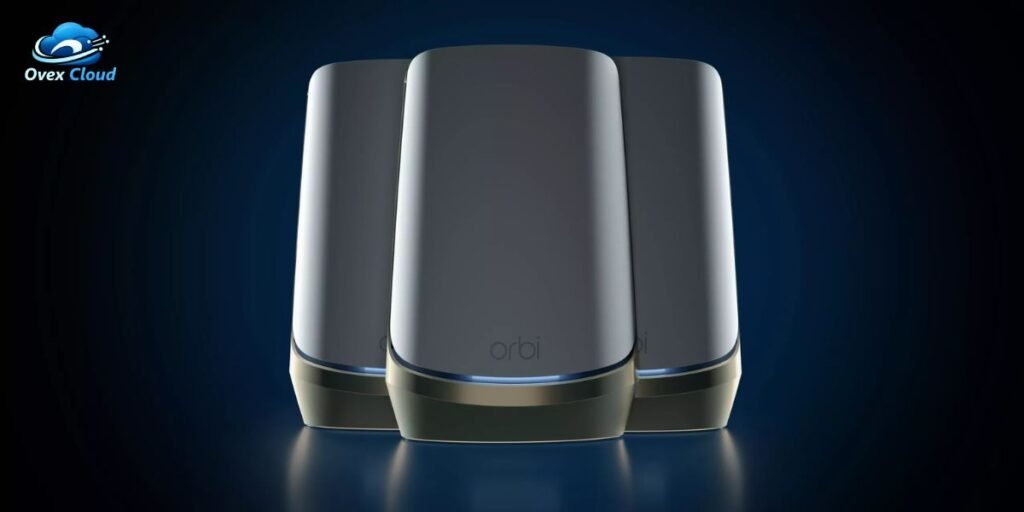
The Netgear Orbi RBKE963 solves this exact physical limitation through an advanced hardware layout. It utilizes a three-unit architecture featuring one router and two satellites, driven by four distinct wireless bands, a dedicated 5GHz backhaul channel, full WiFi 6E capabilities, and multi-gigabit Ethernet switching.
This comprehensive review explores whether this high-end hardware provides enough real-world benefit to justify its premium position, particularly now that newer WiFi 7 systems are widely available on the market.
Netgear Orbi RBKE963 WiFi 6E Mesh System Specifications
Evaluating a high-performance networking kit requires looking closely at the raw hardware specifications that dictate everyday throughput and multi-client handling.
The hardware package relies on a meticulously engineered component layout to manage heavy network traffic without breaking a sweat. To understand the exact hardware framework packed into these units, review the core technical specifications below:
- System Configuration: One RBRE960 router and two RBSE960 satellites forming an AXE11000 class network.
- Theoretical Bandwidth: 10.8Gbps aggregate theoretical wireless capacity across four distinct bands.
- Radio Bands: 2.4GHz, two separate 5GHz bands, and a dedicated 6GHz band.
- Backhaul Architecture: Dedicated second 5GHz band reserved exclusively for inter-node communication.
- Processing Core: 2.2GHz quad-core processor paired with 1GB of RAM and 512MB of NAND flash memory.
- Antenna Array: 12 internal high-gain antennas per standalone unit.
- Wired Interfaces: One 10Gbps WAN port, one 2.5Gbps Ethernet port, and three Gigabit Ethernet ports on the router.
- Coverage Footprint: Rated for up to 9,000 square feet across multi-unit deployments.
- Physical Dimensions: Each tower measures 11.1 x 7.5 x 3.3 inches and weighs 3.18 pounds.
- Included Accessories: Power adapters, a flat high-speed Ethernet cable, and setup documentation.
Hardware and design
Physically handling the RBRE960 router and RBSE960 satellites reveals industrial-grade networking hardware built for performance rather than discreet styling. Standing over eleven inches tall with a cylindrical footprint, these towers require deliberate placement planning on a bookshelf, media console, or dedicated desktop mount.
The sheer size is driven by the internal engineering requirements. Inside each chassis sit 12 high-gain internal antennas arranged to maximize directional signal propagation across wide angles.
Driving the operation is a powerful 2.2GHz quad-core processor paired with 1GB of RAM, giving the system ample compute capacity to process simultaneous data packets from heavy gaming rigs, corporate VPNs, and 4K video streams without experiencing packet lag or thermal throttling.
The physical port selection on the back of the router includes a massive 10Gbps WAN port meant for multi-gigabit fiber connections, a 2.5Gbps LAN port, and standard Gigabit Ethernet ports.
Because these units are substantial, buyers must account for their physical footprint. Trying to hide them inside a closed TV cabinet or behind thick metal equipment racks will severely degrade wireless propagation and thermal performance.
Quad-band WiFi 6E
The defining architectural advantage of the Orbi system lies in how its four wireless bands divide network traffic. Standard routers run on dual-band or basic tri-band layouts, but the RBKE963 incorporates a true quad-band framework consisting of 2.4GHz, 5GHz, a second 5GHz band, and 6GHz.
The inclusion of the second 5GHz radio is what separates this mesh system from consumer alternatives. Netgear configures this specific frequency as a dedicated wireless backhaul channel.
Data traveling between the satellites and the main router flows entirely across this isolated lane, leaving the primary client-facing bands completely unburdened. This means connected laptops and smartphones do not suffer halved bandwidth speeds when relaying data across multiple mesh hops.
The introduction of the 6GHz band opens up brand-new, wider channels specifically for modern WiFi 6E compatible devices. Because the 6GHz spectrum operates at a higher frequency with virtually zero legacy device interference, it delivers exceptional data throughput for supported hardware.
However, higher frequencies suffer from more rapid signal attenuation over distance. Consequently, the 6GHz band should not be treated as a blanket replacement for 2.4GHz and 5GHz coverage throughout a large multi-story house, but rather as a high-speed lane for devices operating in close proximity to a node.
WiFi 6E performance
Real-world throughput testing across various client devices and environmental conditions highlights the raw capability of the RBKE963. When testing a WiFi 6E client positioned in close proximity to the main RBRE960 router, data rates regularly punch past 941Mbps, effectively maxing out standard gigabit pipeline thresholds.
Moving that same client over to a remote satellite location still yields impressive results, with independent testing benchmarks recording sustained speeds around 816Mbps over the wireless backhaul.
Performance varies significantly when obstacles enter the equation. Close-range 6GHz connections are blisteringly fast, but introducing multiple interior walls or moving past fifty feet results in a steeper performance drop-off compared to the more persistent 5GHz bands.
When interacting with legacy WiFi 5 clients, the system gracefully handles backward compatibility without letting older devices drag down the airtime of modern hardware.
Simultaneous traffic management remains a strong suit. Pushing heavy data loads across multiple video streams, smart home hubs, and downloading large files concurrently triggers zero noticeable stutter, proving that the quad-band layout effectively prevents network congestion under heavy household loads.
Range and coverage
Netgear markets the system with a bold 9,000-square-foot coverage claim, but evaluating this metric requires understanding how wireless physics operate in residential buildings.
Coverage does not mean identical, uninhibited peak performance everywhere inside that square footage. Building materials dictate real-world range heavily. Dense concrete, lath and plaster walls, brick fireplaces, and multi-layered subflooring absorb high-frequency RF signals rapidly.
Interference from neighboring wireless networks on crowded channels can also diminish peak signal quality. Satellite distance and router placement dictate whether a remote room enjoys a robust connection or a degraded fallback rate.
A device located at the absolute edge of a satellite’s broadcast zone will maintain a usable link, but its actual throughput will drop substantially compared to being situated line-of-sight to the main node.
The wireless backhaul relies heavily on maintaining a strong intermediary link. If a satellite is placed too far from the router, the backhaul link itself degrades, reducing overall performance across the entire downstream segment of the mesh network.
Ethernet and wired backhaul
While wireless mesh systems are typically bought to avoid running cables, the RBKE963 includes robust multi-gigabit wired networking capabilities that make it a premier choice for power users.
This hardware configuration is particularly valuable for households running multi-gigabit internet tiers, high-speed NAS storage arrays, heavy desktop workstations, competitive gaming PCs, local media servers, and massive file transfers across local network shares.
For homes blessed with pre-existing Ethernet drops, Netgear fully supports wired backhaul configurations. Connecting the satellites directly to the router via physical Ethernet cables bypasses the wireless airwaves entirely for inter-node communication.
Documentation from Netgear notes that wired backhauling is especially useful for reaching distant rooms, thick-walled basements, or detached guest houses and workshops.
Testing a 50-foot Cat 6 connection directly to a satellite establishes a rock-solid wired backhaul link operating at full line rate speed, completely eliminating any environmental interference or distance penalties associated with wireless relaying.
How to set up the Netgear Orbi RBKE963
Configuring a high-end mesh network requires a structured approach to ensure optimal node communication and stable upstream connectivity.
Before you start
Gather the necessary hardware components and account details before unboxing the system to streamline the installation workflow:
- One RBRE960 router and two RBSE960 satellites
- An active broadband modem or ISP gateway
- The supplied flat Ethernet cable
- Three matching power adapters
- A smartphone or tablet with internet access
- An active NETGEAR account
Initial setup is significantly easier when the satellites are placed close to the main router during the initial handshake, rather than being scattered across remote rooms immediately.
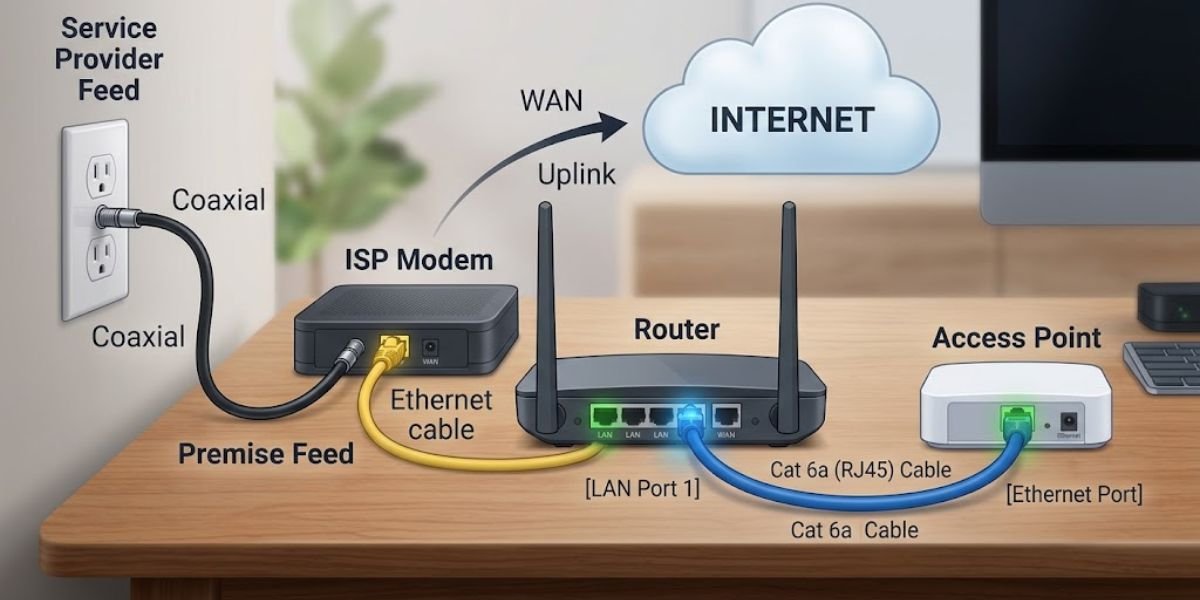
Connect the Orbi router to the modem
Establish physical connectivity between your broadband source and the networking hardware by following this sequential procedure:
- Power down your standalone modem and any existing networking equipment.
- Connect the RBRE960 router’s yellow Internet/WAN port directly to the modem using the supplied Ethernet cable.
- Power on your broadband modem and wait for connection indicator lights to stabilize.
- Plug the Orbi router into a nearby electrical outlet using its dedicated power adapter.
- Wait for the LED indicator ring on top of the router to transition from pulsing white to a solid state, indicating readiness.
Set up the network with the Orbi app
The mobile application acts as the primary command center for configuring the wireless environment. Complete the software provisioning sequence through these steps:
- Download and install the NETGEAR Orbi app on your iOS or Android mobile device.
- Sign in or create a new MyNETGEAR account.
- Use the app interface to scan the QR code printed on the base of the router when prompted.
- Connect your mobile device to the temporary default Orbi WiFi network broadcasted by the router.
- Follow the prompts to designate your permanent WiFi network name (SSID) and secure password.
- Establish a separate, highly secure administrator password for backend device management.
Never reuse the exact same password for your primary wireless broadcast and your router administration login. Setting distinct administrative credentials prevents lateral network compromise if a guest network user or compromised client device discovers standard connection keys.
Add the two satellites
Once the main router is fully configured, expand coverage by integrating the two satellite nodes.
Initially, position the satellites roughly three to four rooms away from the main router to allow clean signal discovery without heavy environmental obstruction. Plug each satellite into a wall outlet and wait for the indicator lights to pulse and settle, showing a successful synchronization with the primary RBRE960 node.
Move the satellites to their final positions
Relocating the synchronized satellites to their target coverage zones requires balancing distance and signal propagation.
Avoid placing a satellite at the absolute outer perimeter of the existing wireless signal boundary. Pushing a node too far from the source creates a weak relay link that bottlenecks overall network performance.
- Poor approach: Router → extremely weak signal → satellite
- Better approach: Router → strong and usable connection → satellite → remote coverage area
Check the mesh connection
After moving the hardware to its permanent living spaces, launch the Orbi app to inspect the connection status of each satellite node.
If the app reports a poor or fair backhaul connection, moving that specific satellite closer to the router or shifting it past fewer interior walls will yield much higher throughput than leaving it stranded in the dead zone.
Use Ethernet backhaul if your home is wired
If your residence features pre-installed Cat 6 or Cat 6A Ethernet wall drops, hardwire the satellites directly back to the router’s LAN ports.
Enabling a wired backhaul offloads inter-node communication entirely from the wireless spectrum, freeing up the dedicated 5GHz backhaul band to handle heavy client traffic or maximize throughput across dense smart home deployments.
Orbi app and network management
Day-to-day administrative oversight runs through the Orbi mobile application or the more granular browser-based web interface.
The management software provides deep insight into your entire digital ecosystem. Key modules include:
- Connected Device Dashboard: Real-time visibility into active clients, connection types, and signal metrics.
- Guest Network Controls: Isolated wireless profiles for visitors that keep smart home appliances secure.
- Traffic Metering: Historical data consumption logs tracking bandwidth usage across daily and monthly periods.
- Firmware Management: Manual or automated system updates patching security vulnerabilities.
- Network Settings: Advanced IP configurations, port forwarding, and DNS adjustments.
Independent testing shows that casual users find the mobile app interface responsive for quick tasks, while power users lean on the local browser portal for advanced routing rules.
Security and subscription features
Protecting a modern smart home requires proactive threat mitigation built directly into the core networking hardware.
The RBKE963 integrates advanced protection utilities via NETGEAR Armor, which is powered by Bitdefender. This layer scans incoming packets at the router level, defending connected IoT devices, laptops, and mobile phones against malware, phishing attempts, and unauthorized intrusion vectors.
For households with children, Smart Parental Controls allow administrators to filter web content, establish scheduled bedtime blocks, and pause internet access on specific devices with a single tap.
Buyers must account for long-term ownership costs, as advanced features like Armor security suites and comprehensive parental control tiers require paid annual subscriptions after the initial hardware trial period expires.
Using the RBKE963 in a real home
Deploying high-end networking hardware yields vastly different results depending on the physical environment and active workloads.
The system shines brightest in large, multi-story properties, sprawling ranch-style houses, and multi-gigabit broadband environments supporting dozens of concurrent devices. Remote professionals managing heavy video conferences, competitive gamers requiring ultra-low latency, and creators moving massive files across local NAS storage arrays make full use of the multi-gigabit backhaul architecture.
Conversely, installing this enterprise-grade hardware in a modest apartment or a small home serviced by a basic 300Mbps internet connection provides little tangible benefit, as the physical infrastructure far exceeds the demands of the environment.
How the RBKE963 compares with other mesh systems
Choosing a high-end mesh network requires weighing alternative hardware architectures against specific user requirements.
For buyers wanting WiFi 6E capabilities without paying for the extreme capacity of the Orbi quad-band layout, legacy tri-band alternatives like the ASUS ZenWiFi ET8 offer a more compact footprint and flexible software configuration options, though with lower sustained multi-node throughput.
When looking at the premium tier, buyers must also evaluate current WiFi 7 mesh systems. While WiFi 7 introduces wider channels and multi-link operation, the RBKE963 remains heavily competitive due to its mature firmware stability and heavy-duty multi-gigabit wired interfaces.
For users running standard broadband packages in smaller spaces, investing in a standard dual-band or entry-level mesh kit delivers better financial value than purchasing over-provisioned enterprise hardware.
Value and long-term ownership
Calculating the true cost of the RBKE963 goes far beyond the initial retail price tag.
Owners must factor in ongoing subscription fees for security and parental control modules, local power consumption across three substantial high-performance towers, and the expected useful lifespan of a WiFi 6E investment in a market rapidly shifting toward newer wireless generations.
For large-scale properties requiring absolute maximum throughput across every square foot, the heavy investment delivers unmatched stability. For average households, the financial layout is difficult to justify over mid-tier alternatives.
Verdict
The Netgear Orbi RBKE963 remains a formidable piece of engineering. Its robust quad-band architecture, dedicated 5GHz backhaul, high-speed WiFi 6E capabilities, and multi-gigabit Ethernet switching target heavy network demands that standard consumer mesh routers cannot handle.
For large homes with high-speed fiber broadband, numerous active clients, and serious wired networking needs, it remains a premier high-capacity option. However, buyers shopping at the ultra-premium tier should carefully weigh its cost against current market alternatives before making a final purchasing decision.