
For modern organizations, email operates as the central nervous system of daily operations. It carries customer inquiries, contractual negotiations, sales communications, vendor invoices, internal approvals, and sensitive corporate data. When these critical workflows rely on personal email accounts or fragmented, unmanaged communication tools, maintaining a unified brand identity, managing access permissions, and securing organizational intelligence becomes nearly impossible.
Gmail for business, delivered through the Google Workspace platform, combines custom business email with cloud-based communication, document collaboration, and administrative governance. Companies can deploy addresses using their own domain while providing employees with integrated access to Google Calendar, Drive, Meet, Docs, Chat, and Keep. However, the available security controls, storage pools, and administrative capabilities depend heavily on the specific Workspace edition and how the environment is configured.
Understanding how Gmail functions as a business-to-business Software as a Service (B2B SaaS) solution requires looking beyond basic messaging. A company can adopt the platform to bypass building and maintaining private email server infrastructure, but the true return on investment depends on how well the platform integrates with existing sales CRM platforms, security frameworks, compliance mandates, and operational budgets.
What Is Gmail for Business?
Gmail is Google’s web-based email client. For commercial organizations that require custom domain addresses, centralized IT administration, and enterprise productivity software, Google delivers Gmail through its Google Workspace platform (formerly G Suite).
The distinction between a personal account and an enterprise deployment is critical for business governance:
- Personal Gmail Accounts: Managed entirely by individual end users. The individual owns the account data, controls security settings, and retains ownership of all inbox communications even if used for business purposes.
- Domain-Verified Google Workspace Accounts: Managed centrally by organizational IT administrators. The business owns the domain, controls account creation, dictates access policies, enforces multi-factor authentication, and retains all corporate communications via the Google Admin console.
Professional Email With a Custom Domain
Deploying Gmail through Google Workspace allows an organization to replace generic @gmail.com addresses with a custom domain, establishing brand credibility across every outbound touchpoint.
For example, a enterprise consulting firm operating under northstarconsulting.com can structure its communication architecture logically:
- hello@northstarconsulting.com for general corporate inquiries.
- sales@northstarconsulting.com for inbound pipeline generation.
- accounts@northstarconsulting.com for accounts payable and billing.
- firstname.lastname@northstarconsulting.com for direct employee identity.
Establishing a custom address alone does not ensure delivery or security. Organizations must verify domain ownership with Google by configuring Domain Name System (DNS) records, including TXT or CNAME records, to unlock administrative controls and prevent unauthorized third parties from spoofing the corporate domain.
Managing Employees and Business Communication
As an organization expands from a small team to an enterprise with hundreds of employees, managing digital identities manually becomes unsustainable.
Google Workspace provides centralized administrative controls that allow authorized IT administrators to automate user provisioning, assign role-based access, and configure organizational units (OUs).
When an employee joins the company, administrators generate a managed identity, grant access to specific shared Google Drive folders, and assign them to departmental Google Groups. Conversely, when an employee departs, administrators can immediately suspend account access, revoke active OAuth tokens across connected third-party applications, wipe corporate data from mobile devices remotely, and transfer inbox data or Google Drive ownership to a manager.
Without centralized account administration, departing employees retain access to proprietary customer records, historical contract negotiations, and sensitive internal correspondence, creating severe operational and legal risks.
Gmail Is Part of a Larger Business Platform
Gmail operates as the primary communications hub within the broader Google Workspace ecosystem. Rather than functioning as an isolated inbox, it integrates natively with core productivity applications:
- Google Calendar: Converts email invitations directly into calendar events, checks colleague availability, and automatically attaches video conference links.
- Google Meet: Supports high-definition, encrypted video meetings directly from Gmail threads or calendar events, supporting up to 500 interactive participants on higher tiers.
- Google Drive: Replaces email file attachments with cloud storage links, providing granular permission controls (Viewer, Commenter, Editor) and preventing version confusion across collaborative teams.
- Google Docs, Sheets, and Slides: Enables real-time, multi-user co-authoring with dynamic commenting, action item assignments, and detailed version histories.
While Google Workspace handles core communication and document creation, it does not replace dedicated enterprise systems like customer relationship management (CRM) platforms, enterprise resource planning (ERP) software, or specialized project management tools. Instead, it serves as the primary communication layer that connects these disparate applications into a single operational workflow.
How Gmail Fits Into the B2B SaaS Business Model
Software as a Service (SaaS) is a cloud computing delivery model where software is hosted centrally by a vendor and licensed to customers on a recurring subscription basis. Under the shared responsibility model, the SaaS vendor manages the physical data centers, server infrastructure, security patches, system redundancy, and core software updates. The customer remains responsible for user identity management, role-based access configurations, data security policies, and third-party software integrations.
Google Workspace operates as one of the world’s largest B2B SaaS platforms. Organizations subscribe to a plan suited to their scale, paying per licensed user rather than deploying on-premise Exchange servers or managing physical mail transfer agents (MTAs).
Subscription-Based Access and Operating Costs
Standard Google Workspace business plans utilize a multi-tiered, per-user per-month pricing model. This structure transforms capital expenditures (CapEx) like physical server hardware into predictable operational expenditures (OpEx).
When calculating the total financial commitment of a Workspace deployment, organizations must evaluate several key factors:
- Base Subscription Cost: Calculated by multiplying the applicable tier price per user by the total number of required employee licenses.
- Storage Allocation: Evaluating whether the pooled storage allowance included in lower tiers (30 GB to 2 TB per user) meets organizational data demands or necessitates upgrading to higher tiers (5 TB per user or custom enterprise storage).
- Implementation and Data Migration: Factoring in the one-time professional services costs or third-party tool licensing required to migrate legacy email archives, calendars, and file repositories from platforms like Microsoft Exchange or IMAP servers.
- Ongoing IT Administration: Accounting for internal staff time or external Managed Service Provider (MSP) retainer fees required to handle routine identity management, security audits, and domain configuration.
Cloud Access and Distributed Collaboration
Because Google Workspace operates entirely in the cloud, authorized employees can access corporate email, shared drives, and communication tools from any internet-connected device or location.
A field consultant can review a contract on a mobile device via the native Gmail app, leave inline comments on a shared Google Sheet from a tablet, and host a client presentation on Google Meet from a laptop—all synchronized in real time.
However, ubiquitous cloud access expands the corporate security perimeter. Organizations must secure mobile entry points by enforcing screen locks, enabling full-disk device encryption, enforcing context-aware access policies, and deploying Google Endpoint Management to monitor compliant devices.
Google Workspace Pricing and Business Plans
Google Workspace is structured into four main commercial tiers for small-to-medium businesses (capped at 300 users per domain), alongside dedicated Enterprise tiers designed for unlimited scale and advanced security needs.
| Workspace Edition | Storage Allowance (Per User) | Video Meeting Capacity | Key Features & Security Controls |
| Business Starter | 30 GB Pooled Storage | Up to 100 Participants | Standard custom email, fundamental security controls, basic admin management. |
| Business Standard | 2 TB Pooled Storage | Up to 150 Participants | Meeting recording, noise cancellation, appointment booking pages, eSignatures. |
| Business Plus | 5 TB Pooled Storage | Up to 500 Participants | Google Vault (data retention/eDiscovery), advanced mobile endpoint management, enhanced security controls. |
| Enterprise Tiers | Custom / Flexible Storage | Up to 1,000 Participants | Data Loss Prevention (DLP), Context-Aware Access, S/MIME encryption, enterprise support. |
Business Starter
Designed for small teams and early-stage startups that require professional domain-branded email and basic collaboration tools. It includes 30 GB of pooled cloud storage per user, standard video conferencing for up to 100 attendees, and core Google Admin controls.
Organizations considering this tier must evaluate storage requirements carefully. Large media files, heavy PDF attachments, and long-term project files can quickly exceed the 30 GB threshold, forcing individual storage upgrades or plan migrations.
Business Standard
Serves as the baseline choice for most growing mid-sized organizations. It dramatically expands pooled storage to 2 TB per user, increases meeting capacity to 150 participants, and introduces native video meeting recording saved directly to Google Drive.
Business Standard also incorporates integrated appointment scheduling pages, native eSignature capabilities within Google Docs and PDFs, and shared drives for team-wide file management.
Business Plus
Built for organizations with heightened compliance, data governance, and regulatory requirements. It supplies 5 TB of pooled storage per user, supports 500-participant video meetings, and integrates Google Vault—an archiving and eDiscovery tool essential for legal holds and regulatory compliance.
In addition to data retention tools, Business Plus elevates administrative control by introducing Advanced Endpoint Management, allowing IT administrators to enforce strict password policies, mandate mobile device encryption, and selectively wipe corporate data from compromised personal devices.
Enterprise Tiers
Engineered for large organizations, highly regulated industries (such as finance, healthcare, and defense), or businesses with complex global infrastructures. Enterprise editions eliminate the 300-user limit, offer flexible or unlimited storage allocations, and support up to 1,000-participant video calls with integrated live streaming.
Enterprise tiers incorporate Google’s most sophisticated security tools:
- Data Loss Prevention (DLP): Automatically scans outbound emails and Google Drive files for sensitive data formats—such as Social Security numbers, credit card details, or custom regular expressions—and blocks or flags unauthorized sharing.
- Context-Aware Access: Allows administrators to define granular access rules based on user identity, geographic location, device security posture, and IP address.
- S/MIME Encryption: Enables direct client-side encryption and digital signatures for outbound email communications.
Security and Data Protection for Business Gmail
Because corporate email inboxes contain sensitive intellectual property, employee personal data, and financial correspondence, securing a Google Workspace deployment requires a layered defense strategy. While Google reports that Gmail blocks over 99.9% of spam, phishing, and malware before reaching an inbox using machine learning filters, organizations must actively configure administrative protections to secure their data environment.
Email Authentication: SPF, DKIM, and DMARC
To protect the organization’s brand reputation and ensure high email deliverability, administrators must implement three core email authentication protocols within their domain’s DNS settings:
- SPF (Sender Policy Framework): A DNS TXT record that publishes an explicit list of authorized mail servers permitted to send email on behalf of the company domain.
- DKIM (DomainKeys Identified Mail): Adds an encrypted cryptographic signature to every outbound email header. The recipient’s mail server verifies this signature against the domain’s public key published in the DNS, confirming the message was not tampered with in transit.
- DMARC (Domain-based Message Authentication, Reporting, and Conformance): A policy framework that uses both SPF and DKIM to determine the legitimacy of an email message. DMARC instructs receiving mail servers how to handle emails that fail SPF or DKIM checks—options include none (monitoring only), quarantine (direct to spam), or reject (block message delivery completely).
Google enforces strict sender guidelines for domain authentication. Senders dispatching over 5,000 messages per day to personal Gmail accounts must deploy authenticated SPF, DKIM, and DMARC policies, maintain spam complaint rates below 0.10% (and never exceeding 0.30%), support one-click unsubscriptions, and publish valid reverse DNS (PTR) records.
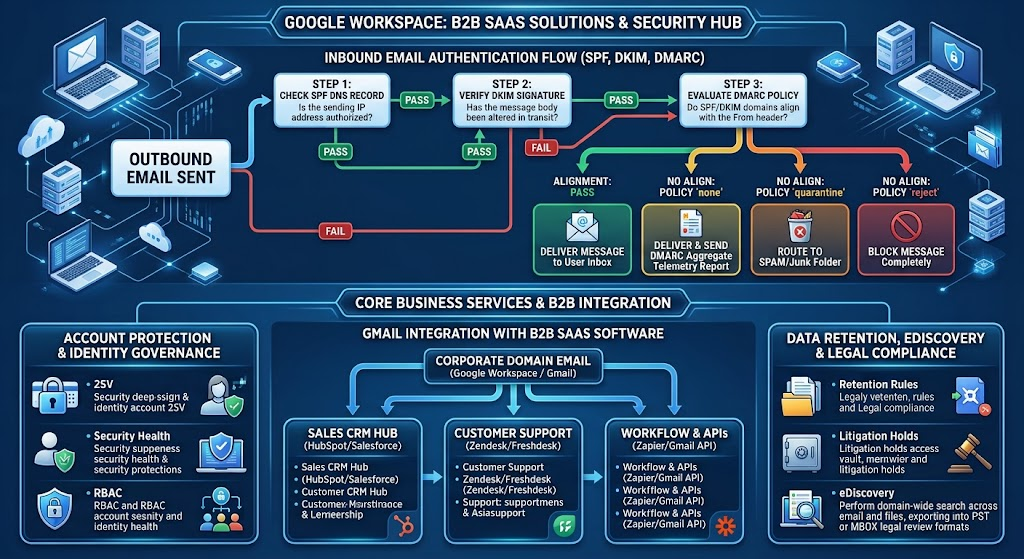
Before configuring DMARC policies, administrators must inventory every platform authorized to send email on behalf of the corporate domain—including marketing automation tools (e.g., HubSpot, Mailchimp), transactional billing platforms (e.g., Stripe, QuickBooks), and customer support platforms (e.g., Zendesk). Omitting an authorized IP from an SPF record when deploying a strict DMARC policy will cause legitimate business communications to fail authentication and be rejected.
Account Protection and Identity Governance
Passwords remain the primary vector for unauthorized account access. To secure managed Google Workspace accounts, organizations should deploy mandatory security controls:
- 2-Step Verification (2SV): Mandate multi-factor authentication across all accounts, prioritizing hardware security keys (FIDO2 / WebAuthn) or time-based one-time password (TOTP) authenticator apps over security-flawed SMS-based verification.
- Security Health Recommendations: Utilize the Google Admin console’s built-in security checklist to monitor password strength parameters, restrict automated email forwarding rules, and disable legacy authentication protocols like IMAP/POP3.
- Role-Based Access Control (RBAC): Follow the principle of least privilege by delegating administrative responsibilities. Use specific, scoped admin roles (e.g., User Management Admin, Help Desk Admin) rather than assigning global Super Admin privileges broadly across the IT department.
Data Retention, eDiscovery, and Legal Compliance
Organizations subject to legal regulations, litigation hold demands, or industry compliance frameworks (such as HIPAA, FINRA, or GDPR) cannot rely on standard user inbox deletion rules.
Google Vault (included in Business Plus and Enterprise editions) provides dedicated archiving, data retention, and legal hold capabilities across Gmail, Google Chat, Google Groups, and Google Drive:
- Retention Rules: Establish automated retention policies that preserve corporate emails and files for specific required timeframes (e.g., 7 years for financial records) regardless of whether an end user manually deletes them from their inbox.
- Litigation Holds: Apply indefinite legal holds on specific user accounts or keyword searches during active litigation, preserving all relevant data in an unalterable state.
- eDiscovery Search & Export: Perform domain-wide search queries across archived emails, metadata, and attachments, exporting target files into standard legal review formats like PST or MBOX.
How Gmail Integrates With B2B SaaS Software
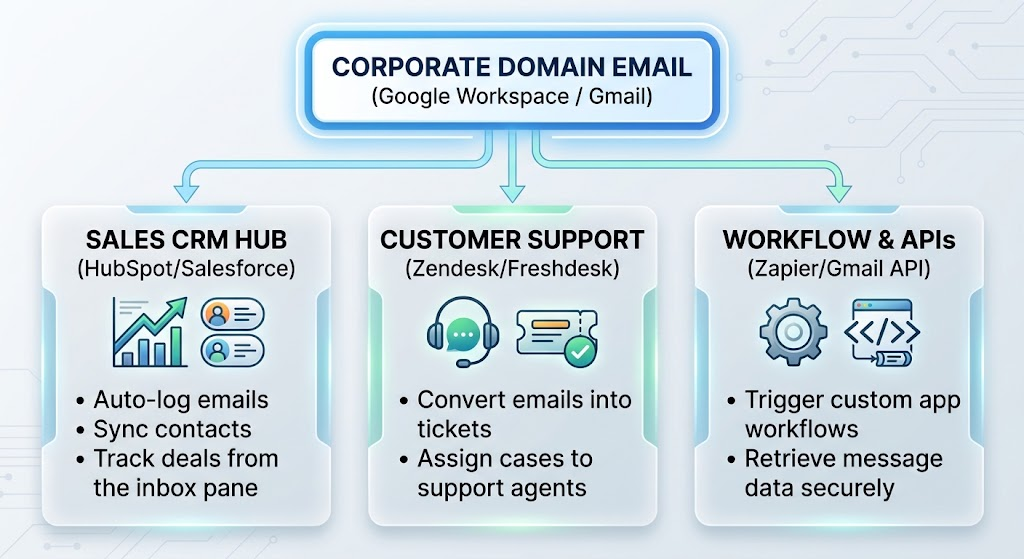
Email rarely functions as an isolated application. In modern B2B organizations, communication flows continuously between the inbox and specialized business platforms like CRMs, helpdesks, and project management tools.
Gmail and Customer Relationship Management (CRM) Systems
Connecting Gmail with enterprise CRMs—such as Salesforce, HubSpot, or Zoho CRM—bridges the gap between client communications and pipeline management.
Using native Google Workspace add-ons, sales representatives can interact with CRM records directly within the Gmail side panel:
- Automatically log inbound and outbound client email exchanges to the corresponding company or deal record.
- Create new contact records, schedule follow-up tasks, and update pipeline deal stages without leaving the inbox interface.
- Access account histories, historical support tickets, and contract values while drafting responses to prospective clients.
Administrators should review the OAuth permission scopes granted during CRM integration. An integration that requests broad read, write, and delete permissions across all domain inboxes should be vetted to prevent unauthorized data scraping or security exposures.
Gmail and Customer Support Platforms
While small teams often manage incoming support inquiries using basic Google Groups aliases (e.g., support@company.com), growing organizations typically transition to dedicated ticketing platforms like Zendesk, Freshdesk, or Intercom.
Integrating Workspace with a ticketing engine automatically converts incoming customer emails into structured support tickets, enabling:
- Automated ticket distribution based on agent availability, skill sets, or customer account tier.
- SLA tracking to monitor response times, resolution velocity, and customer satisfaction (CSAT) metrics.
- Prevention of collision errors, ensuring multiple agents do not accidentally author conflicting responses to the same client inquiry.
API Access and Custom Workflow Automation
For bespoke internal operations, developers can use the Gmail API to build custom software integrations. Operating via RESTful protocols, the Gmail API allows authenticated applications to search thread archives, draft outbound messages, parse headers, and process file attachments programmatically.
Additionally, low-code integration platforms like Zapier, Make, or Google Apps Script enable automated workflows across disparate systems:
- Automatically parse incoming email billing receipts and generate expense line items in accounting platforms like QuickBooks or Xero.
- Convert designated email messages into actionable tasks within project management systems like Asana, Jira, or Trello.
- Send real-time Slack or Microsoft Teams notifications when an email marked as high-priority arrives from a enterprise customer.
When deploying custom API integrations, developers should use restricted OAuth 2.0 scopes, enforce service account delegation carefully, and conduct routine audits of active API keys in the Google Cloud Console.
Calculating the Total Cost of Ownership (TCO)
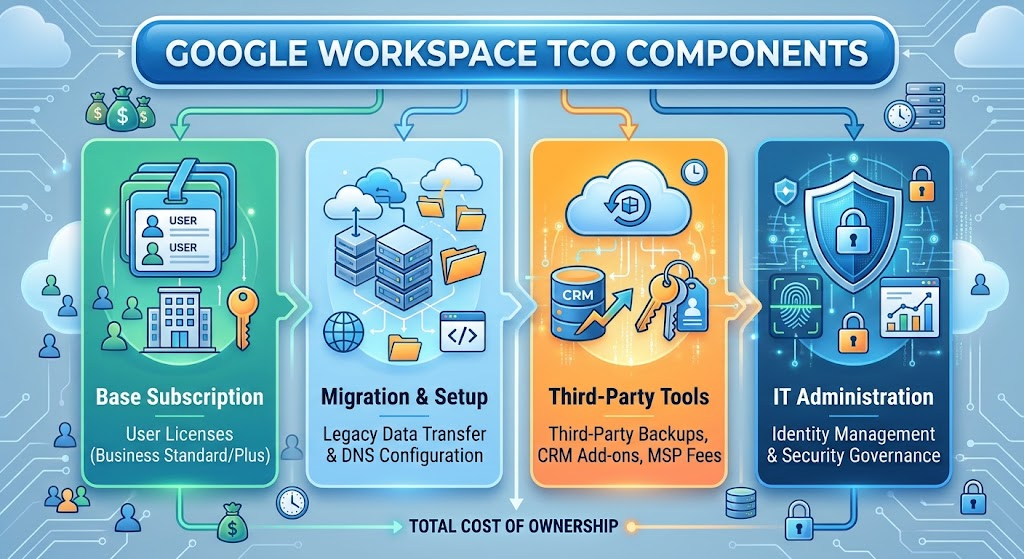
Evaluating a Google Workspace deployment requires looking beyond the advertised baseline per-user subscription price. Organizations must calculate the comprehensive Total Cost of Ownership (TCO) across the full software lifecycle.
A comprehensive TCO evaluation should incorporate both direct software fees and operational expenditures:
Total Cost of Ownership (TCO) = Sb + Md + At + Ic + Op
Where:
- Sb = Base subscription licensing costs (Number of users × Annual tier price).
- Md = Data migration, domain configuration, and technical setup costs.
- At = Third-party security add-ons, spam gateways, or eDiscovery extensions (e.g., Google Vault or third-party backup tools).
- Ic = Software integration development, API connectors, and CRM licensing fees.
- Op = Internal IT management resources or external MSP retainer costs.
For example, a 50-person enterprise deploying Business Standard must factor in its baseline recurring software licensing, any third-party cloud-to-cloud backup solutions (to protect against accidental user deletion), and setup assistance from a certified Google Cloud Partner.
How to Choose the Right Gmail and SaaS Solution
Selecting the optimal Google Workspace configuration requires evaluating organizational workflows, security requirements, and long-term scaling objectives.
1. Assess Business Size and Operational Workflows
Document how your team communicates, stores data, and collaborates daily:
- Micro-Businesses & Freelancers: Require basic custom email branding, simple calendar sharing, and standard file storage easily handled by Business Starter.
- Mid-Sized & Scaling Businesses: Require expanded storage pools, shared drives, meeting recordings, and CRM integrations, making Business Standard the optimal baseline.
- Compliance-Driven & Enterprise Organizations: Require strict data retention, automated eDiscovery, granular device management, and advanced security controls offered by Business Plus or Enterprise tiers.
2. Review Security, Compliance, and Data Governance
Determine whether your industry operates under strict regulatory frameworks. If your organization must comply with HIPAA, GDPR, FINRA, or SOC 2 standards, confirm that the selected Workspace plan supports the necessary administrative controls:
- Ensure Google Vault is included if long-term data retention or legal hold capabilities are legally mandated.
- Verify that a signed Business Associate Agreement (BAA) is executed with Google if handling Protected Health Information (PHI) under HIPAA.
- Confirm that Data Loss Prevention (DLP) rules are deployed if employees handle credit card data or intellectual property.
3. Plan Data Migration and Domain Setup
Migrating to Google Workspace requires structured planning to prevent data loss or service disruptions:
- Inventory Current Data: Audit existing mailbox sizes, file directory structures, contact lists, and calendar archives on legacy servers.
- Pre-Configure Authentication: Set up low Time-to-Live (TTL) settings on existing DNS records several days prior to migration to ensure rapid propagation.
- Execute Pilot Migrations: Test data migration tools—such as Google’s native Data Migration Service (DMS)—on a small cohort of non-critical user accounts before executing a full domain cutover.
- Train End Users: Provide structured training on Gmail search filters, Google Drive permissions, and Google Calendar scheduling to accelerate post-migration adoption.
Frequently Asked Questions
Is Gmail a SaaS solution for businesses?
Yes. Gmail for business, delivered through Google Workspace, is a cloud-based Software as a Service (SaaS) solution. Organizations subscribe to the platform on a recurring basis, accessing email, storage, and administrative controls hosted on Google’s infrastructure without maintaining physical mail servers.
What is the difference between personal Gmail and Google Workspace?
Personal Gmail accounts end in @gmail.com, are owned individually by the user, and lack centralized administrative controls. Google Workspace accounts use a custom business domain (e.g., @company.com), are managed centrally by corporate IT administrators via the Google Admin console, and include enterprise-grade security, retention, and collaboration tools.
Can a business use Gmail with its own custom domain?
Yes. Google Workspace allows organizations to pair Gmail with their own domain name. To activate the service, administrators must verify domain ownership and configure necessary DNS records, including MX, SPF, DKIM, and DMARC settings.
Can Gmail integrate directly with CRM platforms like Salesforce or HubSpot?
Yes. Gmail integrates with major CRM software via native Google Workspace add-ons, APIs, and third-party workflow automation tools. These integrations allow sales teams to log email communications, create new contact records, and track deal pipelines directly within the Gmail interface.
How does Google Workspace protect business email from spam and phishing?
Google Workspace employs machine learning security filters that automatically block over 99.9% of spam, phishing attempts, and malware. Organizations can further enhance protection by enforcing 2-Step Verification, setting up SPF/DKIM/DMARC protocols, deploying Data Loss Prevention policies, and managing device access via Google Endpoint Management.