Why This Matters Now (And Why Waiting Costs More Than Moving)
After migrating over 200 workloads across AWS, Azure, and GCP for companies ranging from 10-person startups to Fortune 500 divisions, I’ve noticed one pattern: the teams that extract maximum value from cloud computing aren’t the ones with the biggest budgets, they’re the ones who understand exactly what cloud infrastructure gives them, where its limits are, and how to bridge the gap.
Here’s the reality most guides won’t tell you: you’re probably already using cloud computing. Your email runs on it. Your file storage. Your CRM. Your team chat.
The question isn’t whether to adopt cloud, it’s whether you’re using it strategically or just paying rent on digital real estate you don’t fully control.
In 2026, cloud computing isn’t a technology upgrade. It’s a business operating system. Companies that treat it as such are pulling ahead in speed, cost efficiency, and resilience. Companies that don’t are discovering that their savings from delaying migration are actually compounding technical debt.
This guide covers what cloud computing essentials actually are, how they unlock measurable business benefits, and how to implement them without the common pitfalls that burn budget and erode trust.
What Cloud Computing Essentials Actually Mean
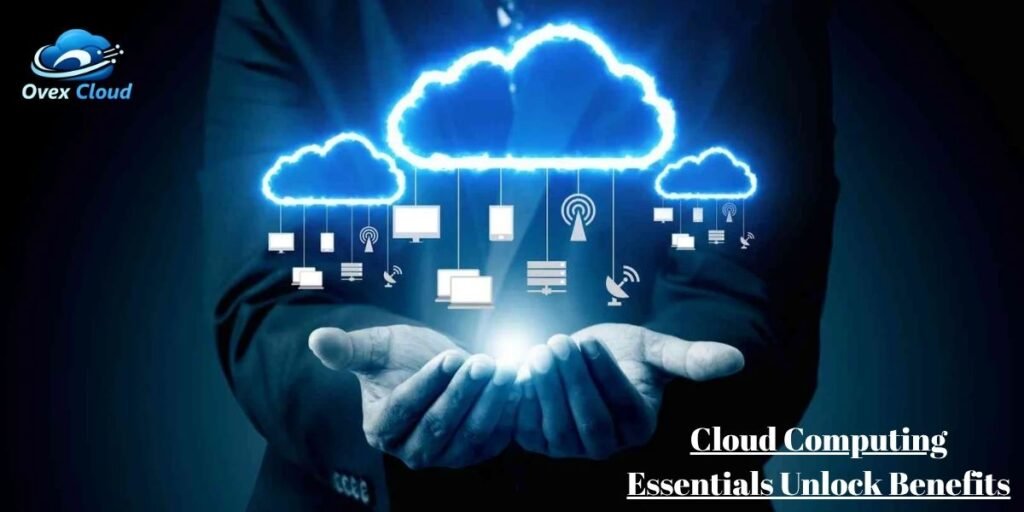
Cloud computing essentials are the foundational components every organization must understand before making strategic cloud decisions. These aren’t abstract concepts, they’re the building blocks of how modern business operates:
- On-demand IT resources (compute, storage, networking) delivered over the internet
- Cloud storage and automated backup systems with defined recovery objectives
- Cloud-native software and business applications (SaaS, custom builds on PaaS)
- Secure remote access from any device, any location, with identity verification
- Elastic scalability that expands and contracts with actual demand
- Security controls and access management that match or exceed on-premise standards
- Service level agreements (SLAs) with measurable uptime commitments and financial backing
- Cost governance frameworks to prevent the “cloud bill shock” that destroys ROI
The critical distinction: cloud computing isn’t about moving your existing setup online. It’s about rethinking how IT serves business objectives.
The 11 Business Benefits That Justify the Transition
Based on implementation data across industries, here are the benefits that consistently deliver measurable ROI—not theoretical advantages, but outcomes you can track on a balance sheet.
1. Cost Control: From Capital Drain to Predictable OpEx
Traditional IT demands massive upfront capital: servers, data centers, cooling systems, IT staff, and replacement cycles every 3-5 years. It’s like buying a restaurant kitchen when you occasionally need to cook dinner.
Cloud computing shifts this to operational expenditure. You pay for what you use, when you use it.
The mechanics:
- No hardware depreciation: You’re not stuck with obsolete servers
- Pay-as-you-go pricing: Costs scale with actual consumption
- Reduced physical overhead: No data center real estate, no power bills, no cooling infrastructure
Real-world data point: According to Flexera’s 2024 State of the Cloud Report, organizations with active cost governance practices (tagging, budget alerts, rightsizing) reduce cloud waste by an average of 28% Without governance, waste typically runs 30-35% of total cloud spend.
The catch most guides ignore: Cloud savings aren’t automatic. They require cost discipline. Left unmanaged, cloud spending can exceed on-premise costs. The essential practice here is pairing cloud adoption with a FinOps framework, monthly spend reviews, resource tagging policies, and automated shutdown of non-production environments.
2. Elastic Scalability: Grow Without the Infrastructure Panic
Instagram launched in 2010 and attracted 25,000 users on day one. Traditional servers would have crashed. Instagram ran on cloud infrastructure and scaled instantly.
This isn’t just about viral growth. It’s about demand variability:
- Seasonal businesses: Tax firms scaling up 10x in March, scaling down in May
- Campaign-driven companies: Marketing agencies handling traffic spikes from viral content
- Product launches: E-commerce sites managing pre-order rushes without permanent over-provisioning
The technical reality: Cloud platforms allow you to add compute, storage, or database capacity in minutes, not the weeks required for hardware procurement, installation, and configuration. When demand drops, you scale down and stop paying for excess capacity.
Key metric to track: Time-to-scale. Measure how long it takes your team to double capacity. In cloud-native environments, this should be under 15 minutes. If it takes days, you’re not using cloud elasticity, you’re just hosting old infrastructure on new servers.
3. Location-Independent Access
A stable internet connection is the only requirement. During a distributed team migration I supported on Azure, enabling cloud-based access cut the average time engineers spent on file syncing and version management by roughly half. The operational friction of “where is the latest version?” largely disappeared.
What this enables:
- Fully distributed teams working across time zones without friction
- Field workers accessing real-time data from job sites
- Executives reviewing dashboards from airport lounges
- Disaster scenarios where office access is physically impossible
The security essential: Location independence must be paired with zero-trust architecture, verify every user, every device, every session. Never assume security because someone is “inside the network.”
4. Automated Backup and Recovery: Sleep-Through-the-Night Reliability
When Hurricane Sandy hit New York in 2012, cloud-based businesses were operational within hours. Companies with submerged on-premise servers? Some never recovered.
Cloud backup essentials:
- Automated snapshots at defined intervals (hourly for critical data, daily for standard)
- Geographic redundancy: Data replicated across multiple regions automatically
- Defined Recovery Point Objectives (RPO) and Recovery Time Objectives (RTO): Know exactly how much data you can lose and how long recovery takes
- Immutable backups: Protection against ransomware that attempts to encrypt or delete backups
Reality check: Cloud providers handle the infrastructure, but you define the policy. A cloud backup without tested recovery procedures is just a false comfort. Run quarterly recovery drills. If you can’t restore critical systems in your defined RTO, your backup strategy is theoretical.
5. Real-Time Collaboration: One Source of Truth, Zero Version Conflicts
Cloud collaboration tools eliminate the “final_final_v2_ACTUAL” document chaos. Multiple users edit simultaneously, change sync in real-time, and version history is automatically preserved.
The business impact:
- Marketing teams co-editing campaign assets across continents
- Legal teams reviewing contracts with tracked changes visible to all parties
- Engineering teams maintaining single-source documentation that never drifts out of date
Implementation tip: The tool matters less than the workflow governance. Establish clear ownership, editing permissions, and approval chains. Cloud collaboration without governance creates chaos faster than it creates value.
6. Automatic Updates and Maintenance: Reclaim Your Sunday Nights
Nobody enjoys 2 AM system updates. Cloud providers handle security patches, software updates, hardware maintenance, and system upgrades automatically.
What this actually means for your team:
- IT staff focus on strategic projects instead of maintenance treadmill
- Security patches deploy within hours of release, not months
- Zero-downtime updates for critical services (when properly architected)
SLA reality: Major providers guarantee 99.9% to 99.99% uptime. At 99.99%, annual downtime is under 53 minutes. Matching this with on-premise infrastructure requires significant investment in redundant hardware, failover systems, and 24/7 operations staff. Most organizations underestimate this cost by 3-5x.
7. Enterprise-Grade Security: Better Than Most Can Build Alone
Major cloud providers invest billions in security, specialized teams, advanced encryption, threat intelligence networks, and compliance certifications that would bankrupt most individual companies to replicate.
Essential security layers:
- Encryption at rest and in transit: Data is unreadable without authorized keys
- Multi-factor authentication (MFA): Not optional for administrative access
- Role-based access control (RBAC): Principle of least privilege—users get minimum necessary access
- Activity monitoring and anomaly detection: Automated alerts for suspicious behavior
- Compliance certifications: SOC 2, ISO 27001, GDPR, HIPAA—verified by third-party auditors
The shared responsibility model: Cloud providers secure the cloud. You secure what you put in it. Weak passwords, excessive permissions, and unpatched custom applications remain your vulnerability. Security is a partnership, not a handoff.
8. Business Continuity: Operations That Survive Anything
Cloud computing separates your business operations from physical location. If your office floods, burns, or loses power, your data and applications remain accessible from any secure device.
Continuity essentials:
- Geographic distribution: Active-active or active-passive setups across regions
- Automated failover: Traffic routes to healthy regions without manual intervention
- Regular disaster recovery testing: Validate that your plan works before you need it
Cost perspective: Building equivalent redundancy on-premise typically costs 4-6x more than cloud-based solutions, and most organizations never achieve the same geographic spread.
9. Rapid Deployment: From Idea to Execution in Hours, Not Months
Traditional IT procurement cycles kill momentum. Cloud services allow you to spin up environments, test concepts, and launch products without hardware delays.
The innovation advantage:
- Development teams create test environments in minutes
- Marketing teams launch campaign landing pages without IT tickets
- Sales teams deploy demo environments for prospects instantly
Development velocity: PaaS environments (Google App Engine, AWS Elastic Beanstalk, Azure App Service) allow developers to deploy code without managing underlying infrastructure. This “fail fast, learn faster” approach reduces experimentation costs and accelerates product iteration.
10. Environmental Responsibility: Measurable Sustainability Gains
Cloud providers operate at efficiency scales impossible for individual organizations. Their data centers use optimized cooling, renewable energy, and shared infrastructure that dramatically reduces per-workload carbon output.
Sustainability data:
- Major providers (AWS, Microsoft, Google) have committed to carbon neutrality or 100% renewable energy
- Shared infrastructure means fewer idle servers—traditional on-premise environments typically run at 15-20% utilization
- Some organizations have cut IT-related emissions by over 90% through cloud migration
Business context: For companies with ESG commitments or sustainability-conscious customers, cloud migration often delivers the largest single reduction in IT carbon footprint.
11. Integration Ecosystem: Connect Your Tools, Automate Your Workflows
Cloud platforms don’t exist in isolation. They connect with thousands of third-party tools through APIs, webhooks, and pre-built integrations.
Integration examples:
- Cloud storage connecting to project management tools for automatic file organization
- CRM systems syncing with marketing automation platforms
- Accounting software pulling transaction data from e-commerce platforms in real-time
The productivity gain: Reduced context-switching between applications, automated data flows that eliminate manual entry errors, and unified dashboards that surface insights without spreadsheet gymnastics.
Cloud Service Models: Choose Your Level of Control
Understanding what you manage versus what the provider manages is essential for strategic decisions.
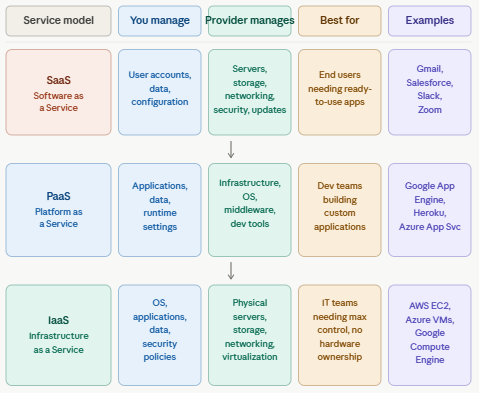
Decision framework:
- SaaS: when you need functionality immediately without technical overhead
- PaaS: when you’re building custom applications and want to focus on code, not infrastructure
- IaaS: when you have specific compliance, performance, or configuration requirements that demand granular control
Emerging model – Serverless (FaaS): Functions as a Service (AWS Lambda, Azure Functions, Google Cloud Functions) takes PaaS further, you write code, the platform handles everything else, scaling automatically from zero to thousands of executions. Ideal for event-driven workloads and microservices.
Cloud Deployment Models: Match Architecture to Risk Tolerance
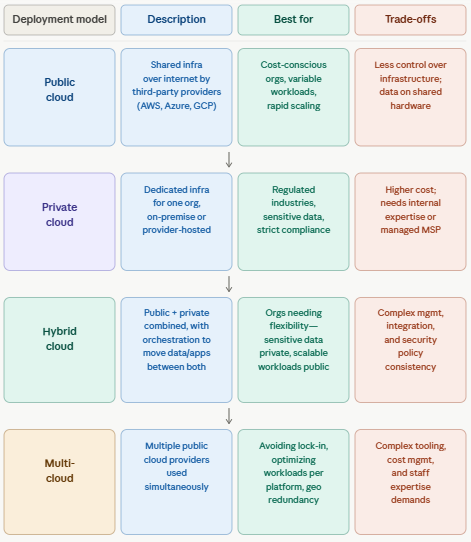
Strategic recommendation: Most organizations should start with public cloud for non-sensitive workloads, then add private or hybrid components as compliance requirements dictate. Multi-cloud should be a deliberate strategy, not an accident of departmental silos.
Cloud Security: The Shared Responsibility Model in Practice
Cloud security failures don’t usually happen because providers are breached. They happen because customers misunderstand where provider responsibility ends and theirs begins.
Provider Responsibilities:
- Physical data center security
- Network infrastructure protection
- Hypervisor and host operating system patching
- Compliance certification maintenance (SOC 2, ISO 27001, etc.)
Customer Responsibilities (Don’t Assume These Are Handled)
- Identity and access management: Who can access what, with what authentication strength
- Data classification and encryption: Which data is sensitive, how it’s encrypted, who holds the keys
- Application security: Code vulnerabilities, dependency updates, input validation
- Network configuration: Firewall rules, subnet isolation, VPN access
- Logging and monitoring: Are you actually watching for anomalies, or just collecting logs?
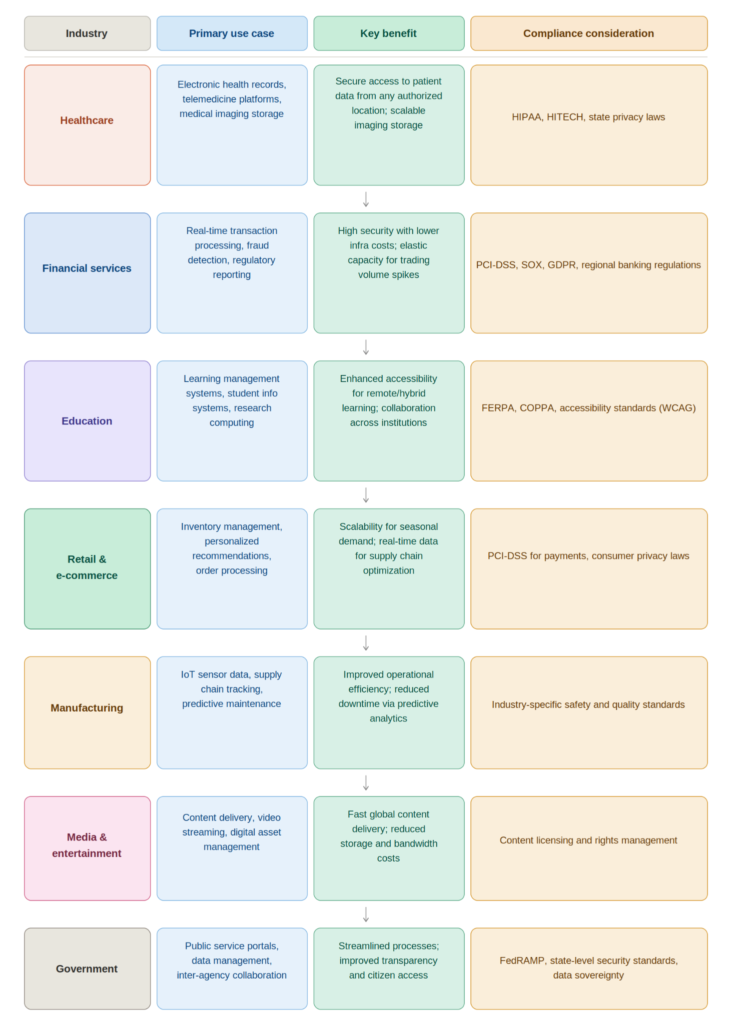
Industry Applications: How Cloud Transforms Specific Sectors
Cloud Migration: A Practical Roadmap
Moving to the cloud without a plan is how organizations create expensive disasters. Here’s the framework that consistently produces successful outcomes.
Phase 1: Assessment (Weeks 1-4)
- Inventory current infrastructure: Applications, data volumes, dependencies, performance requirements
- Classify workloads: Which are cloud-ready? Which needs refactoring? Which should stay on-premise?
- Define success metrics: Cost reduction targets, performance benchmarks, security requirements
- Identify compliance constraints: Data residency requirements, industry regulations, internal policies
Phase 2: Strategy & Provider Selection (Weeks 5-8)
- Choose deployment model: Public, private, hybrid, or multi-cloud
- Select primary provider(s): AWS (breadth), Azure (enterprise integration), GCP (data/analytics), or specialized providers for specific needs
- Define security architecture: Identity management, encryption strategy, network design
- Establish cost governance: Budget alerts, tagging policies, chargeback mechanisms
Phase 3: Pilot Migration (Weeks 9-16)
- Start with low-risk workloads: Non-critical applications, development environments, backup systems
- Implement security controls: Test identity management, encryption, and monitoring in cloud environment
- Train operations team: Cloud-specific skills, provider tools, troubleshooting procedures
- Document lessons learned: Refine processes before scaling to critical workloads
Phase 4: Scale & Optimize (Months 5-12)
- Migrate mission-critical systems: Using refined processes from pilot phase
- Implement cost optimization: Rightsizing, reserved instances, spot instances for non-critical workloads
- Establish FinOps practice: Monthly cost reviews, waste identification, optimization sprints
- Plan for continuous improvement: Cloud is not a destination—it’s an ongoing optimization practice
The Future of Cloud Computing: What’s Coming in 2026-203
Edge Computing: Processing Where Data Lives
As IoT devices, autonomous systems, and real-time applications proliferate, processing data at the edge, near its source rather than in centralized data centers, reduces latency and bandwidth costs. Expect hybrid edge-cloud architectures to become standard for manufacturing, healthcare, and autonomous vehicle applications.
AI-Native Cloud Service
Cloud platforms are integrating AI/ML capabilities directly into their service stacks. This democratizes access to technologies previously reserved for tech giants, natural language processing, computer vision, predictive analytics, available through API calls without specialized infrastructure.
Sustainability as a Selection Criterion
Carbon footprint reporting will become a standard RFP requirement. Providers are racing to carbon-negative operations, and organizations will increasingly select cloud partners based on environmental impact alongside cost and performance.
Quantum-Ready Cloud
Quantum computing access through cloud platforms (IBM Quantum, AWS Braket, Azure Quantum) allows organizations to experiment with quantum algorithms without investing in quantum hardware. While widespread commercial applications remain years away, early experimentation is already happening in cryptography, materials science, and complex optimization.
Conclusion: The Competitive Imperative
The debate about whether cloud computing benefits businesses concluded years ago. The evidence is overwhelming: lower costs, elastic scalability, enhanced security, improved collaboration, and environmental responsibility.
The real question in 2026 is execution speed. Organizations that treat cloud adoption as a strategic transformation, rethinking processes, training teams, implementing governance, pull ahead of competitors still treating it as a simple server relocation.
Cloud computing essentials unlock benefits only when implemented with intention. The infrastructure is available. The cost savings are proven. The security is enterprise-grade. What’s required now is leadership decision-making that moves beyond pilot projects to organization-wide cloud-native operations.
Your next step: Identify the one workload or process causing the most friction in your organization. That’s your cloud starting point. Move it. Measure the results. Build from there.
Frequently Asked Questions
What are cloud computing essentials?
Cloud computing essentials are the core services, deployment models, security practices, and governance frameworks that enable organizations to use cloud technology effectively. They include understanding IaaS/PaaS/SaaS service models, public/private/hybrid deployment options, cost management practices, security controls, and migration strategies.
Is cloud computing secure for small businesses?
Yes, often more secure than self-managed on-premise systems. Cloud providers invest in security capabilities that exceed what most small businesses can build independently. The key is implementing proper access controls, encryption, multi-factor authentication, and regular security reviews. Security is a shared responsibility: providers secure the infrastructure; you secure your data and access policies.
How much can cloud computing actually save?
Savings vary by organization, but typical ranges are 20-40% for well-governed implementations. However, without cost management practices, cloud spending can exceed on-premise costs. The 28% waste reduction achieved by organizations with active FinOps practices (per Flexera 2024 data) illustrates that savings depend on governance, not just migration.
What’s the difference between public, private, and hybrid cloud?
Public cloud: Shared infrastructure, lowest cost, highest scalability, managed by third-party providers
Private cloud: Dedicated infrastructure for one organization, maximum control and security, higher cost
Hybrid cloud: Combines both, keeping sensitive data private while using public cloud for scalable, less-sensitive workloads
Do I need technical expertise to use cloud computing?
Basic cloud services (SaaS applications like email or file storage) require minimal technical skill. Infrastructure-level services (IaaS, PaaS) require cloud-specific expertise. Most organizations benefit from a combination: business users access SaaS tools, while IT professionals or managed service partners handle infrastructure complexity.
How long does cloud migration typically take?
Timelines vary by scope. A single SaaS application deployment can take days. A full infrastructure migration typically takes 6-18 months. The critical factor isn’t speed—it’s planning. Rushed migrations create security gaps, cost overruns, and operational disruptions that take years to resolve.
Can I use multiple cloud providers?
Yes, multi-cloud strategies are increasingly common for avoiding vendor lock-in, optimizing specific workloads, and ensuring geographic redundancy. However, multi-cloud adds complexity in cost management, security policy consistency, and staff expertise requirements. Adopt multi-cloud as a deliberate strategy, not an accident.