Running a business used to mean managing a massive jigsaw puzzle where half the pieces were hiding under different rugs. The warehouse didn’t talk to accounting. Sales didn’t know what inventory actually looked like. Everyone had their own spreadsheets, their own isolated data, and their own version of the truth.
Enterprise Resource Planning (ERP) software was invented to solve exactly that, to act as a central nervous system for a company. But for decades, traditional ERPs came with a massive catch: they required heavy, expensive on-site servers, dedicated IT armies, and rigid architectures that felt more like concrete blocks than flexible business tools.
Then came the cloud.
When erp and cloud computing finally converged, it fundamentally rewrote the rules of business operations. Cloud computing stripped away the physical shackles of legacy software, turning ERP from an elite, high-maintenance luxury for massive conglomerates into a fluid, scalable utility accessible to companies of all sizes. Today, this combination is no longer just a tech upgrade; it is the absolute backbone of digital enterprise transformation.
What is ERP (Enterprise Resource Planning)?
To understand why the cloud transition matters so much, we first have to look at what an ERP actually does at its core.
Core Purpose of ERP Systems
An ERP system exists to tie together a multitude of business processes and enable the seamless flow of data between them. By collecting an organization’s shared transactional data from multiple sources, ERP systems eliminate data silos, the operational death zones where departments lose visibility into what the rest of the company is doing.
Instead of a dozen fragmented applications that don’t speak the same language, an ERP serves as the single source of truth. If a sales rep in Chicago closes a deal, the warehouse in Phoenix instantly sees the inventory deduction, and the finance team in New York automatically sees the revenue projection update.
Key Business Functions Covered by ERP
A comprehensive ERP system acts as a modular suite, meaning a business can plug in different components depending on its specific operations. The most critical modules include:
- Finance & Accounting: The core financial ledger. It tracks accounts payable, accounts receivable, general ledgers, budgeting, and tax compliance without requiring manual data re-entry.
- Supply Chain & Inventory: Manages the entire lifecycle of a product, from raw material procurement and warehouse logistics to shipping and fulfillment.
- HR & Payroll: Handles employee records, performance tracking, onboarding, time tracking, and automated payroll distributions.
- Sales & CRM: Manages customer pipelines, processes orders, tracks historical customer interactions, and automates billing.
What is Cloud Computing in a Business Context?
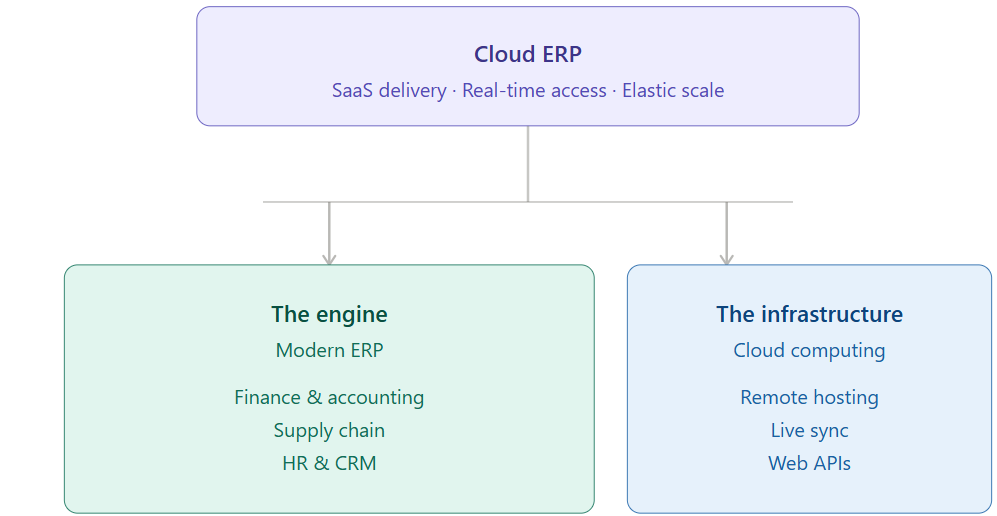
If the ERP is the engine of business data, cloud computing is the modern grid that powers it.
Basic Concept of Cloud Infrastructure
At its simplest, cloud computing is an internet-based model that delivers computing services—including servers, storage, databases, networking, and software—over the internet (“the cloud”) on an on-demand, pay-as-you-go basis. Instead of buying physical hard drives and running software locally on a desktop or an in-house server room, businesses rent access to high-powered infrastructure managed by tech giants like Amazon (AWS), Microsoft (Azure), or Google (GCP).
Types of Cloud Environments
Not every business deploys its cloud infrastructure the same way. Companies generally choose between three core environments:
- Public Cloud: Services are delivered over a network that is open for public use. The infrastructure is entirely owned and operated by a third-party provider, offering massive scalability and lower costs because resources are shared across multiple tenants.
- Private Cloud: The cloud infrastructure is dedicated solely to one organization. It can be physically located at the company’s on-site datacenter or hosted by a third party, offering maximum control and tighter security.
- Hybrid Cloud: This model blends both public and private environments. It allows data and apps to be shared between them, giving businesses the flexibility to keep highly sensitive data on a secure private cloud while running high-volume, less critical applications on the cost-effective public cloud.
What is ERP and Cloud Computing Integration?
When you combine these two forces, you get what the industry refers to as cloud based erp.
Definition of Cloud ERP
A cloud based erp system is an enterprise resource planning platform that runs on a vendor’s cloud platform rather than on an on-premise network. It is typically delivered via a Software-as-a-Service (SaaS) business model, meaning companies subscribe to the software via a monthly or annual fee rather than purchasing a lifetime software license outright.
How Cloud Computing Powers ERP Systems
Cloud computing transforms the ERP from a static archive into a dynamic, living ecosystem. It hosts the massive databases required for enterprise management on remote, highly secure servers, enabling real-time processing of complex data streams.
Because the architecture is inherently scalable, a company experiencing a sudden holiday sales spike can draw on extra cloud computing power instantly without their system crashing or lagging. It democratizes the software, making state-of-the-art enterprise tools accessible via any standard web browser.
How Cloud ERP Works (End-to-End Architecture)
To truly appreciate the power of erp in cloud computing, it helps to lift the hood and see how the data actually flows across an organization.
Vendor-Hosted Systems and the SaaS Model
In a cloud architecture, the ERP vendor takes on the entire burden of managing the physical infrastructure. They handle the server maintenance, hardware upgrades, power cooling, and baseline security protocols.
As a subscriber, your business interacts strictly with the application layer. The vendor pushes global updates, security patches, and feature improvements automatically over the air, ensuring every client is always running the absolute latest version of the software without requiring a manual IT intervention.
Browser-Based Access and Mobility
Legacy systems locked users to specific physical workstations within the company office building. Cloud ERPs break those walls down by utilizing browser-based access and native mobile applications.
Whether an executive is looking at financial dashboards on an iPad from an airport terminal, or a floor manager is scanning barcodes on a rugged android device in a warehouse, they are interacting with the exact same system interface via secure internet protocols (like HTTPS).
Data Synchronization Across Departments
When an event happens anywhere in a cloud ERP ecosystem, it triggers an immediate, global update across the centralized database.
- A customer places an order on an e-commerce storefront.
- The cloud ERP catches the transaction data instantly via webhooks.
- The inventory module updates stock counts across all locations.
- The ledger logs the revenue and calculates tax based on the buyer’s zip code.
- A packing slip is automatically pushed to a warehouse picker’s handheld terminal.
All of this happens in seconds, without a single human having to export a CSV file or send an email.
API Integrations with External Tools
No software platform can do literally everything. A business might want to keep using a specific third-party shipping platform like FedEx, or a niche marketing tool like HubSpot.
Cloud ERP systems rely heavily on robust Application Programming Interfaces (APIs). These modern software bridges allow different cloud applications to pass data back and forth seamlessly, allowing enterprises to build a customized tech stack without fracturing their core data stream.
Cloud ERP vs. On-Premises ERP
To truly understand the value of a cloud based erp, you have to look at what businesses are running away from. Legacy, on-premises ERP systems require an enterprise to buy physical servers, house them in a dedicated, climate-controlled server room, and employ a full-time IT staff just to keep the lights on.
When you strip away the hardware, the entire financial and operational model shifts.
| Cloud ERP vs. On-Premises ERP — Complete Comparison | ||||
| Winner badges: Cloud | On-Premises | Tie / Depends | ||||
| Category | Criterion | Cloud ERP | On-Premises ERP | Winner |
| Cost | Upfront cost | No hardware purchase. Subscription fee covers software, hosting, and support. | Significant capital expenditure for servers, storage, networking, and software licenses before go-live. | Cloud |
| Ongoing costs | Predictable OpEx model. Vendor handles maintenance, upgrades, and security patches. | Ongoing spend on IT staff, hardware maintenance, patches, and major-version upgrades billed separately. | Cloud | |
| Total cost of ownership (5 yr) | Generally 20–30% lower TCO than on-premises when factoring in staffing and infrastructure avoided. | Higher long-term TCO due to hardware refresh cycles, dedicated IT headcount, and upgrade projects. | Cloud | |
| Technology | Deployment speed | Go-live in weeks to months. No physical infrastructure setup required. | Typically 12–24 months. Hardware procurement, data center setup, and testing add significant lead time. | Cloud |
| Upgrades | Automatic, vendor-managed updates pushed continuously. Users always run the latest version. | Manual, infrequent major upgrades requiring IT projects, testing cycles, and custom code rework. | Cloud | |
| Scalability | Near-infinite elasticity. Add users, modules, or storage in minutes via admin dashboard. | Scaling requires purchasing and provisioning additional physical hardware — slow and capital-intensive. | Cloud | |
| Customization | Configurable via APIs, low-code tools, and marketplace extensions. Deep customizations may need vendor involvement. | Deep code-level customization possible but can break on upgrades, locking companies into outdated versions. | Tie / Depends | |
| Integration with other apps | Open APIs and pre-built connectors to modern SaaS tools. Plug-and-play ecosystem. | Integration with modern cloud tools requires custom middleware. Legacy connections are often complex and brittle. | Cloud | |
| Operations | Accessibility | Access from any device, anywhere, on any browser. Critical for remote teams, field workers, and multi-site ops. | Typically limited to office network. Remote access requires VPN configuration and dedicated IT setup. | Cloud |
| IT staff requirements | Minimal internal IT burden. Vendor manages infrastructure, security, and system health. | Requires dedicated in-house IT team or managed service provider for maintenance and troubleshooting. | Cloud | |
| Vendor dependency | Ongoing reliance on vendor for uptime, feature roadmap, and pricing changes. | Full control over software environment, timelines, and infrastructure decisions. | On-Premises | |
| Disaster recovery | Automated, geo-redundant backups managed by vendor. Recovery time typically minutes. | Requires a separate, self-managed backup strategy. Recovery can take hours or days. | Cloud | |
| Security | Data security | Enterprise-grade encryption at rest and in transit. 24/7 SOC monitoring by vendor security teams. | Security is entirely the company’s responsibility. Level depends on internal IT budget and expertise. | Tie / Depends |
| Compliance (HIPAA, GDPR, SOC 2) | Major cloud ERP vendors hold recognized certifications and compliance frameworks as standard. | Company must independently achieve and maintain compliance, requiring significant internal audit effort. | Cloud | |
| Data ownership & control | Data resides on vendor servers. Contracts define portability rights — always verify export provisions. | Complete physical and logical ownership of all data at all times. | On-Premises | |
| Uptime SLA | Vendors guarantee 99.9%–99.999% uptime — under 8 minutes of unplanned downtime per year. | Uptime depends on internal infrastructure investment. Hardware failures cause unscheduled downtime. | Cloud | |
| Note: Winner indicates which deployment model holds the advantage for that criterion. ‘Tie / Depends’ reflects scenarios where the outcome varies by business context, size, or industry. | ||||
Key Differences Explained
- Infrastructure Ownership: With on-premises, you own the metal. If a server rack fails at 2:00 AM on a Sunday, your IT team has to drive to the office to fix it. With a cloud based erp system, the vendor owns the infrastructure. Your only requirement is a stable internet connection.
- Cost Structure: On-premises requires a massive upfront Capital Expenditure (CapEx) to purchase hardware and lifetime software licenses. Cloud ERP flips this into an Operating Expenditure (OpEx)—a predictable, monthly or annual subscription fee that includes maintenance and upgrades.
- Maintenance Responsibility: On-prem systems require manual software patching. Upgrading to a new version can take months and cost hundreds of thousands of dollars because custom integrations break. In the cloud, updates are continuous, handled by the vendor, and designed not to break your existing workflows.
- Scalability: If an on-prem system runs out of storage, you have to order physical hard drives, wait for shipping, install them, and configure the system. In the cloud, scaling up your database size or computing power is a matter of clicking a button in an admin dashboard.
Which Businesses Should Choose What?
While large enterprises with massive, highly customized legacy setups sometimes stick to a hybrid model to sweat their existing hardware assets, small-to-medium enterprises (SMEs) and digital-first operations almost exclusively choose cloud native platforms. The speed to market and lack of capital barriers make on-prem a non-starter for growing brands.
Key Features of Cloud ERP Systems
A modern cloud based erp system is far more than just old accounting software running in a remote browser. It is built from the ground up to take advantage of modern web capabilities.
Real-Time Analytics and Dashboards
Because data is synchronized instantly across every single business department, executives don’t have to wait until the end of the month to see financial health reports. Modern systems feature customizable, role-based visual dashboards that show live KPIs—cash flow, warehouse picking speeds, supply chain margins, or customer acquisition costs—refreshed in real time.
Automation of Workflows
Manually copying data from a sales invoice into a shipping manifest is a recipe for human error. Cloud ERPs automate these repetitive loops entirely. When an order is marked “Paid,” the system can automatically generate a bill of materials for manufacturing, notify the procurement team if raw stocks drop below a specific threshold, and email a tracking number to the end client without human intervention.
Multi-Device Accessibility
Modern work doesn’t happen exclusively at a desk. A true cloud system features full mobile responsive architecture or native apps. Field sales agents can check real-time inventory levels on their phone while standing inside a client’s warehouse; field technicians can log service hours and trigger invoicing directly from a tablet on a job site.
Embedded AI and Predictive Insights
The defining trend of modern ERP platforms is the shift from a passive “system of record” to an active “system of momentum.” Platforms now integrate machine learning models directly into their data streams. Instead of just telling you what you sold last quarter, the system runs predictive analytics to forecast demand for next quarter based on historical trends, seasonal anomalies, and macroeconomic indicators.
Benefits of ERP and Cloud Computing Integration
When an enterprise successfully executes an erp in cloud computing deployment, the impact ripples across the entire balance sheet.
Operational Efficiency
By replacing disconnected, regional software silos with a single unified data ecosystem, businesses drastically reduce internal friction. Teams spend less time chasing down emails, reconciling conflicting spreadsheets, or manually validating data accuracy. According to industry benchmarks, automating routine back-office tasks can free up operational teams to focus on strategic growth rather than administrative data entry.
Cost Optimization
The financial benefits extend far beyond eliminating the physical cost of server hardware and server room electricity. Because cloud systems are priced per user or per resource consumption, businesses only pay for what they actually use. There is no “shelfware”—expensive software licenses sitting idle because a department didn’t adopt them. Furthermore, the risk of catastrophic data loss or system downtime is mitigated by the vendor’s enterprise-grade redundancies.
Scalability and Flexibility
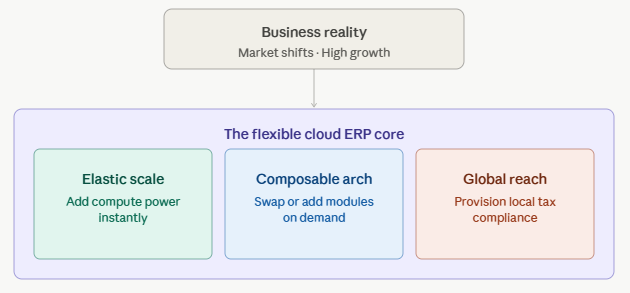
If your business expands into a new geographic market, acquires a subsidiary, or adds a new product line, a cloud ERP adapts without skipping a beat. You don’t need to rebuild your IT network from scratch; you simply provision new business modules, add user seats, or turn on multi-currency and localized tax compliance features within your existing platform configuration.
Faster Deployment and Updates
Implementing a traditional on-prem ERP was historically notorious for dragging on for years and blowing past budgets. Cloud-native solutions offer rapid, structured deployments because the core environment is already live and optimized. More importantly, security patches and operational updates roll out continuously over-the-air. Your system gets stronger and more secure every single week without your operations grinding to a halt for a major system upgrade.
Challenges of Cloud ERP Adoption
While the upside of erp and cloud computing integration is massive, transitioning an entire enterprise’s operational core to the cloud is not a walk in the park. It is a major operational heart transplant. Understanding the roadblocks before you begin is the only way to ensure your project doesn’t become a statistic.
Migration from Legacy Systems
The biggest technical hurdle is moving historical data out of legacy systems. Over decades, companies build up messy, unstandardized data formatting. If your old system recorded customer names as First, Last and the new system expects separate fields, or if historical inventory data has missing sku codes, that data must be thoroughly extracted, cleansed, and mapped before it ever touches the cloud. Passing “dirty” data into a brand-new ERP will simply automate your existing inefficiencies at a faster scale.
Employee Resistance to Change
An ERP system forces standardization. It changes the daily routines of almost every employee in the company. Naturally, people resist change—especially if they have been using the same custom desktop software or manual spreadsheet workarounds for fifteen years. Successful adoption requires heavy investment in change management, proactive internal communication, and comprehensive, department-specific training programs well before the official “go-live” date.
Integration Complexity with Older Tools
While modern cloud apps communicate easily via standard web APIs, many businesses rely on legacy, proprietary on-site machinery or highly specialized local software (like a custom-built piece of lab equipment or a 20-year-old manufacturing press). Connecting these older physical assets to a modern cloud based erp platform often requires middle-tier custom development or specialized IoT (Internet of Things) gateways to act as data translators.
Security in Cloud ERP Systems
One of the most persistent myths surrounding cloud computing is that storing data off-premises makes it inherently less secure than keeping it in an office server closet. The reality is quite the opposite.
How Cloud Providers Secure ERP Systems
Top-tier cloud ERP vendors scale their security infrastructure at a level that individual small-to-medium businesses could never afford on their own. This includes:
- Advanced Encryption: Data is completely encrypted both while it is moving across the internet (in transit) and while it is sitting stored on servers (at rest).
- Disaster Recovery: Continuous, real-time automated backups are distributed across multiple geographically isolated datacenters. If a hurricane knocks out a server facility in Virginia, the system instantly fails over to a facility in Texas without data loss or downtime.
- Continuous Monitoring: Dedicated, 24/7/365 security operations centers (SOCs) utilize AI threat detection to actively identify and neutralize potential intrusion attempts before they can breach the perimeter.
The Shared Responsibility Model
To think about cloud security accurately, you must understand the Shared Responsibility Model.
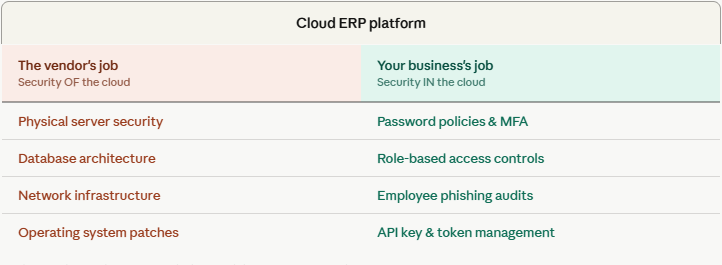
The vendor is responsible for securing the actual software, core database architecture, and physical infrastructure. However, your business is responsible for securing the human layer. If an employee uses a weak password like Password123 or falls for a basic phishing email, the cloud infrastructure didn’t fail—user access management did. Implementing Multi-Factor Authentication (MFA) and strict role-based access control (RBAC) is entirely on the client.
Industry Use Cases of Cloud ERP
Every industry operates differently, and modern modular cloud based erp systems adapt their workflows to match those specific operational needs.
Manufacturing
In manufacturing environments, a cloud ERP serves as the core engine for Material Requirements Planning (MRP). It synchronizes production schedules with live supply chain variables. If a delivery of raw aluminum is delayed by three days due to shipping port congestion, the ERP automatically flags the bottleneck, recalculates the production schedule for the factory floor, and updates customer delivery estimates downstream.
Retail & E-Commerce
For modern omnichannel retailers, inventory visibility is everything. A cloud ERP acts as the master inventory ledger connecting physical brick-and-mortar point-of-sale (POS) systems with online platforms like Shopify or Amazon. If a customer buys the last pair of boots off the shelf at a physical store in Chicago, the cloud backend drops the online stock count to zero globally within seconds, entirely preventing the nightmare scenario of online overselling.
Healthcare
In healthcare operations, a cloud ERP manages non-clinical workflows like medical supply procurement, staff scheduling, and financial billing while maintaining strict regulatory compliance (such as HIPAA). It tracks the exact shelf-life and serial numbers of sensitive medical devices and implants, ensuring that procurement queues are filled seamlessly without risking operational shortages during critical procedures.
Construction
Construction firms use cloud systems to handle complex project management and cost control across multiple distributed job sites. Field managers can upload change orders, track subcontractor hours, and log equipment usage directly from mobile apps. This data flows instantly back to the central accounting office, allowing project managers to monitor real-time cost-to-complete margins against the initial project bid.
Professional Services
For consulting firms, legal practices, and digital marketing agencies, the primary asset is billable human time. Cloud ERP modules for professional services automate timesheet logging, track resource utilization rates, and translate project milestones directly into automated client invoices. This eliminates the multi-week lag between work completion and cash collection.
Future of ERP and Cloud Computing
The convergence of erp and cloud computing is not a static tech milestone; it is an evolving frontier. As we look at the trajectory of enterprise tech, the definition of an ERP is fundamentally shifting from a passive “system of record” (a place where you merely type in what already happened) into an active, autonomous system of intelligence.
The Rise of Agentic AI and Autonomous Workflows
For years, AI in ERP meant simple chatbots that summarized reports or flagged basic anomalies. The modern landscape is completely dominated by Agentic AI—autonomous software agents capable of executing complex, multi-step business operations entirely on their own within defined corporate guardrails.
Instead of a human manager noticing a supply shortage, running a report, and manually drafting a purchase order, an agentic ERP can autonomously analyze supplier pricing, check logistics transit delays, evaluate historical vendor quality records, and issue an authorized purchase order to the most optimal vendor without requiring a single manual click. Human interaction shifts from initiating workflows to supervising automated execution queues.
Hyperautomation and Conversational Interfaces
The days of forcing employees to navigate labyrinthine nested menus and complex, rigid data tables are coming to an end. Cloud ERP environments are rapidly adopting natural language processing (NLP) interfaces. Executives and operational staff can talk directly to their data stack using standard conversational prose.
Example: An operational director can simply type: “Show me our top three inventory bottlenecks in the Midwest region and generate a predictive shipping schedule to fix them before Friday.” The ERP processes the request, pulls the real-time data cross-departmentally, runs the analytical models, and outputs the deliverables instantly.
Composable ERP Architecture
The historic paradigm of ERP deployment was monolithic—you bought a single massive software suite from a single vendor, and you were completely locked into their ecosystem for decades. The future belongs to Composable ERP architecture.
Built entirely on modern, cloud-native API frameworks, a composable setup allows an enterprise to establish a secure, locked-down financial core (the general ledger platform) while treating peripheral modules—like advanced warehouse management, e-commerce checkouts, or specialized CRM tools—as interchangeable plug-and-play apps. If a superior demand-planning engine hits the market, you don’t rip out your whole ERP; you simply swap out that specific module without destabilizing the rest of your operation.
The Sustainability Ledger
Driven by evolving global regulatory updates like Extended Producer Responsibility (EPR), businesses are legally required to treat environmental, social, and governance (ESG) data with the exact same mathematical rigor as their financial balance sheets. Modern cloud ERP platforms embed the “sustainability ledger” directly into the core database architecture. Every single batch of raw material, shipping lane choice, and packaging option automatically carries auditable carbon and resource-usage attributes alongside its monetary cost.
How to Choose the Right Cloud ERP System
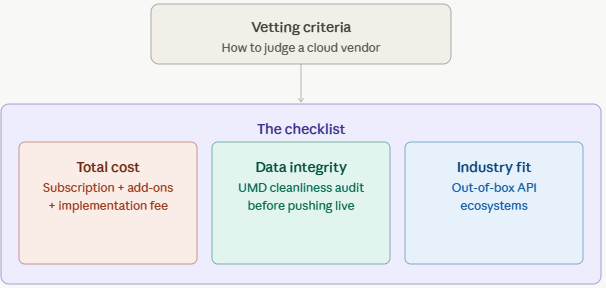
Because an ERP runs your entire company, choosing the wrong platform is an incredibly expensive mistake. Vetting vendors requires looking past marketing buzzwords and assessing structural alignment.
1. Business Size and Scalability Needs
Assess the platform’s sweet spot. Lightweight, agile platforms like Odoo or Acumatica fit growing mid-market brands perfectly due to rapid implementation times. Mid-to-large market omnichannel brands often lean toward deep all-in-one structures like Oracle NetSuite or Microsoft Dynamics 365, while massive global entities with highly intricate international supply chains require the enterprise-grade depth of heavy hitters like SAP S/4HANA or Infor.
2. Industry-Specific Functionality
Never buy a generic ERP framework if your business relies on highly specific operational regulations. Look for vendors providing pre-configured vertical editions. A pharmaceutical manufacturer needs strict batch-lot tracing and FDA compliance protocols built directly into the box, whereas a professional service agency needs a platform fully optimized for resource utilization tracking and milestone-based billing.
3. Total Cost of Ownership (TCO)
Do not get blindsided by the base user subscription price. A true TCO calculation must include:
- The initial implementation and custom configuration fees.
- The cost of ongoing data storage upgrades as your enterprise database balloons.
- The price of adding secondary modules as your company grows.
- Third-party developer fees for specialized API integrations.
4. Integration Capabilities & Data Governance
Before signing a contract, audit the vendor’s open API ecosystem. Your chosen platform must connect flawlessly with your existing, non-negotiable tech tools. More importantly, prioritize a platform built around Unified Master Data (UMD) architectures—locking down your baseline data definitions so that as you scale your peripheral software integrations, your single source of truth remains uncorrupted.
Conclusion
The debate over whether to keep business operations on-premises or move them to the cloud is officially over. Today, erp and cloud computing are structurally inseparable. Attempting to run a modern, agile company on rigid, legacy desktop architecture is the operational equivalent of trying to compete in a high-frequency trading market using a dial-up internet connection.
By merging the vast operational scope of Enterprise Resource Planning with the elastic scaling, remote mobility, and advanced computing power of the cloud, organizations successfully shift their back office from a passive administrative archive into a proactive engine of strategic transformation. It breaks down the data silos that blind leadership teams, automates the grinding manual processes that drain human capital, and introduces predictive, AI-driven foresight to daily operational decision-making.
As market volatility, supply chain complexity, and regulatory demands continue to accelerate, the long-term business impact of your data architecture is stark. Embracing a unified, cloud based erp system is no longer a matter of simply upgrading your internal corporate IT stack—it is about securing the core competitive survival, agility, and long-term scalability of your entire enterprise.
Frequently Asked Questions
What is cloud ERP software?
Cloud ERP (Enterprise Resource Planning) is business management software hosted on a vendor’s remote servers and accessed via the internet. Instead of installing and maintaining software on company-owned servers, organizations subscribe to the platform and access all modules: finance, inventory, HR, supply chain, and more — through a standard web browser from any location or device.
What is the difference between cloud ERP and on-premises ERP?
On-premises ERP runs on servers owned and managed by your company inside your own data center. Cloud ERP is hosted by the software vendor and delivered over the internet. The key differences are cost structure (CapEx vs OpEx), maintenance responsibility (internal IT vs vendor-managed), accessibility (office-bound vs anywhere), and upgrade cadence (infrequent manual vs automatic continuous updates).
Is cloud ERP secure?
Yes, and in most cases more secure than on-premises systems for small-to-medium businesses. Reputable cloud ERP vendors invest in enterprise-grade encryption, 24/7 security operations centers, geo-redundant data backups, and compliance certifications (SOC 2, ISO 27001, HIPAA, GDPR). Most SMEs cannot match this level of security investment on their own infrastructure.
How much does cloud ERP cost?
Cloud ERP pricing varies widely by vendor, module count, and user count. Entry-level solutions start from around $100–$500/month for small businesses. Mid-market platforms (NetSuite, Acumatica, Microsoft Dynamics 365) range from $1,000 to $10,000+/month depending on configuration. Always calculate the Total Cost of Ownership (TCO), including implementation, training, and customization costs, not just the base subscription fee.
How long does cloud ERP implementation take?
Cloud ERP typically takes 2–6 months to implement, compared to 12–24 months for on-premises systems. The absence of hardware setup and the use of pre-configured cloud environments significantly reduces lead time. Complex implementations with heavy customization, large data migrations, or multiple business units can extend this timeline.
What are the main benefits of cloud ERP?
The core benefits are: (1) lower upfront costs with no hardware investment, (2) automatic vendor-managed upgrades, (3) anywhere access on any device, (4) rapid scalability as your business grows, (5) built-in disaster recovery and geo-redundant backups, (6) faster implementation compared to on-premises, and (7) seamless integration with modern SaaS tools via open APIs.
What is SaaS ERP and how does it differ from cloud ERP?
SaaS ERP (Software-as-a-Service ERP) is a specific delivery model of cloud ERP where the vendor hosts a single version of the software shared across multiple customers (multi-tenant). Cloud ERP is the broader category, it includes SaaS, single-tenant cloud, and hosted private cloud deployments. All SaaS ERP is cloud ERP, but not all cloud ERP is SaaS.
What industries use cloud ERP?
Cloud ERP is used across virtually all industries. Manufacturing companies use it for production scheduling and MRP. Retailers use it for omnichannel inventory management. Construction firms use it for job costing and project management. Healthcare organizations use it for supply procurement and compliance. Professional services firms use it for project billing and resource planning. Modern cloud ERP vendors offer industry-specific editions pre-configured for these verticals.
When should a company switch to cloud ERP?
Key signals that it’s time to switch include: employees spending excessive time on manual data entry or spreadsheet workarounds, inability to get real-time financial or inventory visibility, difficulty supporting remote workers, IT costs consuming budget without delivering competitive advantage, or when business growth (new locations, acquisitions, product lines) is constrained by your current system’s limitations.
What is multi-tenant cloud ERP?
Multi-tenant cloud ERP means a single version of the software serves many customer organizations on shared infrastructure, while each company’s data remains completely isolated and inaccessible to others. This model allows vendors to deliver upgrades efficiently to all customers simultaneously, maintain lower costs through shared resources, and reinvest development effort into the single shared codebase rather than managing hundreds of separate instances.
Analysis – mine was blog 4
Now let me build the full analysis dashboard.Here’s the full analysis. Click through each blog tab for the detailed breakdown. Here’s a summary of what’s going on:
Blog 4 (Independent guide) — Best overall at 85/100. Wins on SEO and structure by a wide margin. It has the best keyword variation (“erp and cloud computing,” “cloud based erp”), the deepest content, the strongest H-tag hierarchy, and genuinely differentiating sections like Agentic AI, composable ERP, and the Shared Responsibility Model. Its fatal flaw: no author, no date, no stats cited, and no CTA — which tanks its E-E-A-T and conversion potential.
Blog 3 (SAP/Oracle style) — Second at 78/100. The only blog with a last-updated date (Jan 26, 2026), which is a meaningful E-E-A-T signal. Tone is balanced and clean. Loses points for being the shortest, having no FAQ, and not linking its analyst citations.
Blog 1 (NetSuite) — Third at 72/100. The FAQ section is a real SEO asset (targets Google’s People Also Ask). Strong CTA. But no author or date, the IDC citation is unlinked, and some sections are thin.
Blog 2 (Acumatica) — Weakest at 61/100. The most promotional in tone, which hurts both user trust and E-E-A-T. The industry pain-point lists are repetitive and the content relies too heavily on pushing Acumatica rather than genuinely educating the reader.
One gap all four share: Not a single blog has a proper comparison table (cloud vs on-prem), and none implement confirmed FAQ or Article schema markup. Whichever blog adds those two things first gets a significant PAA and featured snippet advantage. Want me to go deeper on any specific blog or category?