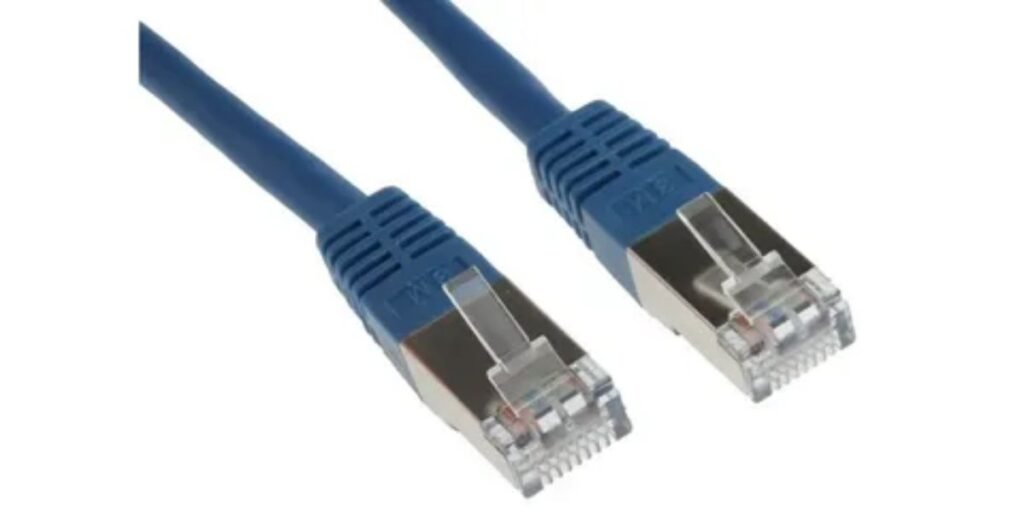
A Pearstone Cat 6 Snagless Network Patch Cable is a pre-terminated Ethernet cable designed to connect network devices such as computers, routers, switches, gaming systems, access points, and other wired networking equipment. Unlike bulk Ethernet cable that is installed through walls and terminated during structured cabling projects, a patch cable is ready to use with factory-installed RJ45 connectors on both ends.
Pearstone’s Cat 6 snagless patch cable line is built around the Category 6 Ethernet standard, which is widely used for modern home networks, offices, and small business installations. These cables are designed to support Gigabit Ethernet connections up to 1 Gbps and can also support 10 Gigabit Ethernet over shorter distances under suitable network conditions when the rest of the infrastructure supports that speed.
The term snagless refers to the protective boot design around the RJ45 connector. This small feature prevents the plastic locking tab from catching on other cables, equipment, or cable management panels when the cable is installed or removed. It is especially useful in areas where many cables are connected close together, such as network racks, switches, and entertainment centers.
A product such as the Pearstone Cat 6 Snagless Network Patch Cable is not designed to increase internet speed by itself. The cable provides the physical connection between devices. Actual network performance depends on other components, including the router, switch, network adapter, Ethernet standard supported by connected devices, and the internet or local network service being used.
Understanding What Makes a Cat 6 Patch Cable Different
Ethernet cables are classified into categories based on their electrical performance specifications. The Cat 6 category was developed to provide better performance than older Cat 5 and Cat 5e cabling, mainly through improved control of interference and signal quality.
A Cat 6 cable supports:
- Up to 250 MHz bandwidth
- Gigabit Ethernet at 1000 Mbps
- 10 Gigabit Ethernet performance in appropriate installations, typically up to 55 meters depending on interference conditions and cable quality
For most home users, the biggest practical advantage of Cat 6 is not that it automatically delivers faster internet. Many households have internet connections below 1 Gbps, meaning a Cat 5e cable may already meet their needs.
The benefit appears when the cable is part of a faster local network. Examples include transferring large files between computers, connecting network-attached storage devices, working with high-resolution media files, or building a wired gaming and streaming setup.
A high-quality Cat 6 patch cable provides additional capacity for future upgrades. Someone installing Ethernet cables today may still be using the same cable several years later when network equipment becomes faster.
The Role of a Network Patch Cable in a Wired Setup
A patch cable serves as the connection point between active networking equipment. It is commonly used after the permanent cabling infrastructure has already been installed or when users need a simple connection without running cable through walls.
Common examples include:
A desktop computer connected to a router or network switch.
A gaming console connected directly to a wired network connection.
A wireless access point connected to a switch to provide network access.
A smart television, streaming device, or media server connected through Ethernet.
A workstation connected to an office network.
The main advantage of a patch cable is convenience. It arrives ready with connectors attached, tested, and designed for immediate installation.
Professional network installations often use patch cables in equipment racks and work areas because they allow devices to be connected and replaced without modifying permanent cabling.
Why the Snagless RJ45 Connector Design Matters
The RJ45 connector is the standard plug used for most Ethernet connections. Inside the connector is a small plastic locking tab that clicks into the network port and keeps the cable securely attached.
Traditional Ethernet connectors expose this tab, which can create problems in crowded setups. When multiple cables run together behind a desk or inside a network cabinet, the tab can catch on neighboring cables during removal.
The snagless boot design adds a protective cover around this locking mechanism.
This provides several practical benefits:
- Reduces the chance of breaking the RJ45 locking tab
- Makes cable removal easier in crowded networking areas
- Improves cable handling when frequently reconnecting equipment
- Helps protect connectors during storage and movement
For a single cable behind a home computer, the difference may seem minor. In larger setups with multiple Ethernet connections, the design becomes much more valuable because damaged connector tabs can lead to loose connections and unnecessary cable replacement.
Pearstone Cat 6 Snagless Network Patch Cable Specifications and Build Features
Pearstone offers its Cat 6 snagless patch cables in different lengths and colors, allowing users to select a cable based on their installation needs rather than forcing a one-size-fits-all option.
Specific versions may vary by length and product number. For example, retailer listings commonly identify individual variants using model numbers associated with cable length and color combinations. These details matter when replacing existing cables because choosing the correct length can improve cable management and reduce unnecessary slack.
Important features commonly associated with this cable category include:
Category 6 Ethernet construction
The cable follows Cat 6 performance specifications designed for higher-frequency Ethernet communication compared with older cable categories.
RJ45 connectors
Both ends use standard Ethernet connectors compatible with common networking equipment such as routers, switches, computers, printers, and access points.
Snagless molded boots
The protective boot helps prevent connector tab damage and makes installation easier.
Pre-terminated design
The cable is ready for connection without requiring crimping tools, cable testing equipment, or manual termination.
Multiple length options
Different lengths allow users to choose shorter connections for clean desk setups or longer runs between separated devices.
Choosing the Correct Cable Length for Your Network Setup
Cable length is often overlooked when buying Ethernet cables. A cable that is too short creates unnecessary strain on connectors, while an excessively long cable can create poor cable management.
For common setups:
A short Ethernet patch cable is suitable for connecting devices located close together, such as a desktop computer beside a network switch.
A medium-length cable works well for home offices where equipment is placed several feet apart.
A longer cable such as a 25-foot option is commonly used for connecting devices across rooms, entertainment centers, gaming areas, or workspaces where the router and device are separated.
The best choice is usually the shortest length that comfortably reaches the equipment. Keeping extra cable neatly managed improves airflow around electronics and makes troubleshooting easier.
Compatibility: Where the Pearstone Cat 6 Snagless Network Patch Cable Works
The biggest advantage of a standard Ethernet patch cable is broad compatibility. The Pearstone Cat 6 Snagless Network Patch Cable uses standard RJ45 connectors, which are supported by most modern wired networking equipment.
It can typically be used with:
- Network routers that provide Ethernet LAN ports
- Network switches used for expanding wired connections
- Desktop computers and laptops with Ethernet ports
- Gaming consoles that support wired networking
- Smart TVs and media streaming devices with Ethernet connectivity
- Wireless access points and mesh networking equipment with Ethernet backhaul support
- Network-attached storage devices used for local file sharing
The cable itself does not determine whether a device runs at Gigabit or 10 Gigabit speeds. The connection speed is negotiated between the connected hardware.
For example, connecting a Cat 6 cable between a Gigabit router and a computer with a Gigabit network adapter will create a 1 Gbps link. The same cable connected between compatible 10Gb Ethernet equipment may operate at higher speeds if the cable length, network hardware, and installation conditions support it.
Cat 6 Cable Compatibility With Older Ethernet Standards
One important advantage of Ethernet standards is backward compatibility.
A Cat 6 cable can work with equipment using older Ethernet standards such as:
- 10BASE-T
- 100BASE-TX Fast Ethernet
- 1000BASE-T Gigabit Ethernet
This means upgrading from an older cable to a Cat 6 patch cable usually does not require replacing existing networking equipment.
However, users should understand that a newer cable does not upgrade older hardware. A computer with a 100 Mbps Ethernet adapter will still communicate at 100 Mbps even when connected using a Cat 6 cable.
The cable provides the connection capability, but the slowest component in the network determines the final speed.
Pearstone Cat 6 Snagless Network Patch Cable vs Standard Ethernet Cables
The difference between the Pearstone Cat 6 Snagless Network Patch Cable and a standard Ethernet cable usually comes down to category rating, connector design, construction quality, and intended use.
Many basic Ethernet cables sold today are Cat 5e because that category is sufficient for many home internet connections. Cat 6 cables are designed with tighter performance specifications and better signal management, making them a better choice for newer installations and higher-performance local networks.
Cat 6 Compared With Standard Cat 5e Ethernet Cables
The most common comparison is between Cat 6 and Cat 5e.
Both cables can handle Gigabit Ethernet, which is why many users do not notice an immediate speed difference when replacing Cat 5e with Cat 6.
The difference is mainly in performance headroom.
Cat 5e cables:
- Support Gigabit Ethernet up to 100 meters
- Use bandwidth up to 100 MHz
- Are suitable for most basic home and office networks
Cat 6 cables:
- Support Gigabit Ethernet up to 100 meters
- Provide bandwidth up to 250 MHz
- Offer better performance for environments with higher network demands
- Provide greater capability for future network upgrades
For a normal internet connection, the difference may not be noticeable. For local network activities such as large file transfers, server connections, or high-performance workstations, Cat 6 provides a stronger foundation.
Snagless Cable Design Compared With Standard RJ45 Cables
A regular Ethernet cable may use a basic RJ45 connector without additional protection around the locking tab.
The snagless design used in cables like the Pearstone Cat 6 patch cable adds a molded cover around this area.
This matters most in environments where cables are frequently moved.
Examples include:
- Office desks where computers are regularly replaced
- Network cabinets with many connected cables
- Testing environments where technicians connect and disconnect equipment often
For a cable installed once behind a television or desktop computer, snagless protection is a convenience feature. In professional networking environments, it can reduce damaged connectors over time.
Real-World Uses for Pearstone Cat 6 Snagless Network Patch Cable
A cable’s value depends heavily on where it is being used. The same Ethernet cable can serve very different purposes depending on the network environment.
Home Networking
Many home users choose Cat 6 patch cables when connecting:
- Desktop computers
- Gaming systems
- Smart TVs
- Streaming devices
- Home office equipment
- Network switches
A wired connection often provides lower latency and more stable performance than wireless connections, especially for gaming, video calls, and large downloads.
Gaming and Entertainment Setups
Gamers often prefer wired Ethernet connections because they avoid some of the interference and signal variation that can affect wireless networks.
A Cat 6 patch cable can connect:
- Gaming PCs
- Consoles
- Streaming devices
- Network switches placed near entertainment systems
The cable does not reduce game server latency by itself, but it can provide a more consistent local network connection compared with unstable wireless conditions.
Office and Small Business Networks
In office environments, Ethernet patch cables connect user devices to network infrastructure.
Typical uses include:
- Connecting workstations to switches
- Connecting printers to networks
- Connecting VoIP phones
- Connecting wireless access points
The snagless connector design becomes more useful in these environments because cables are often installed close together and handled regularly.
Home Labs and Advanced Networking Projects
Users building home labs for learning networking, cybersecurity, virtualization, or server management often need reliable wired connections.
A Cat 6 patch cable can be useful for connecting:
- Network switches
- Small servers
- NAS devices
- Virtualization hosts
- Testing equipment
These environments benefit from organized cabling because multiple devices may operate together at the same time.
Is the Pearstone Cat 6 Snagless Network Patch Cable Good for 10 Gigabit Ethernet?
A common question with Cat 6 cables is whether they support 10 Gigabit Ethernet.
The answer depends on the complete installation.
Cat 6 cabling can support 10GBASE-T, but the maximum distance is generally shorter than the full 100-meter range supported for Gigabit Ethernet. Performance can also be affected by:
- Cable quality
- Electrical interference
- Nearby cables
- Connector quality
- Network hardware capability
For typical home and small office users, this means a Cat 6 patch cable provides more than enough performance for current Gigabit networks and leaves room for faster upgrades.
Users building professional 10Gb networks should evaluate the entire cabling system rather than choosing a cable based only on category labeling.
What to Consider Before Buying a Pearstone Cat 6 Snagless Network Patch Cable
Choosing an Ethernet cable is simple, but a few details can prevent buying the wrong option.
Check the Required Length
Measure the distance between devices before purchasing.
Avoid buying an extremely long cable when a shorter option is available because excess cable creates clutter and makes cable management harder.
Confirm Your Device Connections
Most traditional networking equipment uses RJ45 Ethernet ports, but some newer laptops and compact devices may require adapters.
Check whether your equipment has a compatible Ethernet connection before purchasing.
Consider Your Network Speed Requirements
For basic internet browsing and streaming, many Ethernet cables can perform well.
For higher-demand uses such as:
- Network storage
- Large file transfers
- Gaming setups
- Professional workstations
a Cat 6 cable provides additional performance capability.
Think About Cable Management
Features such as snagless connectors may not seem important during purchase, but they become valuable when multiple cables are installed together.
A well-organized network is easier to maintain, troubleshoot, and support basic network security practices.
Final Buying Perspective
The Pearstone Cat 6 Snagless Network Patch Cable is designed for users who need a reliable, ready-to-use Ethernet connection with the performance benefits of Cat 6 cabling and the practical protection of a snagless RJ45 connector.
It is not a product that increases internet speed by itself. Instead, it provides a dependable physical connection between network devices and helps ensure the cable is not the limiting factor when building or upgrading a wired network.
For home users, gamers, office environments, and small networking projects, a quality Cat 6 patch cable offers a good balance between current compatibility and future network capability.
Frequently Asked Questions
Does the Pearstone Cat 6 Snagless Network Patch Cable work with routers?
Yes. It can connect compatible routers, switches, computers, gaming devices, and other Ethernet-enabled equipment that uses standard RJ45 ports.
Is Cat 6 better than Cat 5e for home internet?
It depends on the network. Cat 5e is enough for many home internet connections, but Cat 6 provides higher bandwidth capability and more room for future upgrades.
Does a Cat 6 cable make Wi-Fi faster?
No. A wired Ethernet cable does not increase wireless speed. It improves the wired connection between devices and network equipment.
Can this cable be used for gaming?
Yes. A Cat 6 Ethernet patch cable can be used for gaming consoles and PCs with Ethernet ports. A wired connection may provide more stable performance compared with wireless networking.
Does cable length affect Ethernet speed?
Normal Ethernet distances within the supported range generally do not reduce performance. Very long runs, poor installation conditions, or interference can affect network reliability.
Is a snagless Ethernet cable worth it?
For crowded setups or frequent cable handling, yes. The protective boot helps reduce damage to the RJ45 locking tab and makes cable management easier.