
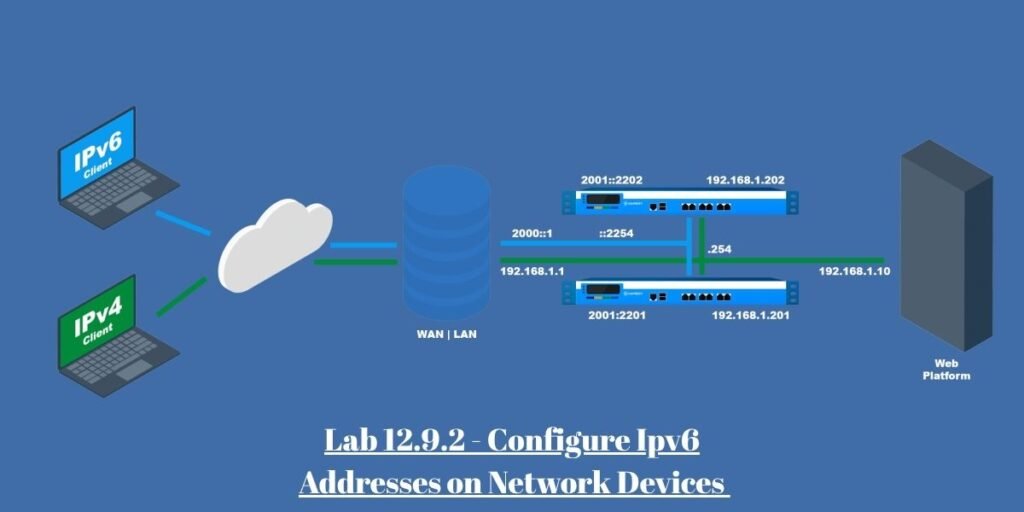
Networking students and candidates studying for the Cisco CCNA certification frequently encounter Lab 12.9.2: Configuring IPv6 Addresses on Network Devices within the official curriculum. This hands-on lab teaches the practical mechanics of deploying IPv6 addressing schemes across routers, multi-layer switches, and end-host operating systems.
Mastering IPv6 configuration is a fundamental requirement for modern network engineering because legacy IPv4 exhaustion has forced enterprise environments to adopt native dual-stack and pure IPv6 architectures.
By the end of this practical exercise, readers will successfully cable physical or virtual network topologies, assign global unicast and link-local addresses, activate IPv6 routing daemons, and verify end-to-end host communication using standard diagnostic tools.
This comprehensive guide is designed for CCNA candidates, IT support technicians, and system administrators looking for a crystal-clear breakdown of every command and operational principle required to pass the exam and build production networks.
Understanding What You’ll Build After Lab 12.9.2: Configuring IPv6 Addresses on Network Devices
Before entering command line instructions into a terminal emulator, establishing a mental model of the underlying network topology is essential.
The standard topology for this lab consists of an active Cisco router acting as the core gateway, an enterprise-grade layer-two or layer-three switch handling internal switching, and two end-user personal computers designated as PC-A and PC-B.
The addressing plan divides the network into distinct subnets utilizing a standard /64 prefix length, which is the architectural standard mandated for Ethernet segments using Stateless Address Autoconfiguration.
Data packets flow from end hosts through switch access ports, cross the switch virtual interface, traverse the router physical interfaces, and route between isolated subnets.
Successful completion means that every device recognizes its local neighbors, processes router advertisements correctly, and executes successful ICMPv6 echo requests across the entire enterprise grid.
Before You Begin
Preparing the lab environment prevents frustrating syntax errors and device lockouts during active configuration stages.
Ensure you are running a stable version of Cisco Packet Tracer 8.x or working directly with physical hardware connected via standard rollover console cables.
Verify that all network devices are powered on and that you have established an active terminal session into the router and switch command line interfaces.
Access the privileged EXEC mode using the enable command so you can enter global configuration mode via configure terminal.
It is also good practice to clear previous configurations or reload devices to factory defaults if residual settings interfere with your fresh addressing plan.
Configuring the Router
Configuring the router requires deliberate command execution to establish proper gateway services across physical Ethernet ports.
The first and most critical global configuration command executed on the router is ipv6 unicast-routing.
Plaintext
Router(config)# ipv6 unicast-routing
Enabling this command activates the router IPv6 forwarding engine, which is disabled by default on Cisco operating systems.
Without this command, the router acts strictly as a passive host, dropping incoming IPv6 traffic instead of routing packets between connected subnets.
Enabling unicast routing also allows the router to generate and transmit Router Advertisement messages, which inform local hosts of the network prefix and default gateway parameters.
Assigning IPv6 Addresses to Router Interfaces
Every physical interface connecting the router to local area networks must be explicitly provisioned with unique network identifiers.
Administrators assign global unicast addresses along with specific prefix lengths to ensure routable communication across external networks.
Plaintext
Router(config)# interface GigabitEthernet0/0/0
Router(config-if)# ipv6 address 2001:db8:acad:1::1/64
Following global address assignment, engineers configure custom link-local addresses to streamline local network identification and troubleshooting.
Plaintext
Router(config-if)# ipv6 address fe80::1 link-local
Router(config-if)# no shutdown
Link-local addresses are mandatory for all IPv6 nodes and are used extensively by neighbor discovery protocols.
The interface must then be explicitly activated using the no shutdown command to transition the physical layer state to up.
After configuration, checking the interface reveals the active link-local address and confirms that the port has joined required multicast groups like FF02::1 and FF02::2.
Configuring IPv6 on the Switch
Switches within an enterprise topology require management accessibility to allow remote administrators to monitor device health and execute configuration updates.
Unlike routers that route packets at Layer 3, traditional switches utilize a Switch Virtual Interface (SVI), typically designated as VLAN 1, to handle administrative traffic.
Assigning an IPv6 management address to the switch SVI separates management traffic from user data traffic traversing access ports.
Plaintext
Switch(config)# interface Vlan1
Switch(config-if)# ipv6 address 2001:db8:acad:1::b/64
Switch(config-if)# ipv6 address fe80::b link-local
Switch(config-if)# no shutdown
The switch automatically discovers its default gateway by listening to Router Advertisement messages sent by the adjacent router, ensuring seamless remote management across different subnets.
Configuring the End Devices
End hosts require both static configuration and dynamic auto-configuration parameters to participate effectively in a dual-stack or pure IPv6 network.
Access the IP configuration window on each end device and assign a static global unicast address matching the correct subnet range.
Enter the router link-local address or interface IP as the default gateway to ensure packets destined for external networks are forwarded correctly.
In addition to static entries, hosts utilize Stateless Address Autoconfiguration to dynamically generate secondary global addresses based on network prefixes broadcasted by the gateway router.
Verifying host settings via the operating system command prompt confirms that both static and auto-configured addresses are active and ready for transmission.
Verifying That Everything Works
Validating network functionality requires a systematic approach utilizing specialized verification commands within the command line interface.
Execute show ipv6 interface brief on routers and switches to verify that physical and virtual interfaces display active operational statuses.
Plaintext
Router# show ipv6 interface brief
Review the routing table using show ipv6 route to confirm that connected networks and local prefixes are properly installed.
Plaintext
Router# show ipv6 route
Inspect active device settings using show running-config to check for typos in global addresses or missing link-local parameters.
Test data path integrity from end hosts by executing an icmpv6 ping to neighboring interface addresses and link-local gateways.
Plaintext
C:\> ping fe80::1
Trace the complete communication path across devices using the tracert utility to ensure multi-hop routing functions without packet drops.
Why Each IPv6 Command Matters
Understanding the theoretical purpose behind specific command-line entries builds professional competency and prevents blind memorization.
| Command | Purpose | Why It Matters |
| ipv6 unicast-routing | Enables routing engine | Allows router to forward IPv6 traffic between distinct subnets |
| ipv6 address | Assigns address | Gives interface global reachability across network segments |
| no shutdown | Enables interface | Activates physical and logical Layer 3 communication ports |
| show ipv6 route | Displays routes | Confirms routing table population and path availability |
Troubleshooting Common Problems of Lab 12.9.2: Configuring IPv6 Addresses on Network Devices
Identifying and resolving common configuration pitfalls is a core competency tested on the Cisco CCNA examination. Field engineers frequently encounter silent packet drops and interface synchronization failures that require a methodical debugging approach.
Interfaces Remain Administratively Down
When network interfaces remain administratively down despite physical cabling being verified, the issue almost universally stems from an omitted command. Technicians frequently execute addressing commands in interface configuration mode but forget to issue the active state command. The symptom presents as a down/down interface status in command outputs. The immediate fix requires re-entering interface configuration mode and issuing the explicit command to bring the port online.
IPv6 Routing Was Never Enabled
Another prevalent misconfiguration involves missing routing daemons. If end hosts within the same VLAN communicate locally, but cross-subnet packets are dropped instantly, the routing engine is disabled. Symptoms show up as unreachable gateways even though the local interface is fully configured. Engineers must access global configuration mode and enable unicast routing immediately to activate the packet forwarding engine across network boundaries.
Incorrect Prefix Length Assignment
Prefix length discrepancies also plague novice lab deployments. Assigning a prefix length other than the standard /64 to an Ethernet segment breaks Stateless Address Autoconfiguration entirely. Hosts fail to generate valid global addresses because neighbor discovery mechanisms rely on the exact /64 subnet boundary for interface identifier generation. Reviewing interface configurations and updating the mask to match standard requirements resolves this issue instantly.
Missing Link-Local Gateway on End Devices
Finally, missing link-local gateways on end hosts prevent traffic from leaving the local broadcast domain. When troubleshooting PC-to-router communication failures, checking the static network adapter properties usually reveals an unassigned gateway field. Entering the correct router link-local address restores full multi-hop reachability across the network topology.
Verifying Your Configuration Before Submission
Before submitting your completed lab file or closing your terminal session, execute this practical validation checklist:
- Verify that all physical router and switch interfaces are up and operational.
- Confirm that the switch VLAN interface is active and responding to management pings.
- Check that valid IPv6 routes appear in the router routing table.
- Validate that end devices possess both static and auto-configured global addresses.
- Perform successful ping tests between PCs and router link-local addresses.
- Save your running configuration to startup memory using the write memory command.
Key IPv6 Concepts Reinforced by Cisco CCNA Lab 12.9.2
This hands-on exercise reinforces critical networking principles directly tested on certification exams and applied in professional environments.
Global Unicast vs Link-Local Addresses
Global addresses provide routable communication across the public internet, whereas link-local addresses facilitate local neighbor discovery and router communication within a single broadcast domain.
IPv6 Interface Configuration
Assigning structured hexadecimal identifiers requires strict adherence to prefix boundaries and subnet allocations to prevent routing loops and address overlapping.
IPv6 Routing
Activating dynamic forwarding daemons transforms standard hardware nodes into active gateway routers capable of managing multi-subnet enterprise traffic.
Conclusion
Cisco CCNA Lab 12.9.2 serves as a critical bridge between theoretical protocol study and practical network deployment. Mastering the mechanics of configuring global unicast addresses, activating routing engines, and troubleshooting connectivity issues builds the confidence needed for real-world engineering tasks.
Developing these foundational skills prepares administrators to manage modern dual-stack enterprise networks effectively while ensuring robust performance across distributed organizational layouts.
Whether preparing for certification examinations or maintaining active production enterprise infrastructure, executing these structured lab steps establishes the reliable habits required of professional network engineers.
Frequently Asked Questions
Why is ipv6 unicast-routing required?
Cisco routers disable IPv6 packet forwarding by default for security and performance reasons, requiring administrators to explicitly enable the routing engine.
Can I use automatic IPv6 addressing instead of static addressing?
Yes, Stateless Address Autoconfiguration allows hosts to generate their own global addresses automatically using prefixes broadcasted by local routers.
Why can’t I ping another device after configuration?
Common causes include missing routing commands, incorrect prefix lengths, interface shutdown states, or firewall blocks on end hosts.
What is the difference between a global unicast and a link-local address?
Global addresses are globally routable across networks, while link-local addresses are restricted to the local physical link and never routed.
Why is the switch assigned an IPv6 address?
Switches require management IP addresses on a virtual interface to allow remote administrators to connect via SSH or telnet.
Which verification commands are most useful during this lab?
The show ipv6 interface brief and show ipv6 route commands provide immediate feedback on interface status and routing table health.
Does this lab appear on the CCNA exam?
Yes, foundational IPv6 configuration and verification tasks are core topics evaluated extensively on the Cisco CCNA certification exam.