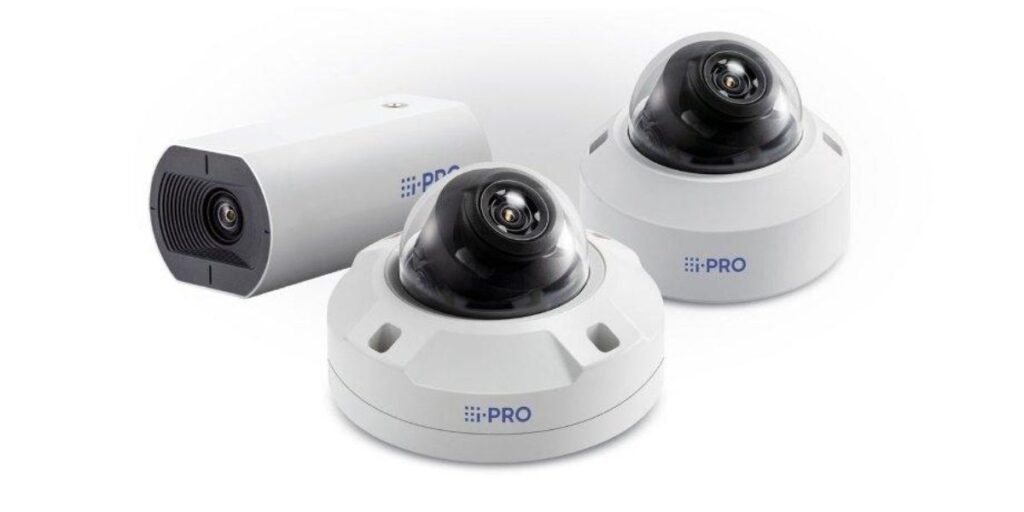
The i-PRO WV-U2132LA is an indoor network dome camera built around 1080p Full HD video for commercial security work. It sits in i-PRO’s entry-level U series, which the company positions as <a href=”https://www.use-ip.co.uk/i-pro/i-pro-dome-cameras/i-pro-wv-u2132la.html”>affordable cameras with high functionality and reliability</a>. In practice, that means solid build quality, cyber-secure networking, and a lens that can be adjusted without climbing a ladder twice.
Indoor surveillance rarely happens in perfect light. A bank lobby with glass doors, a school corridor with a window at one end, and a retail checkout lane under mixed fixtures all push a sensor in different directions. That is why this model shows up so often in retail outlets, office corridors, bank lobbies, schools, and healthcare facilities, where it covers entryways, checkout lanes, and shared interior spaces.
Here are the core parameters at the top level. The camera uses a 1/3-type CMOS image sensor that outputs a native 1920 × 1080 image at up to 30 frames per second. Its 2.9 mm to 7.3 mm motorized varifocal lens gives 2.5× optical zoom with remote focus control. Built-in infrared LEDs handle night coverage, and the manufacturer’s figure for reach is 30 meters (about 100 feet).
On the network side, the camera uses a single 10Base-T / 100Base-TX RJ-45 port and draws power through PoE IEEE 802.3af Class 2, so one cable does the job. A local slot accepts MicroSD, MicroSDHC, and MicroSDXC cards up to 512 GB for edge recording. Interoperability is covered by ONVIF Profile G, Profile S, and Profile T support, which is what lets the camera work with so many third-party video management platforms.
Image Quality, Lens, and Night Vision
Video quality comes from the sensor, the lens, and the image processor working as one system. The WV-U2132LA aims for a balance of standard high-definition clarity and dependable low-light sensitivity, and it largely delivers on that.
2MP Full HD Video at 30 fps
The camera records at 1920 × 1080 pixels with frame rates peaking at 30 fps. The 16:9 format suits how people actually move through rooms, and 30 fps keeps motion smooth enough to follow a person walking through a doorway or a hand moving across a counter.
A 2MP stream also keeps network and storage demands well below those of a 4K camera. For a site running dozens of cameras on one switch and one recorder, that difference adds up fast. At short to medium range, 1080p is enough to pick out facial features and read the flow of a transaction.
Its limits are worth stating plainly. A large atrium, a warehouse floor, or a wide hall where someone needs forensic detail at long distance is a poor fit for any 2MP sensor. In those spaces, a 5MP or 4K model gives investigators far more pixels to work with.
Motorized Varifocal Lens and Optical Zoom
The lens runs from 2.9 mm to 7.3 mm and is fully motorized. Technicians can change the viewing angle and focus from a laptop instead of opening the dome cover on the ceiling every time the framing needs a tweak.
In 16:9 mode, the horizontal field of view runs from 97° at wide down to 42° at telephoto. The vertical field moves from 54° down to 23° over the same range.
Here is how those settings map to real spaces:
- Wide settings near 97° suit open lobbies, sales floors, and reception areas.
- Telephoto settings near 42° suit hallways, checkout counters, and restricted access doors.
- Mid-range settings work for offices and classrooms where the camera sits about two-thirds of the way down the room.
Motorized focus is one of those features that sounds minor on a spec sheet and saves real labor on site. In my experience, the cost of a second site visit to refocus a fixed-lens dome usually outweighs the small price premium of a motorized unit. Security staff can also fine-tune sharpness remotely over the IP network through the browser interface, which helps after a camera is nudged during cleaning or maintenance.
Infrared Night Vision and Low-Light Performance
The 1/3-type CMOS sensor delivers color images in light as low as 0.1 lux in standard mode. With extended slow shutter settings, the color sensitivity drops to 0.006 lux. Distributor pages for the model also advertise <a href=”https://www.use-ip.co.uk/i-pro/i-pro-dome-cameras/i-pro-wv-u2132la.html”>color night vision in the 0.006 to 0.1 lux range</a>.
When light falls below those limits, the internal infrared-cut filter (ICR) switches the camera into monochrome mode. Built-in IR LEDs then light a completely dark room out to roughly 30 meters (100 feet). One UK reseller describes the unit as <a href=”https://www.networkwebcams.co.uk/i-pro-u2132la-indoor-varifocal-dome-camera/”>offering 30 m of built-in IR illumination</a> for around-the-clock indoor use.
A practical tip on IR. Infrared light bounces off glass, polished floors, and acrylic. Aiming a dome at a window or a mirrored wall at night often produces a washed-out glare patch in monochrome mode. Angling the camera slightly away from reflective surfaces fixes most of it.
Image Processing and Surveillance Features
Light inside a building changes constantly. Sunlight moves across a floor, fixtures dim, and glossy surfaces bounce brightness around. The WV-U2132LA carries built-in hardware processing designed to keep the picture stable through all of it.
Its headline feature here is Super Dynamic at 120 dB wide dynamic range (WDR). WDR balances scenes where bright backlight meets deep shadow, which is exactly what a ground-floor glass entrance or a windowed storefront produces. Without WDR, a person walking in from outside often turns into a dark silhouette. With it, their face stays visible while the bright doorway behind them keeps its detail.
Intelligent Auto and Lighting Adjustments
i-PRO’s own distributor materials explain that the <a href=”https://www.use-ip.co.uk/i-pro/i-pro-dome-cameras/i-pro-wv-u2132la.html”>original Intelligent Auto and Super Dynamic functions</a> are what help the camera produce usable images even in harsh conditions. Intelligent Auto (iA) evaluates scene dynamics continuously and changes shutter speeds automatically to cut motion blur on moving subjects.
The camera also offers several targeted lighting tools:
- Backlight Compensation brightens underexposed foreground subjects when a bright background pulls exposure the wrong way.
- High-Light Compensation dampens blinding sources such as indoor spotlights or car headlights near a garage entrance.
- Fog Compensation restores contrast when smoke, haze, or mist degrades the scene.
Fog Compensation is an easy one to dismiss on an indoor camera. It earns its place in commercial kitchens, parking structures with partial enclosure, and venues that use theatrical haze.
The camera also ships with H.265 Smart Coding. On a quiet scene, the codec spends fewer bits on static background, which stretches both SD card life and recorder capacity. Reseller descriptions point out that Smart Coding is meant to <a href=”https://www.networkcamerastore.com/i-pro-wv-u2132l-fullhd-indoor-dome-network-camera-h-265-v-f-lens/”>increase bandwidth efficiency for longer recording and less storage</a>.
Analytics Support and Image Adjustments
For automated monitoring, the camera supports built-in Video Motion Detection that triggers alerts when activity occurs inside preset zones. It also includes Scene Change Detection, which raises an immediate alarm if the lens is covered, spray-painted, or physically tampered with. Retail catalog listings reflect this too, with <a href=”https://rewards-catalog.catalogapi.com/shop/item/5516461″>camera sabotage and tampering plus motion detection</a> listed as the analytics set.
Operators can configure privacy masking to block out up to 8 private zones on the live stream. That helps in healthcare settings, offices with shared windows, or any location with a legal duty not to record certain areas.
The camera also supports Corridor Mode Rotation, which turns the video stream by 90° or 270°. Long vertical layouts such as hallways and aisles then fill the frame with useful scene instead of wasting pixels on side walls. Distributors single this out as the feature that <a href=”https://www.use-ip.co.uk/i-pro/i-pro-dome-cameras/i-pro-wv-u2132la.html”>makes the camera well suited to schools, offices, and shopping centres</a>.
Corridor mode is often the hidden reason this camera wins a hallway project. A normal 16:9 view of a narrow corridor leaves roughly half the image looking at paint. Rotating the stream to 9:16 puts the pixels where the people are.
Network Connectivity, PoE, and Recording Options
The camera sends its video and control traffic over standard Ethernet, so it fits into almost any existing structured cabling plan with no special hardware.
It uses a 10Base-T / 100Base-TX RJ-45 connection. Power arrives through PoE IEEE 802.3af Class 2, which removes the need for separate low-voltage power cabling. Total consumption is roughly 5.8 W, so a standard PoE switch port handles it with plenty of headroom. A large PoE budget is rarely the constraint on a project using this model.
CDW’s listing confirms the <a href=”https://www.cdw.com/product/panasonic-1080p-indoor-vandal-dome/6705163″>PoE Class 2, 10/100 LAN, and H.265, H.264, and MJPEG</a> feature set. The same page listed the camera at $648.50 when checked, though pricing changes often, so verify before budgeting.
For compression, the camera supports H.265 and H.264, plus JPEG, together with Smart Coding to squeeze data hard when nothing is moving in the scene. Compared with H.264 alone, H.265 typically lowers storage needs substantially for the same image quality, though the exact saving depends on scene activity.
A reseller note worth passing on to installers: some stores point out that <a href=”https://www.use-ip.co.uk/i-pro/i-pro-dome-cameras/i-pro-wv-u2132la.html”>a power supply is not included</a> with the camera. If your site lacks a PoE switch or injector, budget for one.
Local Edge Recording
An onboard card slot accepts MicroSD, MicroSDHC, and MicroSDXC cards up to 512 GB. One reseller also notes <a href=”https://www.networkwebcams.co.uk/i-pro-u2132la-indoor-varifocal-dome-camera/”>on-camera recording with card encryption support</a>.
Operators can set up three recording triggers:
- Manual continuous recording for always-on capture.
- Event-driven alarm recording that starts on motion or tamper detection.
- Scheduled interval recording for business-hours-only coverage.
Edge storage acts as a safety net. If the link to a central recorder drops, the camera keeps writing footage locally, so there is no gap in the record when the network comes back. I recommend treating the SD card as a backup and not a primary archive, and replacing industrial-grade cards on a regular maintenance cycle.
NVR Compatibility and Network Security
Putting a camera on an enterprise network means getting two things right. It has to speak the same protocols as the recording platform, and it has to avoid becoming a weak link in the network.
The WV-U2132LA includes native compliance with ONVIF Profile G, Profile S, and Profile T. Retail technical summaries confirm that the camera <a href=”https://www.cdw.com/product/panasonic-1080p-indoor-vandal-dome/6705163″>supports ONVIF G, S, and T profiles and H.265 and H.264</a> for a wide range of VMS and NVR connections.
Each profile covers a different job:
- Profile S handles standard real-time video streaming.
- Profile G manages edge storage retrieval, so a recorder can pull footage from the SD card.
- Profile T handles advanced H.265 streaming parameters and alarm metadata.
You can verify ONVIF conformance for any device through the <a href=”https://www.onvif.org/conformant-products/”>official ONVIF conformant products list</a>, which is a smart step before buying for a mixed-vendor system.
Built-In Cybersecurity Features
Network cameras are a frequent entry point for attackers, so the security feature set matters as much as the optics. This model includes several protections out of the box:
- Pre-loaded GlobalSign digital device certificates for end-to-end encrypted communication and device authentication. A UK distributor confirms the camera has a <a href=”https://www.use-ip.co.uk/i-pro/i-pro-dome-cameras/i-pro-wv-u2132la.html”>pre-installed secure certificate that supports end-to-end encrypted communication and device authentication</a>.
- HTTPS and SSL/TLS encryption for data in transit.
- IEEE 802.1X port-based authentication to control which devices can join the network.
- Multi-level user login privileges so that operators, installers, and administrators each get only the access they need.
My practical advice is to change the default credentials on first login, place cameras on a dedicated VLAN, and turn on 802.1X wherever the switch infrastructure supports it. A pre-installed certificate gives you a strong starting point, but the network design around the camera still decides how safe the deployment is.
Installation Requirements and Physical Specifications
A good installation starts with the physical details. Mounting surface, weight, temperature range, and humidity all need checking before the first screw goes in.
The camera uses a surface-mount dome design with an ABS resin main body and a clear acrylic dome cover. A UK reseller lists the casing materials as <a href=”https://www.networkwebcams.co.uk/i-pro-u2132la-indoor-varifocal-dome-camera/”>ABS resin in i-PRO white with a clear acrylic dome cover</a>. It measures 129.5 mm in diameter by 101 mm in height and weighs 350 grams (0.77 lbs). The same reseller notes that the camera is <a href=”https://www.networkwebcams.co.uk/i-pro-u2132la-indoor-varifocal-dome-camera/”>lightweight at 350 g and can be mounted directly to a wall or ceiling</a>.
Environmental limits are as follows:
- Operating temperature of -10 °C to +50 °C (+14 °F to +122 °F).
- Cold start range of 0 °C to +50 °C (+32 °F to +122 °F).
- Relative humidity of 10% to 90% non-condensing.
The same reseller confirms the camera is <a href=”https://www.networkwebcams.co.uk/i-pro-u2132la-indoor-varifocal-dome-camera/”>built for indoor use at temperatures between -10°C and 50°C</a>.
The cold start threshold deserves attention. A camera mounted near a loading bay door or inside an unheated storage area may see temperatures near the lower limit. If the camera is powered up from a cold state below 0 °C, it may not boot correctly.
Gimbal Adjustment Range
Inside the housing, a flexible three-axis gimbal mechanism provides adjustment across ±180° pan, -30° to +85° tilt, and ±100° yaw (azimuth). A retail listing confirms the <a href=”https://rewards-catalog.catalogapi.com/shop/item/5516461″>horizontal range of -180 to 180 degrees and vertical range of -30 to 85 degrees</a>.
This range makes both flat ceiling mounts and vertical wall mounts straightforward while keeping the horizon level. Without the yaw adjustment, a wall-mounted dome often ends up with a tilted picture, and many installers know the frustration of rotating the whole housing to fix it.
Is the i-PRO WV-U2132LA Suitable for Your Surveillance Setup?
The answer depends on how closely the camera’s strengths line up with your facility’s needs.
The WV-U2132LA gives commercial sites a dependable feature set built around low power draw, easy remote lens adjustment, and cyber-secure hardware. Motorized zoom and focus cut installation labor noticeably. Pre-installed GlobalSign certificates give IT teams more confidence in the device’s security posture from day one. At about 5.8 W on standard PoE, it also fits cleanly into modern energy-conscious infrastructure.
For buyers working under US procurement rules, the reported NDAA compliance adds real value. It simplifies approval for public sector, education, and healthcare projects that must avoid restricted components.
There are limits to weigh before you buy:
- The camera is strictly for indoor use. It has no outdoor IP66 weatherproofing and no IK10 vandal-proof impact rating.
- It has no built-in microphone and no external audio line input, so it cannot handle sound monitoring.
- Its 1080p resolution suits rooms and doorways, but large open areas needing extreme optical detail call for 5MP or 4K models.
Vandal resistance matters more than many buyers expect. A dome in a school stairwell, a detention-adjacent area, or a public transit waiting room can take a beating. In those spots, a vandal-rated model is a better investment than a standard dome, even if the entry price is higher.
For the right job, though, the WV-U2132LA is a sensible choice. Think corridors, reception desks, retail aisles, office floors, and classrooms. In those environments, the combination of WDR, motorized optics, corridor mode, and edge recording does exactly what a security manager needs.
i-PRO WV-U2132LA Specifications at a Glance
The i-PRO WV-U2132LA is an indoor 2 Megapixel Full HD network dome camera built on a 1/3-type CMOS image sensor. It delivers a maximum resolution of 1920 × 1080 pixels at up to 30 frames per second.
Optical adjustments come from a 2.9 mm to 7.3 mm motorized varifocal lens with 2.5× optical zoom. In 16:9 mode, that translates to a horizontal field of view from 97° wide to 42° telephoto. For dark environments, integrated IR LEDs extend night visibility up to 30 meters (100 feet), and Super Dynamic 120 dB WDR handles high-contrast scenes.
Video is compressed with H.265, H.264, or JPEG and sent over a standard 10Base-T / 100Base-TX RJ-45 interface. Power comes exclusively through PoE IEEE 802.3af Class 2 at roughly 5.8 W. Edge storage is available through a MicroSD, MicroSDHC, or MicroSDXC slot supporting up to 512 GB.
The unit meets ONVIF Profile G, S, and T standards. It measures 129.5 mm in diameter by 101 mm in height and weighs 350 grams (0.77 lbs). It operates in ambient temperatures from -10 °C to +50 °C (+14 °F to +122 °F).