
Getting an original Xbox 360 onto a modern home network is harder than it should be. The console debuted in North America in November 2005 without any built-in wireless hardware on its early motherboards, so anyone who wanted to cut the cable had to buy an external accessory. For years, that meant running a long Ethernet cable across the living room or settling for a slower adapter.
Microsoft addressed the gap during the console’s life cycle. As Xbox LIVE grew into a place for downloads, video streaming and voice-heavy multiplayer, the old single-antenna adapter started to feel dated. Households were adding laptops, phones and streaming boxes to the same router, and a console sharing a congested 2.4 GHz2.4\text{ GHz}2.4 GHz channel with all of them often paid for it in lag.
This guide covers the design, network specifications, installation process, and troubleshooting steps for the Microsoft Xbox 360 Wireless N Networking Adapter. It also covers whether you can still buy one in 2026 and what to check before you do. If you are keeping a legacy console alive, these details will save you real time.
What Is the Microsoft Xbox 360 Wireless N Networking Adapter?
The Microsoft Xbox 360 Wireless N Networking Adapter is a proprietary dual-band Wi-Fi accessory made to add wireless networking to the original Xbox 360 models, including the Arcade, Core, Pro, Premium, and Elite.
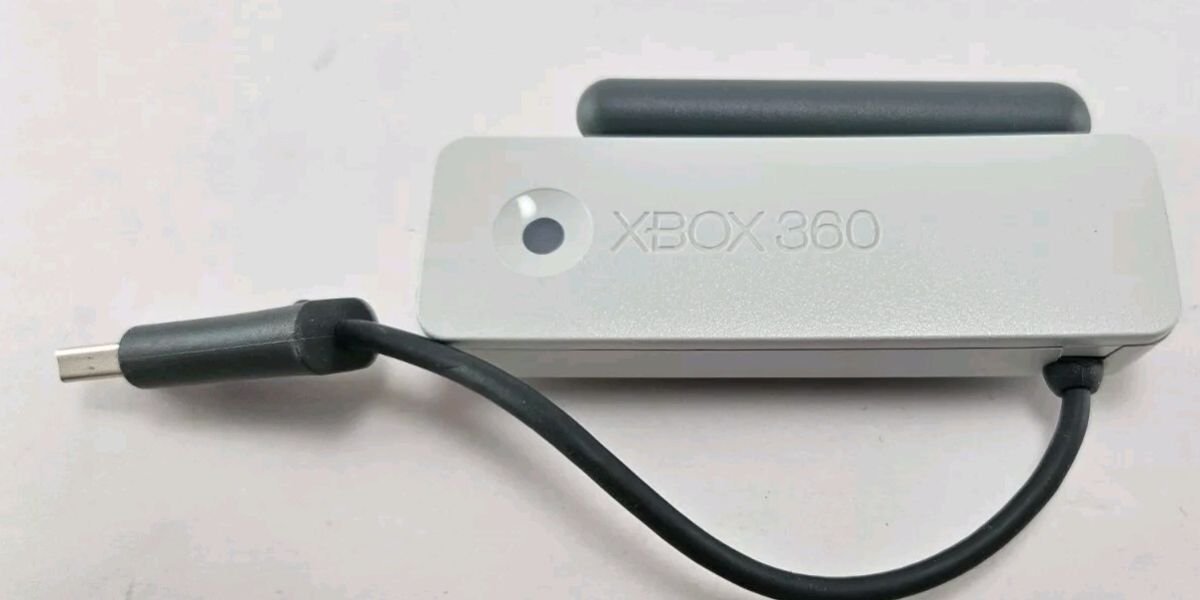
Microsoft released it in late 2009 under model number A9K-00001 as the replacement for the older adapter, which was limited to the 802.11g802.11g802.11g era. Early consoles had no wireless chip on the motherboard, so this accessory filled that gap by plugging into the rear USB port.
Once connected, the adapter handles everything the console needs from a network. That includes secure sign-in to Xbox LIVE, system-link play between consoles, and file sharing with PCs on the local network.
The timing of the release matters. In 2009, Netflix streaming on the Xbox 360 was gaining traction and digital game downloads were getting larger. The older 802.11g802.11g802.11g adapter topped out at a theoretical 54 Mbps54\text{ Mbps}54 Mbps, and real-world speeds were far lower once other devices competed for airtime. Microsoft built the new unit around the 802.11n standard to give the console room to breathe on busy home networks.
Xbox 360 Wireless N Networking Adapter Specifications
Microsoft’s published documentation sets the operating boundaries for this unit. These are the core details confirmed for the hardware:
- Product name: Microsoft Xbox 360 Wireless N Networking Adapter
- Model number: A9K-00001 (also listed as 1387)
- Manufacturer: Microsoft Corporation
- Category: Gaming console networking accessory
- Wireless standards: IEEE 802.11a802.11a802.11a, IEEE 802.11b802.11b802.11b, IEEE 802.11g802.11g802.11g and IEEE 802.11n802.11n802.11n
- Frequency bands: 2.4 GHz2.4\text{ GHz}2.4 GHz and 5.0 GHz5.0\text{ GHz}5.0 GHz (dual-band)
- Antennas: Two external adjustable dipole antennas
- Connection: Standard USB 2.0 Type-A connector
- Security protocols: WEP, WPA-PSK (TKIP) and WPA2-PSK (AES)
- Compatible consoles: Original Xbox 360, Xbox 360 S and Xbox 360 E
- Release period: Late 2009
Microsoft never published a few deeper details in its public user documentation. These include the exact chipset manufacturer and the precise antenna gain in dBi\text{dBi}dBi. Anyone who tells you those figures with certainty is guessing, so treat such claims with caution.
Wireless N Technology and Dual-Band Connectivity
Moving to Wireless N was the biggest jump in console networking performance Microsoft delivered during the Xbox 360 era. The gains came from three places: protocol support, dual-band radios and the antenna design.
Support for 802.11a/b/g/n Wireless Standards
The adapter supports IEEE 802.11a802.11a802.11a, IEEE 802.11b802.11b802.11b, IEEE 802.11g802.11g802.11g and IEEE 802.11n802.11n802.11n. That backward compatibility means it will join an older router without forcing you to replace your home network gear.
On a compatible 802.11n802.11n802.11n connection, the theoretical physical data rate reaches 300 Mbps300\text{ Mbps}300 Mbps. That is a ceiling set by the standard, not a speed you will see in a speed test. The console connects over USB 2.0 and shares the airwaves with every other device in the house, so actual throughput is lower. Even so, the extra headroom reduces the queuing delays that cause rubber-banding in online matches.
2.4 GHz and 5 GHz Network Support
The adapter works on two frequency bands, so you can match the connection to your room layout and your neighbors’ wireless noise.
The 2.4 GHz2.4\text{ GHz}2.4 GHz band travels farther and pushes through walls more easily. The tradeoff is crowding. Microwave ovens, Bluetooth gadgets, cordless phones, and every neighboring router compete for the same narrow slice of spectrum.
The 5 GHz5\text{ GHz}5 GHz band offers a much cleaner environment and higher sustained throughput. Its weakness is range, because the signal fades faster through floors and thick walls. If your router sits in the same room as the console or one room over, 5 GHz5\text{ GHz}5 GHz is usually the better pick.
To use both bands, you need a dual-band router broadcasting on 2.4 GHz2.4\text{ GHz}2.4 GHz and 5 GHz5\text{ GHz}5 GHz at the same time.
Two External Antennas and Wireless Reception
Signal capture depends on two external antennas on flexible hinges at the top of the adapter body.
This two-antenna layout supports MIMO (Multiple-Input Multiple-Output), which lets the adapter handle more than one spatial data stream at the same time. That is a big part of why the Wireless N model holds a steadier connection than the single-antenna unit it replaced.
Antenna position makes a visible difference. Fan the two stalks outward into a V shape so they sit at different angles to the incoming signal. In practice with legacy setups, antennas left pointing straight up or folded flat are a common reason for weak signal bars on a connection that should be fine.
Key Features of the Xbox 360 Wireless N Adapter
Microsoft designed the accessory to cover the console’s full range of online and local networking tasks. Here are the features that matter most in day-to-day use:
- High-speed Xbox LIVE integration: Supports low-latency multiplayer, digital game downloads, and system software updates.
- Dual-band spectrum selection: Lets you pick between the crowded 2.4 GHz2.4\text{ GHz}2.4 GHz band and the quieter 5 GHz5\text{ GHz}5 GHz band.
- HD media streaming support: Provides enough local bandwidth to stream 1080p1080p1080p video from a Windows Media Center PC or from online streaming apps.
- System-link connectivity: Allows console-to-console wireless play without a long Ethernet cable between rooms.
- Integrated mounting clip: Snaps onto the rear plastic of an original Xbox 360 for a flush fit.
Xbox 360 Wireless N Adapter Compatibility and Network Requirements
A smooth setup depends on pairing the adapter with the right console and configuring the router correctly.
Hardware Compatibility and Security Standards
Every original Xbox 360 revision (Core, Premium, Arcade, Pro, and Elite) lacks internal Wi-Fi and needs an external adapter like this one for wireless access.
The Xbox 360 S (Slim), which arrived in 2010, and the later Xbox 360 E both ship with built-in 802.11n802.11n802.11n wireless. The external adapter will physically plug into those consoles over USB, but it gives you no real advantage over the internal radio.
To get a clean connection, your network should meet these requirements:
- A wireless router broadcasting on IEEE 802.11a/b/g/n802.11a/b/g/n802.11a/b/g/n.
- An active broadband connection, such as cable, fiber, or DSL, for Xbox LIVE access.
- WPA2-PSK with AES encryption. WEP and WPA-TKIP are supported but cap you below full Wireless N speeds.
- Separate network names (SSIDs) for the 2.4 GHz2.4\text{ GHz}2.4 GHz and 5 GHz5\text{ GHz}5 GHz bands, so you can pick the band you want from the console.
A generic USB Wi-Fi dongle built for a desktop PC will not work on the Xbox 360. The console’s operating system has no universal USB driver framework, so only official Microsoft wireless adapters are recognized. If you cannot find one, a wired bridge is the alternative.
How to Install and Connect the Xbox 360 Wireless N Adapter
Installation takes about five minutes. It splits into a hardware stage and a software stage.
Preparing the Console and Connecting the Adapter
Follow these steps to seat the hardware properly:
- Turn the Xbox 360 completely off before you touch any ports.
- Line up the plastic clips on the adapter with the slots near the rear USB port.
- Press the adapter firmly into place until the clips lock onto the rear grill of the console.
- Plug the attached USB cable into the rear USB port.
- Raise both antennas and spread them outward in a V shape of roughly 454545 degrees.
Configuring the Wireless Network
With the hardware in place, connect to your network as follows:
- Power on the console and go to Settings, then System Settings.
- Open Network Settings.
- Select Search for Networks so the console scans nearby channels.
- Pick your home network from the list. Choose the 5 GHz5\text{ GHz}5 GHz name if your router is close to the console.
- Enter your Wi-Fi password with the on-screen keyboard and confirm.
- Run Test Xbox LIVE Connection to confirm the console received an IP address and can reach the internet.
If the test fails, Microsoft’s Xbox 360 network connection error guide walks through the standard fixes.
Xbox 360 Wireless N Adapter vs. Original Wireless Adapter
The two official Microsoft adapters look different and perform differently. The older unit was translucent grey and white with a single rotating antenna. The Wireless N model is solid black with two adjustable antennas.
The protocol gap is the first big difference. The original supported 802.11a802.11a802.11a, bbb and ggg. The newer unit adds 802.11n802.11n802.11n. The older adapter’s top theoretical speed was 54 Mbps54\text{ Mbps}54 Mbps, while the Wireless N adapter reaches 300 Mbps300\text{ Mbps}300 Mbps.
Band support is the second difference. The original adapter could technically reach 5 GHz5\text{ GHz}5 GHz through 802.11a802.11a802.11a, but it never offered the dual-band flexibility of the newer model. The Wireless N adapter treats both bands as first-class options.
The third difference is MIMO. The original had no spatial stream support, while the Wireless N adapter does. In practical terms, the black adapter gives you better signal stability, lower latency, and faster file transfers on a modern home network. That is why it remains the preferred choice for retro setups.
Common Xbox 360 Wireless N Adapter Problems
Most problems with this adapter come down to power, channel selection, interference, or router settings. Here are the four most common issues:
Adapter Not Recognized by Console
If the status LED stays dark, the USB port may not be delivering enough power. Unplug the cable and blow any dust out of the port with compressed air. Then reseat the connector firmly. You can also try one of the front USB ports to rule out a failing rear port.
Wireless Network Missing From Scan List
When your 5 GHz5\text{ GHz}5 GHz network does not show up, the router may be using a DFS channel (Dynamic Frequency Selection). Older hardware often fails to detect these. Log into your router admin page and set the 5 GHz5\text{ GHz}5 GHz channel manually to a non-DFS option, such as one between 36 and 48.
Intermittent Connections and Lag
Dropped packets usually trace back to radio interference. Move cordless phone bases, microwave ovens, and large metal objects away from the console. If the problem persists, switch from the crowded 2.4 GHz2.4\text{ GHz}2.4 GHz band to 5 GHz5\text{ GHz}5 GHz.
Xbox LIVE NAT Type Errors
A Moderate or Strict NAT type can block voice chat and make joining matches difficult. The simplest fix is to enable UPnP (Universal Plug and Play) in your router settings. If that does not work, assign the console a static IP address and forward the ports Microsoft lists in its Xbox LIVE port documentation. These are 88 (UDP), 3074 (UDP and TCP), 53 (UDP and TCP), and 80 (TCP).
Is the Microsoft Xbox 360 Wireless N Adapter Still Available?
Microsoft no longer makes the Xbox 360 Wireless N Adapter. The company ended Xbox 360 console production in April 2016, and its accessories left shelves along with the hardware.
Today you will find these adapters through secondhand channels such as retro gaming shops and online marketplaces like eBay. Prices vary widely, and condition matters more than the listing price.
These checks will help you avoid a bad purchase:
- Test the antennas: Both stalks should rotate smoothly and hold their position when angled outward without drooping.
- Inspect the USB cable: Look for fraying, sharp kinks, or cracked insulation near the housing.
- Confirm the branding: Look for Microsoft embossing and the A9K-00001 model number on the sticker. This helps you avoid clones that lack a proper dual-band chipset.
- Consider an alternative: If official units are priced too high, a universal Ethernet-to-Wi-Fi bridge or a powerline adapter plugged into the console’s RJ-45 port works without needing console drivers.
Generic USB Wi-Fi keys made for Windows PCs will never function in an Xbox 360 USB port.
Frequently Asked Questions
Does the Xbox 360 Wireless N Adapter Support Both 2.4 GHz and 5 GHz?
Yes. The adapter has true dual-band radios, so it can connect to either the 2.4 GHz2.4\text{ GHz}2.4 GHz or the 5 GHz5\text{ GHz}5 GHz band depending on how your router is set up.
Which Wi-Fi Standards Does the Adapter Support?
It supports IEEE 802.11a802.11a802.11a, IEEE 802.11b802.11b802.11b, IEEE 802.11g802.11g802.11g and IEEE 802.11n802.11n802.11n.
Can the Adapter Work With Older Wireless Routers?
Yes. Backward compatibility lets it connect to older 802.11b/g802.11b/g802.11b/g routers, though your speed will be capped at the legacy standard’s rate.
Can a Regular USB Wi-Fi Adapter Replace the Microsoft Adapter?
No. Standard PC USB Wi-Fi dongles lack drivers in the Xbox 360 operating system, so the console will not detect them.