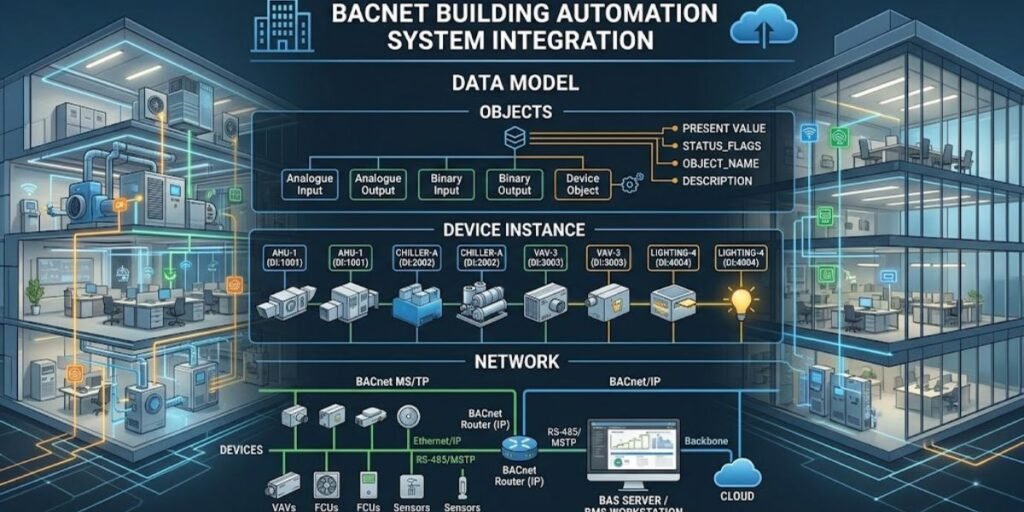
Modern commercial infrastructure relies on the seamless cooperation of equipment from diverse manufacturers. A single high-rise facility might deploy specialized heating, ventilation, and air conditioning controllers from one vendor, variable air volume boxes from another, chillers from a third, lighting panels from a fourth, and electric meters from a fifth.
Coordinating these assets through a centralized building management platform requires a standardized communication framework. Without a common language, individual controllers remain isolated islands of automation that cannot share operational data or respond collectively to changing environmental conditions.
BACnet (Building Automation and Control Networks) solves this interoperability challenge by providing a standardized communication protocol specifically engineered for building automation systems. Standardized under ANSI/ASHRAE Standard 135, BACnet establishes a universal method for representing building equipment data, identifying devices, and routing messages across complex network architectures.
This guide explores the technical mechanics of BACnet integration, examining how the protocol structures device data models, manages device instances and network numbers, connects through diverse physical media, and enables reliable system-wide supervision.
What Is BACnet in Building Automation?
BACnet is an open communication protocol developed under the guidance of the American Society of Heating, Refrigerating and Air-Conditioning Engineers (ASHRAE). Its primary engineering objective is to allow building automation and control applications from different manufacturers to interoperate without requiring custom protocol translation software at every interface.
Before the standardization of BACnet, building automation systems relied on proprietary protocols unique to individual manufacturers. A facility owner installing a chiller plant from one vendor and an air-handling unit from another faced severe integration hurdles, often requiring expensive custom gateways or restricted operating software.
BACnet eliminates this vendor lock-in by separating the logical representation of building information from the physical hardware and proprietary programming languages used by individual device manufacturers.
The protocol achieves this independence by standardizing objects, properties, services, and communication mechanisms. A BACnet-compliant controller does not need to use the same internal processor, memory structure, or programming syntax as a controller from a different brand.
As long as both devices interpret BACnet objects and execute standard messaging services correctly, they can exchange information freely.
It is important to distinguish between BACnet as a communication protocol and a Building Management System (BMS) as the supervisory software platform. BACnet defines the rules, data structures, and message formats used to move data across the network wire or IP infrastructure.
The BMS serves as the operational software and user interface that queries BACnet devices, logs historical data, displays graphic dashboards, and executes supervisory control sequences.
How the BACnet Data Model Represents Building Equipment
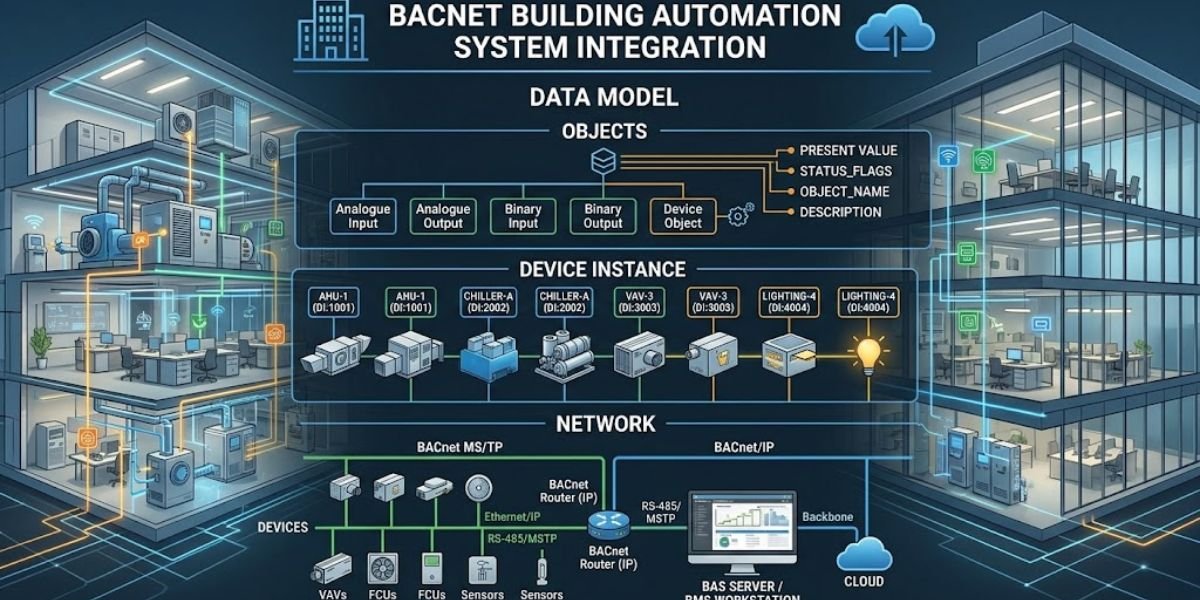
The foundational strength of BACnet lies in its object-oriented data model. Instead of treating field data as raw memory registers or proprietary data streams, BACnet abstracts physical and logical building points into standardized objects. Each object contains a collection of properties that describe its identity, configuration, current operational status, and behavior.
BACnet Devices and Device Objects
In the BACnet architecture, a physical controller, programmable logic controller, supervisory gateway, or workstation is recognized as a BACnet Device. Every physical device on the internetwork contains a special control construct known as the Device Object.
The Device Object acts as the primary administrative anchor for the physical controller, providing standardized information about the device itself to the rest of the network.
The Device Object exposes several mandatory and optional properties that define its operational parameters:
- Object_Identifier: A globally unique numeric identifier combining the object type and a unique instance number.
- Object_Name: A human-readable text string assigned to the device for graphic labeling and operator reference.
- Vendor_Identifier: A unique numeric code assigned by ASHRAE to identify the hardware manufacturer.
- Model_Name: A descriptive string identifying the specific hardware model of the controller.
- Firmware_Revision: The version number of the embedded firmware running on the device.
- Protocol_Revision: The version of the BACnet standard supported by the device implementation.
- Object_List: An indexed array containing the identifiers of every object hosted within that specific device.
The Device Object is essential for network discovery. When a BMS boots up or scans a network, it queries the Device Object to populate its internal device inventory and understand what data points reside within each controller.
BACnet Object Types and Instances
Within each BACnet device, building control points and operational functions are represented by specific object types. Each object type addresses a particular category of input, output, or internal calculation.
| Object Type | Purpose in Building Automation |
| Analog Input | Represents a measured continuous physical input, such as a duct temperature or static pressure sensor. |
| Analog Output | Represents a continuous control output sent to an actuator, valve, or variable speed drive. |
| Analog Value | Represents an internal software-managed continuous value, such as a temperature setpoint or PID loop parameter. |
| Binary Input | Represents a two-state physical input, such as a status contact or airflow switch. |
| Binary Output | Represents a two-state control output, such as a relay command for a fan starter or lighting contactor. |
| Binary Value | Represents a software-managed two-state flag, such as an occupancy mode or alarm override. |
| Multi-State Input | Represents an input with multiple discrete operational states, such as a multi-stage selector switch. |
| Multi-State Output | Represents a control output with multiple discrete operating positions. |
| Device | Represents the physical controller and its overarching administrative parameters. |
| Schedule | Represents time-based operational schedules for equipment occupancy and setpoint adjustments. |
| Trend Log | Records historical property values over time for diagnostic and energy analysis. |
Every individual object within a device is identified by its object type combined with an instance number. For example, an air-handling unit controller might host three separate temperature sensors.
These would be represented in the data model as Analog Input 1, Analog Input 2, and Analog Input 3. The object type defines the category of data, while the instance number distinguishes that specific point from others of the same type within that device.
BACnet Object Properties and Present Value
Properties provide the granular detail required to understand and manipulate each object. While dozens of properties exist for advanced configuration, certain properties are universally critical for building automation monitoring and control.
- Present_Value: The most frequently accessed property, representing the current operational reading, state, or command value of the object.
- Units: The engineering units associated with the Present_Value, such as degrees Fahrenheit, Pascals, kilowatts, or percent.
- Description: A descriptive text string providing field context, such as Discharge Air Temperature Sensor North Wing.
- Status_Flags: A four-element bit string indicating whether the object is in alarm, faulted, overridden, or out of service.
- Reliability: Indicates whether the physical input or calculation is functioning correctly or experiencing a sensor failure.
- Out_Of_Service: A logical flag determining whether the object’s Present_Value is driven by physical inputs or manually overridden for testing.
- Event_State: Reflects whether the object’s value has triggered an alarm or warning state.
When a BMS requests a temperature reading from a sensor, it issues a read command for the Present_Value property of the corresponding Analog Input object. Simultaneously, it can inspect the Units property to confirm whether the value is reported in Celsius or Fahrenheit and check the Reliability property to verify that the sensor wiring is intact.
How BACnet Objects Connect to Real Building Equipment
Translating the abstract data model into physical operational reality requires examining how real building equipment exposes its internal parameters through BACnet. Consider a modern commercial air-handling unit responsible for conditioning a multi-zone office floor. A fully integrated controller attached to this unit manages fans, heating coils, chilled water valves, and outside air dampers.
To make these physical processes readable across the network, the controller exposes a specific set of objects and properties. The supply air temperature measured by a physical thermistor located in the ductwork maps directly to an Analog Input object, where the Present_Value property continuously reports the exact temperature in degrees Fahrenheit or Celsius.
The outdoor airflow rate maps to another Analog Input, while the chilled water valve position is controlled through an Analog Output object that adjusts actuator voltage from zero to ten volts.
Digital statuses and commands use binary objects. A differential pressure switch across the air filter maps to a Binary Input object that triggers an alarm flag when dirty filters restrict airflow past a pre-set threshold.
The supply fan start-and-stop relay connects to a Binary Output object, allowing the central building management system to issue start commands or read run-status confirmations.
Internal operational modes, such as whether the unit operates in occupied mode or night setback, are stored in Binary Value and Multi-State Value objects that internal control logic or remote schedulers can modify.
By structuring physical inputs and outputs into standardized object types, BACnet allows a supervisory operator interface to display animated graphics, trend historical discharge temperatures, and issue automated setpoint adjustments without needing proprietary driver code for every specific valve actuator or sensor brand.
BACnet Device Instances and Object Identifiers
Managing thousands of data points across a large facility requires a rigorous addressing methodology. BACnet solves this through a hierarchical identification structure centered on Device Instances and Object Identifiers.
Every BACnet device on an internetwork must be assigned a unique device instance number ranging from 0 to 4,194,302. This number is stored within the Device Object and serves as the primary network-wide address for that specific physical controller. Regardless of what IP address or serial port the controller uses, its device instance remains its permanent logical identity across the entire BACnet network.
Within each device, individual objects are identified by combining their object type with an object instance number. Because object instance numbers only need to be unique within their parent device, multiple controllers can simultaneously host an Analog Input 1 without creating network confusion. The combination of the global device instance and the local object instance creates a universally unique data reference across the entire automation infrastructure.
Device Instance Versus Object Instance
Understanding the operational difference between a device instance and an object instance prevents severe addressing errors during system commissioning.
- Device Instance: A unique numeric identifier (such as 12001) that distinguishes a specific physical controller or gateway across the entire BACnet internetwork.
- Object Instance: A local numeric identifier (such as 1) that distinguishes a specific point, such as a temperature sensor or fan relay, inside that particular device.
When a building management system queries a discharge air temperature, it addresses the request to Device 12001 and specifies Analog Input 1. This dual-layer structure ensures that data packets reach the correct physical controller and retrieve the exact data point requested.
Why Duplicate Device Instances Cause Integration Problems
Assigning the same device instance number to two different controllers on the same internetwork creates catastrophic communication failures. When a supervisory system broadcasts discovery requests or attempts to poll data, multiple physical devices respond with identical identifiers.
This duplication results in erratic device discovery, dropped polling packets, corrupted trend logs, and persistent communication timeouts. Integrators must establish and enforce a strict device instance allocation plan before deploying field controllers, grouping instance ranges by building floor, equipment type, or zone to maintain absolute uniqueness across the network.
BACnet Network Architecture and Addressing
Moving from the application data model to the physical communication infrastructure requires understanding how BACnet devices exchange data across diverse physical media. A BACnet internetwork consists of one or more local networks connected by routers.
BACnet Network Numbers, MAC Addresses, and IP Addresses
Proper network configuration relies on distinguishing four critical communication identifiers used across different layers of the protocol stack.
- Device Instance: Identifies a BACnet device at the application layer across the entire internetwork.
- Network Number: A unique integer between 1 and 65,535 that identifies a specific local network segment within a multi-segment BACnet architecture.
- MAC Address: A link-layer address that identifies a physical device on its immediate local network segment, such as an Ethernet MAC address or an MS/TP station address.
- IP Address: A standard network layer address used when transporting BACnet messages over Ethernet and IP infrastructure using UDP.
A device instance is entirely separate from an IP address. If a controller’s IP address changes due to a subnet reconfiguration, its device instance remains unchanged, preserving all database point mappings within the central building management system.
BACnet/IP Networks
Modern commercial building automation systems rely heavily on BACnet/IP to transport control data over standard Ethernet cable and wireless network infrastructure. BACnet/IP encapsulates BACnet application layer messages inside standard UDP packets, typically utilizing UDP Port 47808 (0xBAC0).
Because BACnet relies heavily on network-wide broadcast messages to discover new devices, and standard IP routers block broadcasts from crossing subnets, large installations require specialized routing tools. A BACnet Broadcast Management Device (BBMD) solves this limitation by capturing broadcast traffic on one IP subnet, unicasting it across the router to BBMDs on other subnets, and rebroadcasting it locally.
Remote or temporary controllers can also register as Foreign Devices with a local BBMD to participate in subnet-crossing communications without requiring full BBMD configuration.
BACnet MS/TP Networks
While BACnet/IP handles supervisory and high-bandwidth equipment, field-level terminal unit controllers typically communicate over BACnet MS/TP (Master-Slave/Token-Passing). MS/TP is a deterministic serial communication protocol operating over an RS-485 physical layer, utilizing twisted-pair wiring configurations.
The token-passing architecture ensures orderly communication. A designated master device holds the token, transmits its data packets, and then passes the token downstream to the next master address on the daisy-chain trunk. Slave devices, such as simple wall thermostats, only respond when queried by a master controller.
MS/TP networks require precise baud rate configuration, typically set at 38,400, 76,800, or 115,200 bps, along with proper end-of-line polarization and terminating resistors to prevent signal reflections across long serial runs.
BACnet Routers and Gateways
Connecting different physical media requires understanding the distinction between network routing and protocol translation.
- BACnet Router: Forwards native BACnet messages between different physical layers, such as bridging a BACnet/IP backbone to an MS/TP serial trunk, without altering the underlying data payload.
- Gateway: Translates non-BACnet protocols, such as Modbus, KNX, or proprietary legacy systems, into standard BACnet objects and properties, allowing foreign equipment to appear as native BACnet devices to the management system.
How BACnet System Integration Works
System integration follows a structured operational workflow that transitions unconfigured field hardware into a fully monitored and controlled building automation environment.
Device Discovery and Identification
When an integration engineer connects a new supervisory workstation to a building network, the software initiates device discovery. The BMS broadcasts a Who-Is service request across the network.
Every compatible BACnet controller listening on that network segment responds with an I-Am service message containing its unique device instance number, maximum supported APDU length, and segmentation capabilities. The supervisory software compiles these responses into an active device inventory.
Reading BACnet Objects and Properties
Once devices are cataloged, the integration platform begins polling data using standardized communication services. The ReadProperty service requests the exact value of a single property, such as checking the Present_Value of an Analog Input object.
For efficiency, engineers utilize ReadPropertyMultiple, which allows a supervisory controller to request dozens of property values across multiple objects in a single consolidated network transaction, dramatically reducing network traffic overhead.
Mapping BACnet Points into a BMS
Discovered data points must be organized into the supervisory software platform before operators can utilize them. This mapping process involves assigning clear point naming conventions, defining engineering units, setting read-and-write security permissions, configuring alarm thresholds, and linking objects to animated graphical floor plans.
For an air-handling unit, this means binding supply temperatures, damper positions, and fan start commands into a unified equipment graphic that reflects real-time mechanical operations.
Configuring Control and Data Exchange
BACnet supports advanced supervisory control beyond simple polling. The WriteProperty service allows central software to send new setpoints or manual override commands back to field controllers.
To minimize unnecessary network polling, systems configure Change of Value (COV) subscriptions. Instead of constantly asking a sensor for its reading, the BMS instructs the controller to transmit an update message only when the measured value changes by more than a specified increment, preserving critical network bandwidth.
Verifying Interoperability Between Different Manufacturers
A common misconception assumes that any two devices bearing a BACnet logo will integrate effortlessly. Real-world interoperability requires verifying that both products support the exact object types, services, and operational BIBBs required for the specific project.
Every compliant device manufacturer publishes a document known as the Protocol Implementation Conformance Statement (PICS). The PICS details the exact hardware profile, supported object types, maximum buffer sizes, and functional BACnet Interoperability Building Blocks (BIBBs) implemented in the device firmware.
Integrators must analyze these conformance statements before purchasing equipment to ensure that a third-party lighting controller supports the specific scheduling and alarming services required by the primary building management system.
Common BACnet Integration Problems and Their Causes
Complex integrations frequently encounter communication failures rooted in architectural or configuration oversights.
- Duplicate Device Instances: Occurs when two controllers share the same device instance number, causing intermittent polling dropouts and device discovery conflicts. Resolution requires modifying the device instance on one of the conflicting controllers using configuration software.
- Incorrect Network Numbers: Happens when routers or workstations are assigned conflicting network numbers, preventing message forwarding across segments. Resolution requires auditing network documentation and aligning router configuration tables.
- Incorrect MS/TP MAC Addresses: Arises when two master devices share the same station address on an RS-485 serial trunk, resulting in token drops and communication freezing. Resolution requires readdressing individual controllers via physical DIP switches or software tools.
- BACnet/IP Broadcast Issues: Caused by unconfigured subnets where Who-Is discovery requests fail to traverse network routers. Resolution requires properly installing and configuring BBMD routing tables.
- Unsupported Object Properties: Occurs when a BMS attempts to poll a custom or unimplemented property on a legacy third-party controller, generating error response packets. Resolution requires verifying device PICS documentation to ensure property compatibility.
BACnet Security and Network Protection
Connecting operational technology networks to enterprise IT infrastructure introduces cybersecurity vulnerabilities that require robust defensive architectures. Modern building automation deployments demand rigorous network segmentation, isolating BACnet control networks behind dedicated hardware firewalls and restricting remote maintenance access to encrypted virtual private networks.
To address modern threat landscapes, ASHRAE introduced BACnet Secure Connect (BACnet/SC). BACnet/SC provides a secure, encrypted communication layer tailored specifically for IP-based building automation networks.
It utilizes standard web socket encryption and certificate-based device authentication to prevent eavesdropping, man-in-the-middle attacks, and unauthorized device spoofing, ensuring that building control data remains protected even when traversing enterprise IT backbones.
Planning a BACnet Integration Project
Executing a successful building automation integration requires disciplined project management and adherence to a standardized engineering methodology.
- Audit Existing Infrastructure: Catalog all legacy controllers, physical network media, and available IT subnets.
- Establish an Addressing Plan: Allocate unique device instance ranges and network numbers across all facilities prior to field installation.
- Verify PICS Documentation: Review manufacturer conformance statements to confirm functional compatibility before equipment procurement.
- Document Topologies: Map all BACnet/IP subnets, MS/TP serial trunk lengths, router placements, and BBMD assignments.
- Execute Commissioning Validation: Perform systematic device discovery verification, point mapping audits, alarm trigger testing, and communication load validation before handing the system over to building operators.
Frequently Asked Questions
What is a BACnet device instance?
A unique numeric identifier assigned to a physical BACnet controller or gateway, ensuring it remains distinguishable across the entire network internetwork.
What is the difference between a device instance and an object instance?
A device instance identifies a physical controller across the global network, while an object instance identifies a specific point or control function residing inside that device.
How does the BACnet data model work?
It abstracts physical building equipment into standardized objects containing properties that describe their operational identity, configuration, and current values.
What is the difference between BACnet/IP and BACnet MS/TP?
BACnet/IP transports control messages over standard Ethernet and IP infrastructure using UDP, while BACnet MS/TP utilizes deterministic token-passing serial communication over RS-485 twisted-pair wiring.
Can BACnet devices from different manufacturers communicate with each other?
Yes, provided both devices implement compatible object types, standard messaging services, and verified interoperability blocks as outlined in their PICS documents.
What happens when two BACnet devices have the same device instance?
Network discovery conflicts occur, resulting in dropped polling packets, erratic device behavior, and persistent communication failures.
What is the difference between a BACnet router and a gateway?
A router forwards native BACnet messages between different physical network media without altering data, whereas a gateway translates non-BACnet protocols into standard BACnet objects.
How does a BMS discover BACnet devices?
The supervisory system broadcasts a Who-Is service request across the network, prompting all active controllers to reply with I-Am response messages containing their device instances.