When you open a website, watch a video, or send a message, your device is talking to computers that may sit on the other side of the planet. At any given second, thousands of separate data streams are moving through cables, fiber, and radio signals, and somehow none of them get mixed up.
The thing that keeps all that traffic sorted is the socket. Sockets sit between your software and your network hardware, and every app on your device depends on them.
This article walks through what a socket is, how it works with IP addresses and port numbers, and why a single machine can juggle thousands of connections at once without losing track of a single one.
Explain What a Socket Really Is
Your computer is doing several network jobs at the same time right now. Maybe a browser with ten tabs, a music app streaming in the background, and a cloud backup quietly uploading photos. All three push and pull data through the same Wi-Fi chip or the same Ethernet port.
So the operating system needs a way to make sure the music data lands in the music app and not in your browser. If it had no way to separate those streams, incoming packets would pile up together and nothing would work properly.
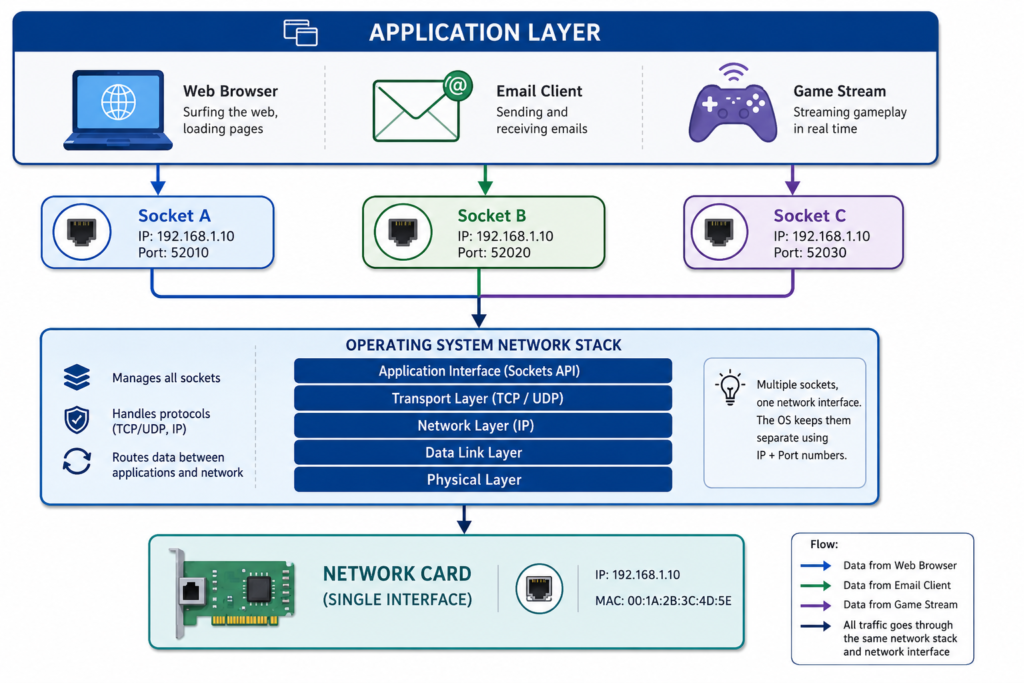
A socket is the endpoint the operating system creates so two programs can talk over a network. It is the door an app uses to read data from the network and write data back out.
Picture a phone line. The phone network covers the whole country, but you still need your own handset to have your own call. A socket does the same job for software: it gives one app its own private line.
A socket is not the same thing as a port. A port is just a number. A socket is a real object the operating system builds and keeps track of. It holds memory buffers for incoming and outgoing data, remembers the state of the connection, tracks packet sequence numbers, and ties your local address to the remote one.
Sockets are not new, either. The design most systems still use today came out of Berkeley’s 4.2BSD Unix release in 1983. Those Berkeley sockets are the reason the same basic commands like create, bind, listen, accept, and connect show up in almost every programming language.
Why IP Addresses Alone Are Not Enough
An IP address points to one machine on a network, the way a street address points to one office building. It tells routers around the world where to drop off your packets.
But that only gets the data to the front door. Since your device runs a dozen network apps at once, the receiving computer still has to figure out which program the data belongs to.
Port numbers solve part of that. Ports are virtual channels inside the operating system, numbered 0 through 65535. The IANA splits them into three groups:
- 0 to 1023: Well-known ports, reserved for standard services
- 1024 to 49151: Registered ports, claimed by specific software vendors
- 49152 to 65535: Dynamic or ephemeral ports, handed out temporarily
Web traffic uses port 80 for HTTP and 443 for HTTPS. Email uses 25 for server-to-server delivery and 587 for sending from a mail client. Reading mail uses 143 for IMAP or 993 for IMAP over TLS, and 110 or 995 for POP3.
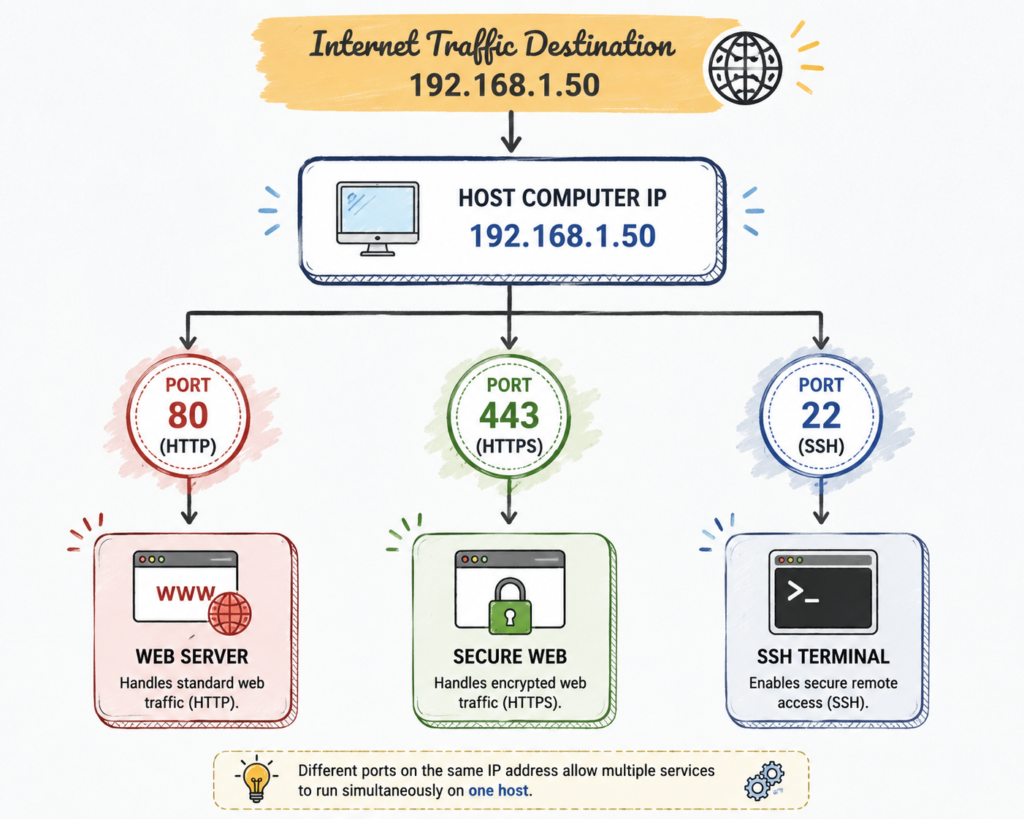
Ports get traffic to the right kind of software. What they cannot do is tell apart two connections that are using the exact same software.
Open five browser tabs to the same website and all five head for the same destination IP and the same port 443. That is where sockets matter. A socket pairs your local details with the remote details, and that combination is unique for every single session.
How a Socket Is Created During a Network Connection
Setting up a connection follows a fixed order of steps, and the operating system kernel runs all of them:
- Application Connection Request
An app asks the operating system to open a channel. A browser, for example, asks for a connection so it can pull down a page from a domain. - Socket System Call and Allocation
The operating system runs a system call and sets aside memory for a new socket. That memory holds the read and write buffers plus the fields that track connection state. - Local Endpoint Assignment
The operating system attaches your machine’s IP address and picks a free local port, an ephemeral port, and binds it to the new socket. - Destination Binding
The socket then records the remote machine’s IP address and the service port it needs to reach. Now it has everything required to go out and connect. - Handshake and Connection Establishment
The operating system sends the first control packets to set up the link. Once the far end accepts, the socket flips into the ESTABLISHED state and is ready to carry data. - Data Exchange and Closure
From here the app reads and writes to the socket much like it would read and write a file. When the job is finished, a close call ends the session and hands the memory back to the system.
The Four Pieces That Identify Every Socket Connection
Every socket connection on the internet is pinned down by four values working together. Network engineers call this the 4-tuple:
- Source IP Address: The address of the machine on your side of the connection.
- Source Port: The local port the operating system picked for this session.
- Destination IP Address: The address of the machine on the far end.
- Destination Port: The port the remote service is listening on.
This four-part ID is the reason a single web server can serve tens of thousands of visitors through one public port.
When thousands of people connect to port 443 on the same server, each of them arrives with a different Source IP and Source Port. The full 4-tuple comes out different every time, so the operating system always knows which socket a packet belongs to. Nothing collides.
Socket vs Port
Ports, sockets, and IP addresses get mixed up constantly, and it is an easy mistake to make. Here is how they split apart:
| Network Element | Core Function | Technical Analogy |
| IP Address | Identifies a specific hardware device on a network. | Street address of an apartment building. |
| Port | Identifies a specific service channel or process on a device. | Individual apartment number in the building. |
| Socket | An active operational endpoint for reading and writing data. | The complete phone line connection inside a specific apartment. |
| Connection | The active full-duplex link maintained between two sockets. | An ongoing conversation between two people over that phone line. |
Short version: the IP address finds the machine, the port finds the door, and the socket is the pipe running through that door between two live programs.
Sockets also have a state, and knowing the common ones saves a lot of guessing later. A socket sitting in LISTEN is a server waiting for callers. ESTABLISHED means data is flowing. TIME_WAIT is a socket that closed but is being held for a short cool-down, usually around 60 seconds on Linux, so that stray late packets do not confuse a brand-new connection. CLOSE_WAIT means the other side hung up and your app has not closed its end yet, which is almost always a bug in the code.
You can see all of this yourself. On Linux, run the command ss -tunap. On macOS or Windows, run netstat -an. The list you get back is every socket your machine has open right now.
TCP and UDP Sockets Serve Different Purposes
Sockets run on different transport protocols depending on what the app needs. The two you will meet most often are TCP and UDP.
TCP Sockets (Transmission Control Protocol)
TCP sockets are connection-oriented and built for reliability. Nothing moves until a formal handshake finishes first.
- Reliable Delivery: Lost packets get spotted and sent again automatically.
- In-Order Arrival: Bytes reach the app in the same order they were sent.
- Flow and Congestion Control: Sending speed adjusts on its own based on how busy the network is and how much the receiver can handle.
You will find TCP behind web browsing, SSH sessions, FTP file transfers, and mail retrieval.
UDP Sockets (User Datagram Protocol)
UDP sockets are connectionless. They are built for speed and low overhead. Packets, called datagrams, go straight out with no handshake first.
- Speed Focused: No handshake delay and no waiting on delivery receipts.
- No Retransmission: A lost packet is just gone. Nothing stalls behind it.
- Independent Datagrams: Every message is handled on its own.
UDP shows up in live video, VoIP calls, DNS lookups, and fast online games.
One update worth knowing: UDP is no longer just for games and calls. HTTP/3 runs on QUIC, which is built on top of UDP, so a growing slice of ordinary web browsing now travels over UDP sockets instead of TCP ones. Telemetry data shows significant adoption across major infrastructure, with platforms like Google, Facebook, Netflix, Amazon, and Cloudflare having moved to it over recent years.
How Web Browsers, Email, and Online Games Use Sockets Every Day
Sockets are running underneath just about everything you touch online:
- Web Browsers: Loading one page opens several sockets at once so the browser can pull the HTML, the stylesheets, and the images in parallel instead of one after another.
- Email Clients: IMAP holds a TCP socket open so new mail shows up the moment it arrives, instead of waiting for the next check.
- Video Streaming: YouTube buffers chunks of video ahead of what you are watching. It runs over QUIC when it can and falls back to TCP when a network blocks UDP, which keeps playback from stuttering.
- Voice and Video Calls: Zoom leans on UDP sockets. A dropped frame here and there is better than everyone waiting on a retransmission.
- Multiplayer Online Gaming: Competitive shooters push player positions to the server on UDP sockets. Games like CS2 and Valorant run servers at 64 or 128 ticks per second, meaning the state updates that many times every second.
- Messaging Applications: Chat apps keep one long-lived socket open in the background. It is cheaper on battery than waking up to poll a server every few seconds.
- Cloud Storage Syncing: Dropbox and similar tools hold background TCP sockets open to watch for file changes and push only the parts that changed.
There is also a type you have probably heard of but may not have placed: the WebSocket. Despite the name, it is not a raw network socket. It is a protocol that starts as a normal HTTP request, then asks the server to upgrade the connection so both sides can send messages whenever they want. That is what powers live chat, collaborative documents, and live sports scores in a browser tab.
What Happens When You Type a Website Address into Your Browser
The clearest way to see sockets in action is to follow one page load from start to finish:
- DNS Lookup Resolution
Your computer sends a query over a UDP socket to a DNS server, asking it to turn the domain name into an IP address. - Socket Allocation
The browser asks the operating system for a new TCP socket, and the OS assigns it an ephemeral local port. - TCP Three-Way Handshake
Your socket sends a SYN packet to port 443 at the destination. The server answers with SYN-ACK. Your socket replies with ACK and the link is live. - TLS Security Handshake
On an HTTPS site, both sides now negotiate encryption keys through that open socket. TLS 1.3 handles this in a single round trip, which is why modern sites connect faster than they used to. - HTTP Request Transmission
The browser writes the HTTP GET request into the socket’s outbound buffer and it goes out over the wire. - Server Processing and Response
The server reads the request off its listening socket, works out what to send, and writes the HTML back into the stream. - Socket Termination
When everything has transferred, the sockets run a FIN-ACK sequence to shut down cleanly and release the memory they were using.
If the site supports HTTP/3, steps three and four collapse into one. QUIC folds the transport handshake and the encryption handshake together, so the connection can be ready in a single round trip or zero if you have visited the site before.
Client Sockets and Server Sockets
Sockets come in two roles, and they behave very differently:
- Server Socket: A server socket is passive. It binds to a network interface, listens on a fixed port, and waits. It does not reach out to anyone. When a request comes in, the server accepts it and immediately creates a separate socket just for that one client. The original listening socket goes right back to waiting, which is how a server can keep taking new connections while it is already serving hundreds of others.
- Client Socket: A client socket is active. It goes out and connects to a server’s listening address, using whatever ephemeral port the kernel hands it.
Can One Computer Have Thousands of Open Sockets?
Yes. A single machine can hold tens of thousands of sockets open at once, and a well-tuned server can push into the hundreds of thousands. The million-connection benchmarks you will read about are real, but they come from tuned lab setups with lightweight connections, not from a default install.
What limits you is system resources, not the port numbers. Every socket takes kernel memory for its send and receive buffers.
On Linux, the first wall you usually hit is not memory at all; it is the file descriptor limit. Most systems ship with a default ulimit -n of 1024, so an app tries to open its 1025th socket and fails for no obvious reason. Raising that limit is one of the first things anyone tuning a server does.
On client machines, outgoing connections are capped by the ephemeral port range. Linux typically hands out ports from 32768 to 60999, giving you roughly 28000 outgoing connections to any single destination. Windows uses 49152 to 65535.
Servers do not run into that ceiling. They listen on one fixed port and accept from an unlimited pool of different client IP and port combinations, so their 4-tuples stay unique no matter how many people show up.
Common Networking Problems Related to Sockets
When something breaks, the error message usually points straight at a socket. Knowing what each one means cuts your troubleshooting time in half:
- Connection Refused: The machine is reachable, but nothing is listening on that port. Usually the service crashed, never started, or you typed the wrong port.
- Address Already in Use: Something else is already holding that local port. It is often an old socket still sitting in TIME_WAIT after a restart, which is exactly what the SO_REUSEADDR option is there to fix.
- Socket Timeout: The socket waited longer than the system allows for a reply or an acknowledgement, so it gave up.
- Connection Reset by Peer: The far end slammed the connection shut without warning, usually a crash, a process kill, or a network drop.
- Socket Exhaustion: The machine ran out of ephemeral ports or file descriptors and cannot allocate anything new. Piles of sockets stuck in CLOSE_WAIT are a classic cause, and they almost always mean an app forgot to close its connections.
- Firewall Block: Something in the middle dropped the packets silently. The socket just hangs in a pending state instead of failing fast, which is why a blocked port feels different from a refused one.
Frequently Asked Questions
Is a socket the same as a port?
No. A port is just a number used to steer traffic. A socket is a live operating system resource that combines IP addresses and port numbers into a working endpoint.
Can one port have multiple sockets?
Yes. One server port like 443 can carry thousands of sockets at the same time, because each socket is identified by its full 4-tuple, not by the port alone.
How many sockets can one computer create?
Tens of thousands on ordinary hardware, and far more on a tuned server. The real limits are available memory and the operating system’s file descriptor cap, not the number of ports.
What is a socket address?
A socket address is an IP address and a port number written together, like 192.168.1.50:8080.
How can I see the sockets open on my computer?
Run ss -tunap on Linux or netstat -an on Windows and macOS. The output lists every socket, its local and remote address, and what state it is currently in.