The software you use at work every day does not live on your hard drive anymore. A 2026 market report by Precedence Research shows that the global SaaS market will hit an incredible $465 billion this year.
This massive shift has completely changed how modern businesses function and communicate. If you want your business to stay competitive, understanding cloud software is no longer optional.
In this complete guide, you will learn exactly what is saas in cloud computing and how it operates. We will cover real-world examples, look at industry data, and compare it to other cloud models.
What is SaaS?
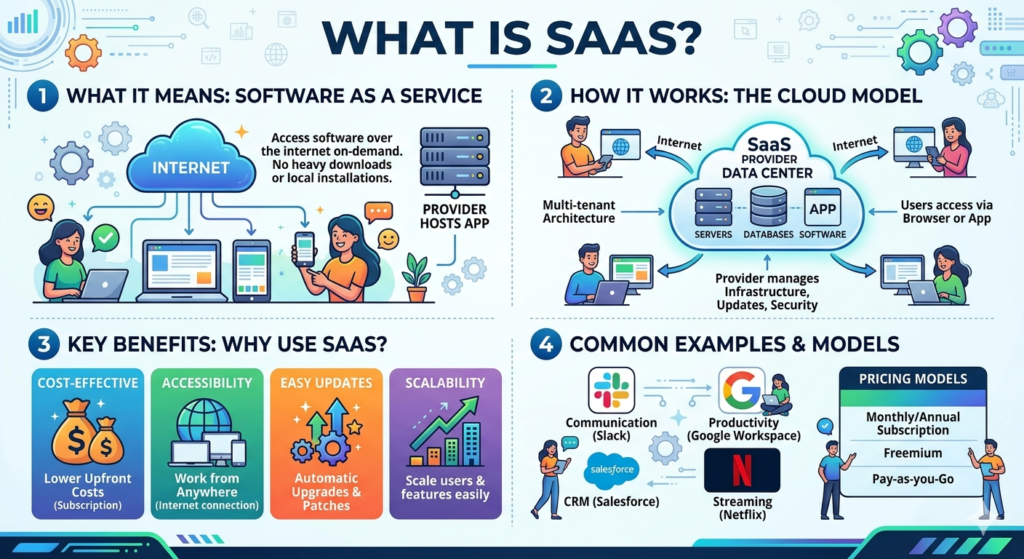
Software as a Service (SaaS) is a modern way of delivering applications over the internet. In the past, using a computer program meant buying a physical disc or downloading a massive installer file. Today, you simply open a standard web browser. You type in a web address, log into your private profile, and start working instantly.
The software vendor builds, hosts, and maintains the entire system on their own remote servers. This means your business does not have to worry about buying expensive hardware or hiring IT teams to manage physical server rooms. You simply pay a recurring monthly or annual fee to access the tools.
What is SaaS in Cloud Computing?
To truly grasp what is saas in cloud computing, you have to look at the top layer of the cloud ecosystem. The cloud is a massive network of remote servers that store, manage, and process digital data. SaaS is the user-facing part of this network. It is the finished product that everyday employees interact with.
When you use a SaaS application, the software vendor handles all the heavy background tasks. They write the source code, apply security patches, manage data storage, and maintain the underlying operating systems. As the end-user, your only job is to interact with the visual dashboard on your screen.
How Does SaaS Work?
A SaaS platform relies on a system called multi-tenant architecture. Think of it like a large apartment building. The building shares the same foundation, main plumbing, and electrical wiring. However, every tenant has their own private apartment with a unique key.
In the software world, this means thousands of separate businesses share the same central database and application code. Yet, your business data remains completely hidden and secured away from every other company.
When the vendor updates the application, every user gets the new features at the exact same time. These services often run on major cloud infrastructure giants like Amazon Web Services (AWS) or Microsoft Azure. This keeps the software running fast and smooth without forcing you to buy local servers.
SaaS vs. Traditional Software
Traditional software requires you to buy an expensive license upfront. You then install it on a specific desktop computer. If that computer crashes, or if you leave your office desk, you completely lose access to your work files.
| Feature | SaaS Platforms | Traditional Software |
| Payment Model | Low monthly subscription fee | Large upfront license fee |
| Installation | None, runs directly in a browser | Manual install on every device |
| Updates | Automatic, handled by vendor | Manual, requires buying new versions |
| Data Storage | Secured instantly in the cloud | Saved locally on a hard drive |
| Access Location | Anywhere with an internet signal | Only on the installed device |
Real-Life Examples of SaaS Applications
You likely interact with SaaS tools multiple times a day without even realizing it. Here are some of the most prominent examples used across the business landscape today:
- Google Workspace: Tools like Gmail, Google Docs, and Google Drive allow teams to type, edit, and collaborate in real-time.
- Slack & Zoom: These communication tools keep global and hybrid workforces connected through instant messaging and video calls.
- Salesforce: A massive customer relationship management platform that helps sales teams track deals and log client interactions.
- AgilityPortal: A modern, centralized digital workplace and intranet application. It is built to simplify project updates and document sharing for remote employees.
Real-World Impact: A SaaS Case Study
To see how this works in real life, look at a mid-sized nonprofit organization operating across the UK and Africa. Before adopting modern tools, their staff relied on messy email chains and standalone chat apps. This old process led to terrible miscommunication, and critical field data was constantly lost.
The nonprofit decided to switch to AgilityPortal’s SaaS platform. They consolidated their project updates, HR resources, and team discussions into one central cloud hub. Field workers could log in from basic mobile devices to share knowledge instantly. Within three months of using the cloud software, the nonprofit reported a 25% improvement in overall employee engagement. They also noticed a massive reduction in duplicated work.
Benefits of SaaS in Cloud Computing
Shifting your business workflows over to a cloud-hosted application offers several distinct advantages.
Massive Cost Savings
You no longer need to purchase expensive physical servers or pay high upfront licensing fees. The subscription model makes IT budgets highly predictable for small businesses.
Work from Anywhere
Because the application lives entirely on the web, your employees can log in safely from home, an airport, or a coffee shop. All they need is a working internet connection.
Zero Maintenance Hassles
You will never have to click “install update” or schedule company-wide downtime again. The vendor pushes out security patches and fresh features silently in the background.
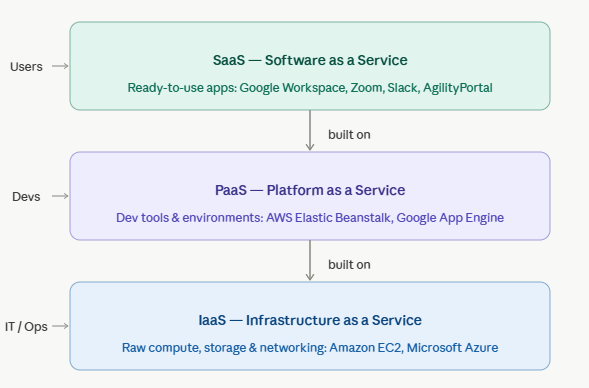
SaaS vs. PaaS vs. IaaS: What is the Difference?
Cloud computing is generally split into three distinct models. Each one offers a different level of control and flexibility for the user.
SaaS (Software as a Service)
These are ready-made tools for employees and end-users. You just log in and use the finished product. Examples include Microsoft 365 and Zoom.
PaaS (Platform as a Service)
This is a secure cloud space built for software developers. It provides the frameworks to write, test, and deploy custom code without worrying about server setups. A popular example is AWS Elastic Beanstalk.
IaaS (Infrastructure as a Service)
These are the raw computing building blocks. You rent virtual servers, hard drives, and network setups. It is built for IT administrators who want total control over their backend infrastructure, like Amazon EC2.
Challenges of SaaS in Cloud Computing
While the benefits are clear, relying heavily on cloud software does introduce a few unique business hurdles that teams must manage.
Shadow IT
Employees frequently sign up for unapproved SaaS applications to solve quick problems without telling the IT department. A recent Gartner IT Spend Forecast highlights that shadow IT can account for up to 30% to 40% of IT spending in large modern enterprises.
SaaS Sprawl
It is incredibly easy to sign up for new digital tools. Over time, companies end up paying for duplicate or abandoned subscriptions, which wastes thousands of budget dollars every year.
Data Security Risks
You are trusting a third-party vendor with your sensitive customer information. Strong password hygiene and multi-factor authentication are required to protect these cloud access points from hackers.
SaaS vs. Cloud Computing: Key Differences
People often use these two tech terms interchangeably, but they are not the same thing. Cloud computing is the grand umbrella phrase for any computing service delivered over the internet. It includes raw data storage, digital networking, and developer platforms.
SaaS is simply a specific, highly popular product type that lives inside that cloud universe. In short: cloud computing is the digital highway infrastructure, while SaaS is the actual car you drive on it.
The Future of SaaS in Cloud Computing
The next decade of cloud software belongs to intelligent automation and AI. Vendors are rapidly embedding analytical artificial intelligence into their core applications. The latest BetterCloud Monitor Report notes that the SaaS industry is quickly shifting from tools that just support humans to autonomous agents that execute work and own outcomes.
We are also seeing a major rise in “Vertical SaaS.” These are highly specialized platforms built for a single niche, like hospital patient management or specific retail logistics, rather than general business tools.
How to Choose the Right SaaS Solution
With thousands of options available, picking the best software for your team requires a careful strategy.
Frequently Asked Questions About SaaS
What are the main benefits of using SaaS?
The main benefits include low upfront costs, automatic background updates, and the ability to log into your work from any device with an internet connection.
Is my data safe inside a SaaS application?
Most professional vendors spend heavily on encryption, cloud backups, and compliance. However, you should always enforce multi-factor authentication (MFA) to prevent unauthorized access.
What is the difference between SaaS and cloud computing?
Cloud computing refers to the entire internet-based server infrastructure. SaaS is a specific type of ready-to-use software application built on top of that infrastructure.
Can I use SaaS tools without an internet connection?
Most SaaS tools require a live web connection to sync data. However, some apps offer offline modes that save your work locally and upload it once you reconnect.
Conclusion
Understanding what is saas in cloud computing helps modern businesses cut down on IT stress and work much faster. By shifting your software tools to the web, you save money, skip tedious manual updates, and keep your remote teams connected across the globe. As artificial intelligence continues to expand, these cloud applications will only get smarter and more essential for daily operations.