
Finding a desktop display that balances sharp text execution with accurate color reproduction often leads us toward 27-inch 4K panels. The LG 27US550-W, part of the popular UltraFine lineup, targets office professionals, photo editors, and everyday content consumers looking for dense pixel presentation without paying premier workstation prices. Operating at a native resolution of 3840 × 2160 pixels, this monitor provides 163 pixels per inch (PPI), creating crisp typography and detailed image rendering across macOS and Windows operating systems.
Prospective buyers often struggle to distinguish between LG’s numerous 27-inch 4K offerings. Models like the 27US550-W, 27UL550-W, and 27UP650-W share similar chassis designs but differ in panel brightness, color gamut coverage, and processing revisions. Evaluating whether the LG 27US550-W justifies your investment requires examining its true panel performance beyond basic spec sheets, including its SDR color accuracy, brightness ceilings, HDR behavior, and ergonomic flexibility.
LG 27-Inch UltraFine 4K Monitor: Specifications and Details
Understanding the technical foundation of the LG 27US550-W helps set realistic expectations for its visual performance and daily utility.
| Specification | Details |
| Model Identifier | LG 27US550-W |
| Screen Size | 27 Inches (68.4 cm diagonal) |
| Panel Type | In-Plane Switching (IPS) |
| Native Resolution | 3840 × 2160 (4K UHD) |
| Aspect Ratio | 16:9 |
| Pixel Pitch | 0.1554 × 0.1554 mm (163 PPI) |
| Refresh Rate | 60 Hz |
| Response Time | 5 ms (Gray-to-Gray at Faster setting) |
| Peak Brightness | 300 nits (Typical), 240 nits (Minimum) |
| Static Contrast Ratio | 1000:1 (Typical) |
| HDR Support | HDR10 |
| Color Gamut | DCI-P3 90% (Typical) / sRGB 99% |
| Color Depth | 10-bit (8-bit + A-FRC), 1.07 billion colors |
| Viewing Angles | 178° Horizontal / 178° Vertical |
| Adaptive Sync | AMD FreeSync (via HDMI and DisplayPort) |
| Connectivity | 2x HDMI 2.0, 1x DisplayPort 1.4, 3.5mm Headphone Out |
| Stand Ergonomics | Height Adjustment (110 mm), Tilt (-5° to 20°), Swivel, Pivot (90° Clockwise) |
| VESA Mounting | 100 × 100 mm |
| Power Consumption | 26W (Typical), 40W (Maximum) |
The 27US550-W uses an In-Plane Switching (IPS) panel structured with 8-bit plus Frame Rate Control (8-bit + A-FRC) temporal dithering. This configuration simulates a full 10-bit color depth, yielding 1.07 billion displayable colors. It covers 90% of the DCI-P3 wide color space and 99% of the sRGB color space, making it well suited for web-standard image editing and general productivity.
Power delivery and signal processing are handled via an external power brick. The physical connectivity suite provides HDMI 2.0 ports supporting 4K at 60 Hz alongside a single DisplayPort 1.4 connection. The monitor omits integrated speakers and USB hub passthrough, routing audio exclusively through a 3.5mm headphone jack.
Key Features of the LG UltraFine 4K Monitor
4K UHD Resolution and IPS Display
The primary strength of the LG 27US550-W lies in its 3840 × 2160 panel grid spread over a 27-inch diagonal workspace. On Windows 11, setting display scaling to 150% maintains comfortable interface proportions while rendering vector fonts and icons with exceptional clarity. If you work on macOS, you benefit from smooth 2:1 Retina scaling when running at a virtual 1080p desktop space, eliminating the pixelation common on standard 1080p or 1440p displays.
The IPS panel architecture ensures consistent color reproduction across wide viewing positions. Off-axis viewing up to 178 degrees incurs minimal color shifting or contrast degradation, allowing you to share your screen with colleagues without perceptual variance.
HDR10 Support and Color Reproduction
LG advertises HDR10 compliance for the 27US550-W, allowing it to accept 10-bit high dynamic range signals from media players, PCs, and game consoles. However, true high dynamic range performance requires localized backlight dimming and high peak luminance.
Because this panel utilizes an edge-lit backlight with a peak brightness capped at 300 nits and lacks Local Dimming zones, it cannot achieve the deep black levels or bright highlights required for impactful HDR. When you enable HDR mode in your operating system, the monitor tone-maps the incoming signal down to its native hardware limits, which can sometimes result in a washed-out appearance compared to a well-calibrated SDR (Standard Dynamic Range) mode.
Connectivity and Ergonomic Design
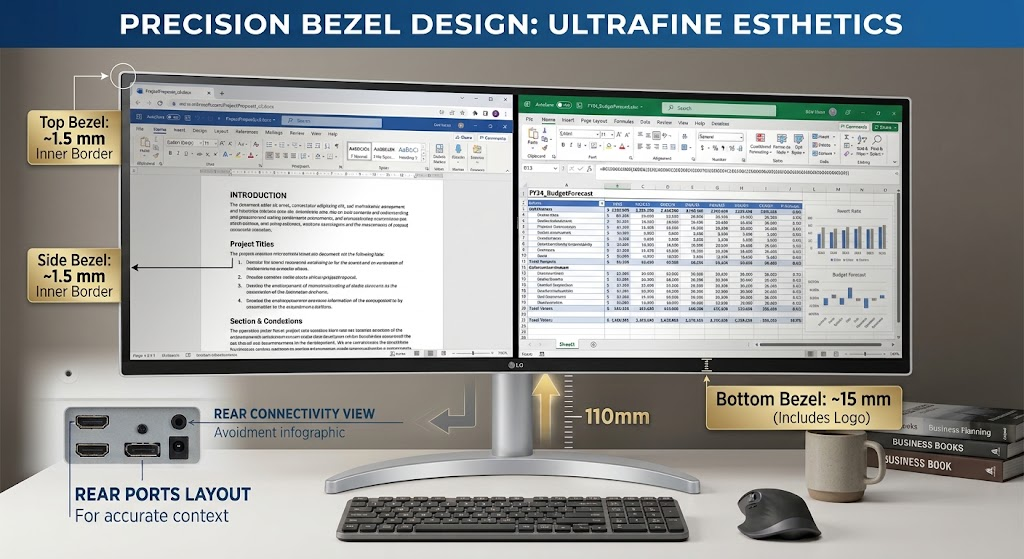
The included ergonomic stand features a curved arc base that provides reliable stability while offering 110 mm of height adjustment, -5° to 20° of front-to-back tilt, horizontal swivel, and a 90-degree clockwise pivot into portrait orientation.
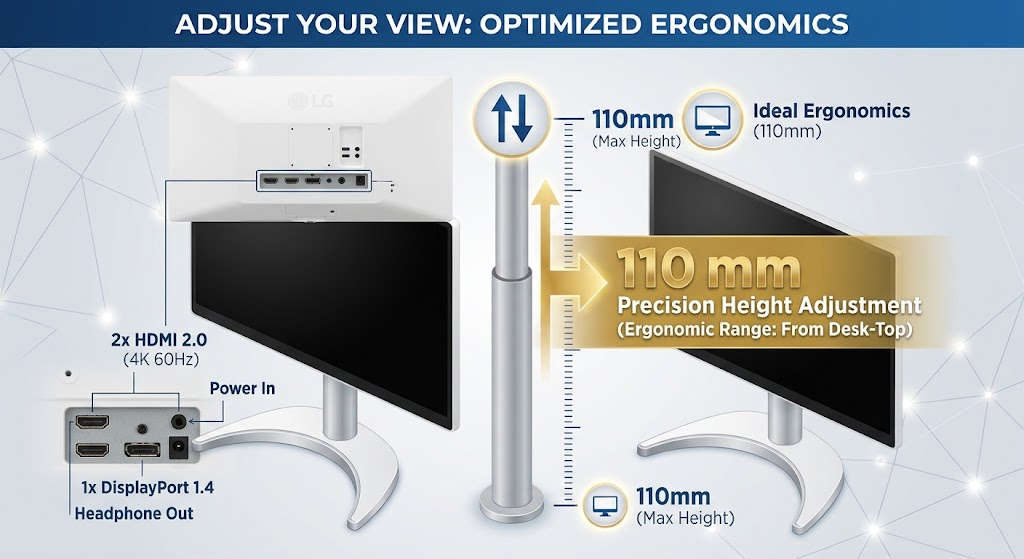
The rear panel houses two HDMI 2.0 ports and one DisplayPort 1.4 connection. All three video inputs support the full 3840 × 2160 resolution at 60 Hz with AMD FreeSync active. A 100 × 100 mm VESA pattern on the back panel allows you to mount the display onto third-party monitor arms or wall brackets easily.
My Experience With the LG UltraFine 4K Monitor’s Picture Quality
Image Sharpness and 4K Detail
Transitioning from a 1080p or 1440p screen to the LG 27US550-W brings an immediate upgrade in visual clarity. Text in code editors, complex spreadsheets, and PDF documents appears sharp and free of screen-door artifacts.
Editing high-resolution raw images from camera sensors allows you to perform fine focus checks without constant zooming. The tight pixel density ensures subtle line work and vector paths in design programs remain clean.
Color Accuracy and Viewing Angles
Out of the box, the Custom color profile delivers balanced saturation across the sRGB space and DCI-P3 gamut. Factory calibrations lean slightly cool, but adjusting the onboard RGB gain settings aligns white points close to the D65 standard (6500K).
Viewing the panel from extreme side angles demonstrates standard IPS stability. Color tone remains consistent when you shift positions in front of your desk, though mild IPS glow appears on dark backgrounds when viewed off-angle in low-light environments.
Brightness, Contrast, and Black Levels
In typical office lighting, setting the brightness slider between 40% and 60% generates comfortable light output around 150 to 200 nits. Pushing the display to its 300-nit maximum handles bright ambient daylight from adjacent windows effectively, though strong anti-glare coatings are needed to diffuse reflections.
Static contrast sits near the rated 1000:1 ratio. In dark rooms, deep blacks appear as dark charcoal grey, a common limitation of edge-lit IPS panels lacking mini-LED backlighting.
HDR10 Picture Performance
Testing HDR10 content highlights the panel’s hardware boundaries. Enabling HDR in Windows or games unlocks broader color processing, but overall dynamic range remains constrained by the 300-nit edge-lit backlight.
Bright highlights lack intense pop, and dark scenes show elevated shadow detail rather than true blacks. For critical color work or immersive media consumption, keeping the monitor in SDR mode yields more predictable contrast and color saturation.
Everyday Performance: Work, Entertainment, and Gaming
Office Work and Multitasking
For productivity tasks, the 4K resolution offers substantial screen real estate. Running two documents side by side at 100% or 125% scaling provides comfortable reading room without horizontal scrolling.
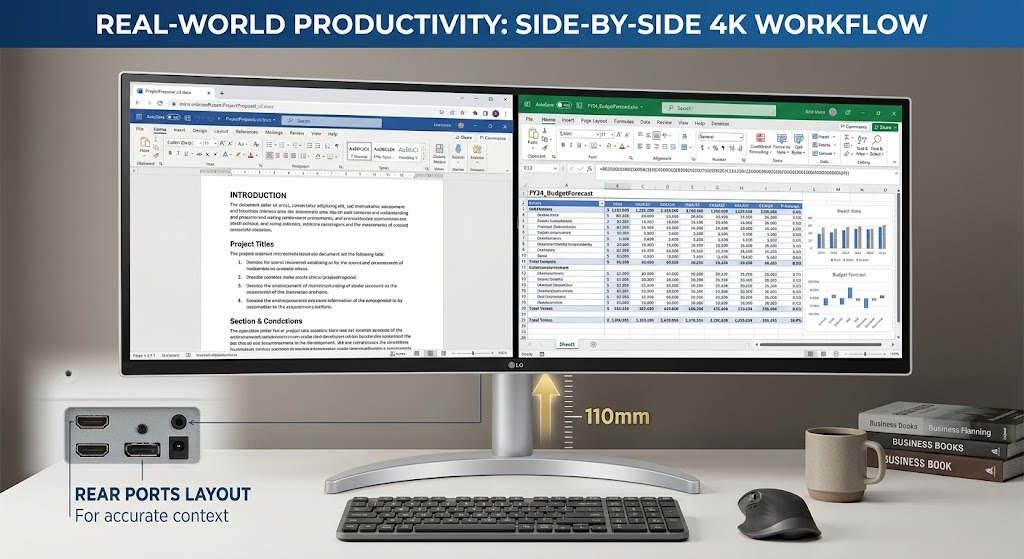
Spreadsheets display more columns and rows simultaneously, reducing navigation effort during complex data entry. The sharp text rendering helps minimize eye fatigue during extended reading and writing sessions.
Video Playback and Streaming
Watching 4K video content on platforms like YouTube or Netflix showcases the monitor’s strength in pixel density and image detail. Nature documentaries and high-bitrate video clips render with realistic texture and vibrant colors.
The anti-glare matte coating reduces distracting room reflections during dark movie scenes without introducing excessive grain or rainbow artifacts over solid white backgrounds.
Gaming and Motion Handling
While built primarily for productivity, the LG 27US550-W handles casual gaming well. The 60 Hz refresh rate limits its appeal for fast-paced competitive esports titles, but single-player RPGs, strategy games, and simulation titles look rich at 4K.
The panel includes AMD FreeSync, operating within a variable refresh rate window of 40 Hz to 60 Hz over both HDMI and DisplayPort. Enabling FreeSync eliminates screen tearing and stuttering when your frame rate drops below 60 FPS in demanding games. Setting the pixel overdrive setting to Fast provides clean motion clarity without introducing noticeable inverse ghosting or coronas behind moving objects.
Design, Connectivity, and Daily Usability
Build Quality and Desk Setup
The LG 27US550-W features a clean matte white rear housing paired with thin black bezels around the top and side borders. This 3-side borderless aesthetic gives the display a contemporary look on modern workstations while minimizing visual gaps when placing two panels side by side.
The chassis is constructed from high-density ABS plastic. While the enclosure feels lightweight at 4.2 kg (without stand), structural rigidity remains solid with no creaking when adjusting panel angles. The matte screen finish features an anti-glare treatment, diffusing reflections from desk lamps and overhead lighting without creating heavy grain or muddying light text.
Stand Adjustments and Mounting Options
The stock arc stand attaches securely to the back panel using a quick-release latching mechanism. The stand footprint requires approximately 253 mm of desk depth, providing stability during height, swivel, and pivot adjustments.
Physical adjustability allows you to tailor the display position for ergonomic comfort:
- Height Adjustment: Up to 110 mm of vertical movement along the main pillar.
- Tilt Range: Forward -5° to backward 20° to reduce neck strain.
- Swivel and Pivot Functions: Includes horizontal swivel adjustment and a full 90-degree clockwise rotation into portrait mode, facilitating long-form code editing or vertical document work.
If you want full articulated movement or need to save desk space, you can use the 100 × 100 mm VESA mounting grid to attach the panel to gas-spring monitor arms.
Ports and Device Compatibility
All connectivity ports face outward on the rear panel, offering easy access for cable routing:
- 2x HDMI 2.0: Supports 3840 × 2160 at 60 Hz with HDCP 2.2 copy protection for 4K streaming services.
- 1x DisplayPort 1.4: Delivers 4K 60 Hz output from desktop graphics cards and laptop docking stations.
- 1x 3.5 mm Audio Out: Pass-through audio jack for external desktop speakers or headphones.
The 27US550-W omits USB Type-C video input, integrated power delivery, and internal USB hubs. If you plan to connect a laptop via USB-C or Thunderbolt 4, you will need a Type-C to DisplayPort or Type-C to HDMI adapter cable, alongside a separate power source to keep your laptop charged.
What I Liked and Disliked About the LG UltraFine 4K Monitor
Evaluating the LG 27US550-W highlights a balance of visual strengths and practical compromises:
Strengths
- High Pixel Density: Crisp text scaling and sharp image rendering at 163 PPI.
- Consistent IPS Performance: Stable color reproduction and wide 178-degree viewing angles.
- Wide Color Coverage: Support for 90% DCI-P3 and 99% sRGB.
- Solid Ergonomics: Includes 110 mm height adjustment, swivel, and portrait pivot support.
- Software Utility: Support for the LG Switch App enables customizable multi-window screen splitting and direct OS setting controls.
- Wide Compatibility: Dual HDMI 2.0 and DisplayPort 1.4 inputs with AMD FreeSync support.
Shortcomings
- No USB-C Connection: Lacks single-cable display and laptop charging integration.
- Basic HDR Capabilities: Peak brightness of 300 nits and lack of local dimming limit true HDR depth.
- No Built-in Speakers: Audio output relies entirely on the 3.5mm headphone jack or external sound systems.
LG UltraFine 4K Monitor vs. Other LG 27-Inch 4K Models
Navigating LG’s product catalog requires comparing the 27US550-W against similar 27-inch 4K IPS monitors:
| Feature / Model | LG 27US550-W | LG 27UL550-W | LG 27UP650-W |
| Peak Brightness | 300 nits | 300 nits | 400 nits (DisplayHDR 400) |
| Color Gamut | DCI-P3 90% / sRGB 99% | sRGB 99% | DCI-P3 95% |
| HDR Certification | HDR10 | HDR10 | VESA DisplayHDR 400 |
| Stand Adjustments | Height, Tilt, Swivel, Pivot | Height, Tilt, Pivot | Height, Tilt, Pivot |
| USB-C Support | None | None | None |
LG 27US550-W vs. LG 27UL550-W
The 27US550-W serves as an updated evolution of the older 27UL550-W. While both models share a 300-nit panel rating, 60 Hz refresh rate, and matching ergonomic stand profiles, the 27US550-W incorporates refined panel processing that expands color coverage up to 90% DCI-P3 alongside 99% sRGB. The 27US550-W also updates border styling with slimmer 3-side bezels and adds compatibility with LG’s modernized LG Switch application for desktop management.
LG 27US550-W vs. LG 27UP650-W
The LG 27UP650-W sits a tier higher in performance. It increases peak brightness to 400 nits, earning official VESA DisplayHDR 400 certification. The 27UP650-W offers a wider 95% DCI-P3 color gamut, making it better suited for digital cinema color grading. If you work in sunlit spaces, you will benefit from the 27UP650-W’s extra brightness headroom, while the 27US550-W provides a more budget-friendly entry point for standard sRGB and wide-color productivity.
Price, Warranty, and Where to Buy
The LG 27US550-W carries a retail launch price around $340 USD, with regional retail pricing fluctuating based on localized promotions.
LG provides a 1-year limited manufacturer warranty covering parts and labor for defects in materials or panel workmanship. Optional extended protection plans are available through authorized retailers.
You can check current regional pricing, verify full technical specifications, and locate authorized distributors via the official LG 27US550-W Product Page. Before purchasing through third-party retailers, make sure to confirm the exact 27US550-W model designation so you do not confuse it with fixed-stand variants like the 27US500-W.
Final Verdict: Is the LG UltraFine 4K Monitor Worth Buying?
The LG 27US550-W UltraFine 4K Monitor delivers solid value if you prioritize crisp text execution, wide viewing angles, and functional ergonomics. Its 3840 × 2160 resolution produces excellent pixel density over a 27-inch canvas, providing a clear visual upgrade for document processing, web development, photo editing, and casual media consumption.
While its 300-nit edge-lit backlight limits high-end HDR performance and the omission of USB-C requires adapters for single-cable laptop setups, its overall color consistency (90% DCI-P3), software support, and flexible ergonomic stand make it an appealing option in the budget-to-mid-range 4K market. If you are looking for an affordable, high-resolution desktop display for daily productivity, the LG 27US550-W remains a practical choice.
Frequently Asked Questions
Is the LG UltraFine 4K Monitor a True 4K Display?
Yes. The LG 27US550-W features a native hardware resolution of 3840 × 2160 pixels, delivering four times the pixel count of a standard 1080p Full HD display.
Does the LG UltraFine 4K Monitor Support HDR10?
Yes. It supports HDR10 signal decoding. However, with a peak brightness of 300 nits and no local dimming, its practical HDR impact is modest compared to standard SDR playback.
Is the LG UltraFine 4K Monitor Suitable for Photo Editing?
Yes. The IPS panel offers 163 PPI pixel density, wide viewing angles, 90% DCI-P3, and 99% sRGB color coverage, making it well suited for web-focused photo editing and graphic design.
Is the LG UltraFine 4K Monitor Good for Gaming?
It works well for casual single-player games at 4K 60 Hz with AMD FreeSync support. However, if you play competitive esports, you may prefer high-refresh-rate displays (144 Hz or higher).
What Ports Does the LG UltraFine 4K Monitor Have?
The monitor includes two HDMI 2.0 ports, one DisplayPort 1.4 input, and a 3.5 mm audio output jack. It does not feature USB-C or built-in speakers.
Is the LG UltraFine 4K Monitor Worth Buying?
If you need sharp 4K text, consistent colors, and height/pivot adjustability under $350, the LG 27US550-W offers strong overall value.